
Better Impact Volunteering: What Nonprofits Need to Know
Explore better impact volunteering: what the Better Impact platform does, its key features, screening fit, pros, cons and how to compare options.
On this page
You're coordinating hospice volunteers, but the sign-up sheets are on your desk, the phone tree is out of date, and the spreadsheet makes sense only to the person who created it. A volunteer asks whether they're cleared for a visiting shift, while a colleague needs last month's hours for a grant report. Neither answer should require searching through several files.
Better Impact volunteering software addresses that administrative friction. The more important question is how to connect applications, screening, assignments and recorded hours to something meaningful: safe, reliable services that help the people your organization serves.
Table of Contents
- What Better Impact Is and Why Its Scale Matters
- Core Features Mapped to Everyday Volunteer Tasks
- How Screening Fits Into the Volunteer Workflow
- Typical Nonprofit Scenarios Where the Platform Helps
- Measuring Impact Beyond Hour Totals
- Strengths, Limits and Trade-offs to Weigh
- Choose a Platform That Fits Your Screening Workflow
What Better Impact Is and Why Its Scale Matters
Better Impact is a volunteer-management platform for coordinating recruitment, scheduling, communications, hour tracking and volunteer records. Think of it as a shared workspace for the information a coordinator otherwise keeps across spreadsheets, inboxes and paper folders.
Its origins fit the hospice scenario. According to Better Impact's company history, founder Tony Goodrow developed a web-based volunteer-management system in 2000 after serving a hospice organization; the company reports that its systems have supported more than 25,000 organizations across more than 20 countries, managed over 2 million volunteers, and recorded more than 500 million volunteer hours. Those are company-reported figures, not an independently audited census.
What that scale means for a coordinator
The platform serves volunteer-dependent settings including nonprofits, hospitals, hospices, schools, faith-based organizations, museums and public agencies. These organizations have different missions, but their coordinators face familiar questions: Who's available? Who has completed training? Which assignments still need someone?
For a hospice with recurring visits, a shared record can help staff check a volunteer's availability, training and service history without asking another coordinator to locate a separate file. For a distributed nonprofit, central records can give program leads a consistent view across locations.
Practical distinction: A shared system makes information easier to find. Your organization still decides what information is trustworthy, who can change it and what action follows.
Recorded hours matter because they provide a basis for grant reporting, service-value estimates and capacity planning. They help a manager describe participation and understand the effort required to deliver services, rather than relying on recollection at reporting time.
Start with your operational problem
Moving from paper to cloud administration changes how colleagues share responsibility. Instead of sending revised spreadsheets around, staff can work from a common record, provided someone owns updates and permissions.
Before evaluating individual features, note your sector and primary pain point. A museum struggling with tour coverage needs a different demonstration from a hospice struggling to confirm assignment readiness. Choose the problem you want the system to resolve first, rather than treating its overall scale as proof that it fits your program.
Core Features Mapped to Everyday Volunteer Tasks
Better Impact feature areas and the volunteer tasks they support
| Volunteer task | Feature area | What it replaces | What to check |
|---|---|---|---|
| Recruit new volunteers | Recruitment | Paper sign-up sheets and email threads | Applications route into screening |
| Fill shifts | Scheduling | Spreadsheet rotas and phone calls | Multi-site and recurring shifts fit your structure |
| Keep volunteers informed | Communications | Group emails and text chains | Message history and opt-in settings |
| Record time | Hour tracking | Separate timesheets and manual totals | Self-reported hours are reviewed before reporting |
| Maintain records | Volunteer records | Scattered files and contact lists | Records can be exported in usable formats |
| Confirm training | Volunteer records | Training logs kept in separate files | Training history is linked to each record |
These are feature areas, not pricing or plan tiers. Treat the final column as a demonstration checklist, not a promise that every configuration will behave exactly as your organization needs.
Recruitment starts the record. A coordinator collects contact details, interests and availability, then routes the application to the appropriate review process. An application shouldn't disappear into an inbox or become a bookable volunteer profile before the necessary decisions are complete.
Scheduling turns availability into assignments. Test a recurring shift, a cancellation and a replacement across your actual locations. If you're comparing scheduling approaches, Pebb's guide can help you find apps for coordinating volunteer shifts and identify questions to bring to a demonstration.
Check the handoffs between features
Communications should help volunteers understand where to go, what to bring and whom to contact. Check whether staff can identify which message was sent, to whom, and whether the volunteer has agreed to the relevant communication channel.
Hour tracking needs a clear distinction between scheduled time and completed service. Decide who submits hours, who reviews corrections, and when a reporting period closes. Otherwise, a missed shift can become a reported contribution.
Volunteer records should bring together the details needed for coordination without giving every staff member access to sensitive information. Confirm export formats and access controls before importing your existing files.
Training history belongs with the person's record, but completion needs a definition. Attending an orientation, passing an assessment and receiving supervisor approval aren't interchangeable.
- For a small program: Start with the scheduling or hours process that creates the most avoidable work.
- For a distributed organization: Test how colleagues share records and communicate across programs.
- For your shortlist: List your most time-consuming manual tasks and match each to a table row.
Ask the vendor to demonstrate the relevant capabilities and confirm current plan inclusions before committing.
How Screening Fits Into the Volunteer Workflow
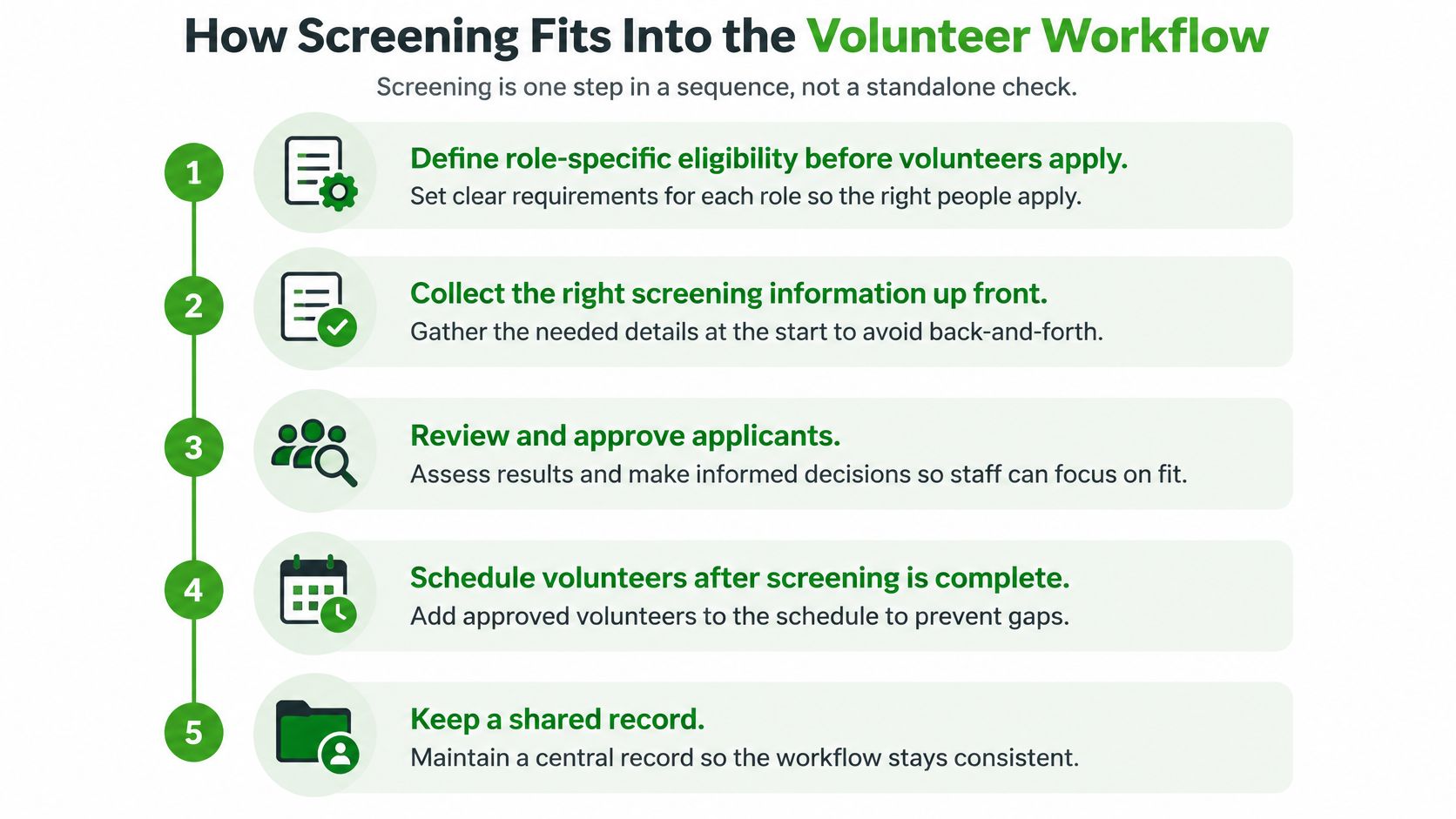
Screening is one step in a sequence, not a standalone check. It should help you decide whether someone suits a particular assignment, not just produce an approved label.
A U.S. study of charities' volunteer-management practices found that organizations reporting stronger adoption of screening and task-matching procedures also reported higher volunteer retention. That's an association, not proof that screening alone caused volunteers to stay.
The workflow needs clear handoffs between the people collecting information, making decisions and assigning shifts.
Put role fit into the process
Define role-specific eligibility before recruiting. Separate mandatory safeguards from preferred skills, and describe the duties that make each requirement relevant. A common slip is writing the rules after applications arrive, which invites inconsistent decisions.
Collect applications in a consistent place. Start each volunteer's record with the information needed to assess the role, while keeping sensitive screening material restricted. Don't collect extra personal information merely because a form has room for it.
Use screening proportionate to the assignment. An event setup role and an unsupervised child-facing role need different risk assessments, with applicable requirements guiding the checks. Sports organizations can use Vanta Sports' guide to youth sports safeguarding requirements to frame their questions, rather than assuming one checklist covers every activity.
Record the assignment decision and its reason. Note the role, decision-maker, review date and any restrictions in the appropriate restricted-access record so later reviewers can understand the placement. Avoid putting sensitive report details into general scheduling notes.
Provide orientation, training and supervision before independent work. Tell the volunteer what to do, when to ask for help and how to report a concern. A satisfactory check doesn't establish competence or replace observation of someone performing the role.
Review performance by role and cohort. Compare completed shifts, training completion, retention, incidents and beneficiary outcomes for groups entering under the same process. Don't judge success solely by how quickly applicants move to approval.
Make the policy usable
A written volunteer screening policy should identify who owns each decision, how exceptions are handled and when a change of duties triggers another review. It should also explain how staff communicate decisions respectfully.
The coordinator's job isn't to remove every possible uncertainty. It's to make defensible placement decisions and provide ongoing support. Draft eligibility lists for your highest-risk roles, then ask their supervisors whether each requirement relates to the work volunteers will perform.
Typical Nonprofit Scenarios Where the Platform Helps
The following are illustrative scenarios, not reported customer case studies. Each shows a different starting point for configuring a volunteer-management system.
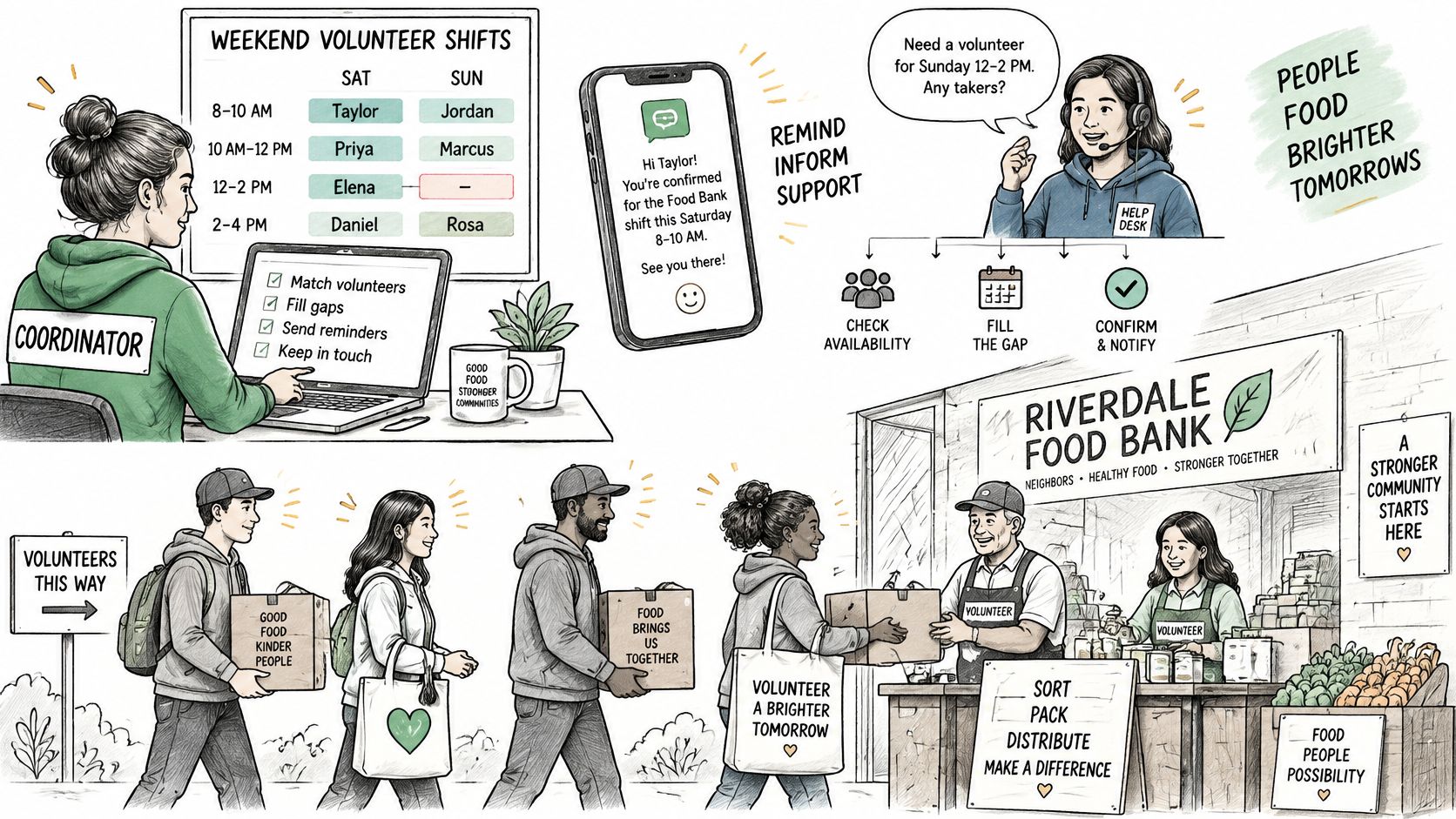
A food bank's busy distribution day illustrates why assignments need to be visible to the people supervising them.
Match the setup to the service
A food bank with weekend distribution shifts needs to coordinate occasional volunteers without burying staff in replacement calls. Scheduling and communications are the priority feature areas: staff need a clear list of openings and a reliable way to send arrival instructions. Begin by defining packing, loading and distribution roles separately.
A hospice with trained visiting volunteers needs continuity when someone changes assignments. Volunteer records and scheduling matter most because the coordinator must connect relevant preparation with the proposed visit. Start by mapping which training and supervisor approvals belong to each visiting role.
An after-school mentoring program needs to distinguish general event helpers from volunteers eligible for child-facing duties. Recruitment and volunteer records should support role-specific review, renewal dates and documentation of supervision. Configure eligibility categories before inviting applications, and verify how access to review information will be restricted.
For a broader operational checklist, use this guide to nonprofit volunteer management to assign ownership of recruitment, placement and ongoing support.
The video provides another format for exploring volunteer coordination.
Account for overlapping assignments
A church with several ministries may discover that different coordinators are asking the same volunteer to serve at overlapping times. Shared records and scheduling are the important pair here. Start by agreeing on ministry names and a common volunteer identifier before importing separate contact lists.
A museum using docents across tours and events needs to separate routine tours from special-event service when reporting contributions. Hour tracking and volunteer records help staff associate completed work with the correct activity. Create clear activity categories before volunteers begin logging time.
Choose the closest scenario, then write down the first setup decision your team needs to make. Importing names can wait until that decision is clear.
Measuring Impact Beyond Hour Totals
Impact measures sorted by stage
| Stage | What it measures | Example measures | Track at |
|---|---|---|---|
| Inputs | Capacity used | Active volunteers, hours, training completed | Role and program |
| Outputs | Service delivered | Visits, meals, tutoring sessions, cases supported | Program and site |
| Outcomes | Change for beneficiaries | Attendance, learning gains, wellbeing, safety incidents | Program and cohort |
| Retention | Volunteer engagement | Return rate and length of service | Role and cohort |
Inputs describe effort. Outputs describe services. Outcomes describe change. Keeping those categories separate prevents a busy program from automatically being described as an effective one.
The University of Richmond capstone on volunteer-impact reporting emphasizes connecting volunteer counts and hours to services delivered and progress toward mission goals. It also cautions that relatively few volunteer-management evaluations use randomized or quasi-experimental designs, so an improvement after a change doesn't establish that the change caused it.
Follow the service from effort to result
Say a tutoring program records more volunteer hours after recruiting new tutors. That's an increase in inputs. Completed tutoring sessions are outputs, while changes in learners' understanding or attendance are possible outcomes.
Hours could rise while effectiveness falls if inexperienced volunteers require more supervision or deliver sessions that don't meet learners' needs. Record staff preparation and supervision costs alongside volunteer activity so the report doesn't present volunteer involvement as costless.
The funding conversation makes this distinction important: the 2025 Points of Light report found that 72% of nonprofits believe volunteers improve service quality, while only 25% of funders agree. A report that connects volunteer work to beneficiary experience gives readers something more useful than an activity total.
Build a small, balanced dashboard
Pair capacity and quality rather than creating separate reports that never meet.
- Capacity: Active volunteers, shift fill rate, reviewed hours and retention.
- Quality: Beneficiary satisfaction, errors, safeguarding incidents and progress toward program goals.
- Cost: Staff coordination, training, supervision and reimbursed expenses.
Define active volunteer using a stated participation window. Total registered volunteers can include people who aren't currently available, so that total isn't a reliable substitute for operating capacity.
Use consistent role names, reporting periods and cohort definitions. A documented volunteer time-tracking process helps keep the input measures dependable, while program staff collect service and outcome information.
Compare results across periods or similar groups, documenting changes in demand, staffing and beneficiary needs. Begin this quarter by choosing an output and an outcome for your largest program, recording a baseline, and naming the person responsible for each measure.
Strengths, Limits and Trade-offs to Weigh
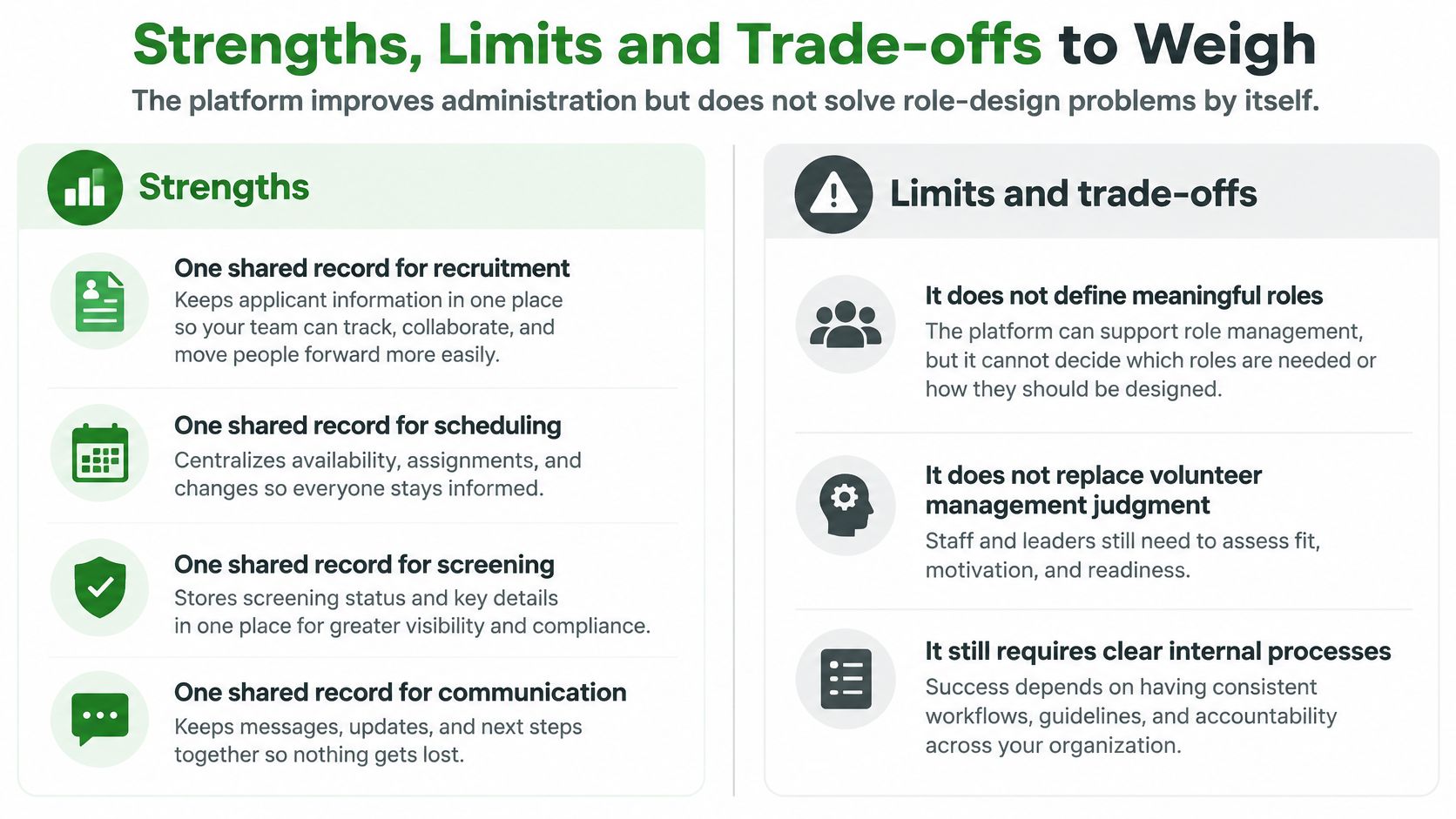
Better Impact can improve administration, but software doesn't design sustainable volunteer roles for you. A well-organized roster can still ask too much of the people on it.
Strengths worth testing
- Shared information: Coordinators can organize recruitment, scheduling, communications and hours together.
- Reporting preparation: Consistent hour records provide a foundation for grant and in-kind reporting.
- Program visibility: Staff can coordinate recurring assignments across distributed activities.
- Continuity: Central history can make staff handovers less dependent on personal files.
Limits that require management attention
- Configuration: Your team must define roles, eligibility and approval responsibilities.
- Record upkeep: Staff need time to correct duplicates, update status and resolve missing information.
- Process quality: Faster administration won't repair an unclear or unfair placement process.
- Evidence quality: Public platform-scale claims aren't independent proof of program outcomes.
The practical balance is administrative support without surrendering management judgment.
Retention needs more than appreciation
Volunteering Victoria's 2025 State of Volunteering Report found that 68.4% of leaders of volunteers considered retention a critical organizational issue, while 22.5% of volunteers cited burnout as a reason for reducing involvement. Those findings make workload a necessary management question, not merely a matter of thanking people more often.
Recognition matters, but it can't compensate for an assignment that regularly exceeds someone's agreed commitment. A coordinator needs permission to leave a gap temporarily, redesign a task or reduce service rather than repeatedly asking the most dependable volunteer to cover it.
Before adding another shift: Ask whether the volunteer wants more responsibility, has the capacity for it and can decline without pressure.
Set realistic shift lengths, offer role rotation and consider shorter or remote assignments where the work allows. Discuss expenses, accessibility and onboarding needs directly instead of assuming every volunteer can participate on the same terms.
A scheduling report may reveal concentrated workloads, but a supervisor must act on that information. Name the limit most likely to affect your program, then assign someone to address it before rollout.
Choose a Platform That Fits Your Screening Workflow
Platform comparison criteria for screening workflows
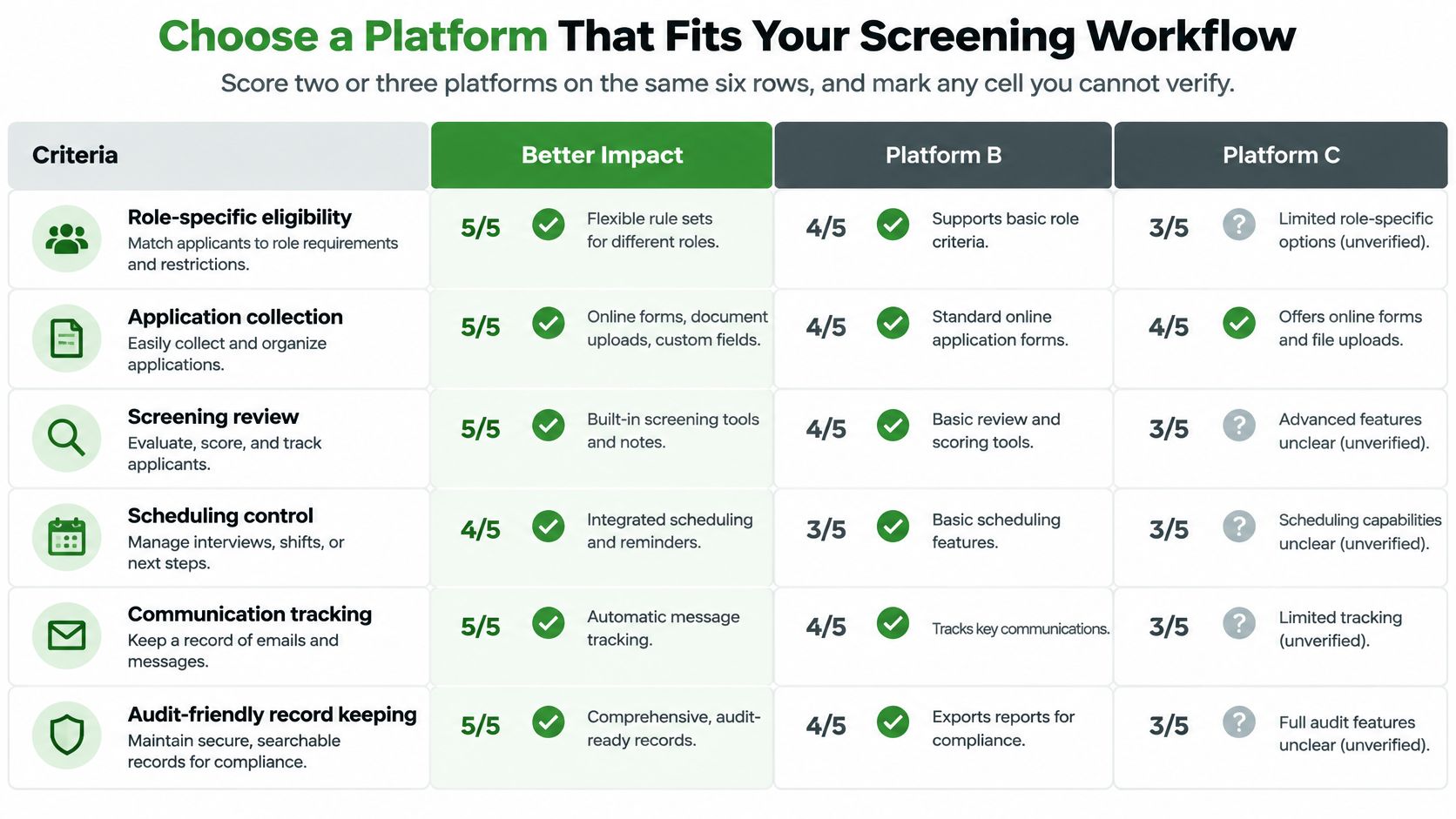
| Criterion | What to check | Why it matters |
|---|---|---|
| Screening integration | Screening results link to the volunteer record | Avoids duplicate data entry |
| Data export | Hours, records and reports export in usable formats | Supports grant reporting and any future move |
| Integrations | Connections to your CRM, church-management or other systems | Prevents double entry across tools |
| Scheduling scope | Multi-site and recurring shift support | Matches how your programs run |
| Pricing model | Per seat, per volunteer or flat fee | Shows how costs change as volunteer numbers grow |
| Onboarding support | Training for staff and volunteers | Drives adoption in the first months |
Use the same criteria for Better Impact and any alternatives. Mark capabilities as demonstrated, partly demonstrated or unverified rather than assigning a favorable score based on a product description.
Keep unanswered questions visible during the comparison.
Test the journey, not just the dashboard
Ask the demonstrator to follow an applicant through review, placement, a changed assignment and completed service. Include an applicant who hasn't met the role requirements, so you can see whether staff can prevent an inappropriate booking.
For screening connectivity, we integrate with Planning Center, Bloomerang, Little Green Light, Breeze ChMS, Better Impact, Rosterfy, Assemble, CERVIS and Zapier. In your demonstration, establish which system owns the volunteer record and which staff members can see screening information.
Check exports by opening a sample file, not merely confirming that an export button exists. Examine whether program names, completed hours and approval information remain understandable outside the platform.
A checklist for this week
- Request a trial or guided demonstration using your actual role and location structure.
- Test a complete volunteer journey from application through reviewed, logged service.
- Confirm data ownership and export access, including what happens when your subscription ends.
- Inspect the screening handoff, including permissions, incomplete reviews and assignment restrictions.
Have coordinators and a volunteer test the parts they'll use. Confirm current pricing, plan boundaries and onboarding arrangements directly with each vendor, since those details can change.
Choose the system that supports your real decisions, including the uncomfortable ones, rather than the one with the most attractive summary screen.
VolunteerBadge offers background screening that can sit within your application-to-placement workflow, rather than operating as a disconnected task. Visit VolunteerBadge to create a free account, invite a volunteer and run a fully FCRA-compliant check for $5, with no contract and no monthly fee.
