
Nonprofit Volunteer Management That Actually Works
A practical guide to nonprofit volunteer management covering recruitment, screening, onboarding, retention, metrics, and tools that help small
On this page
Volunteer management isn't a goodwill problem. It's an infrastructure problem. In the United States, 75.7 million people, or 28.3% of the population, volunteered through an organization between September 2022 and September 2023, contributing more than 4.99 billion hours with an estimated economic value of $167.2 billion, according to AmeriCorps and the U.S. Census Bureau. Organizations that still manage this workforce with spreadsheets, inboxes, and hopeful reminder emails aren't saving money. They're shifting the cost into staff time, missed shifts, weak safeguards, and constant re-recruitment.
I've watched small and mid-sized nonprofits lose excellent volunteers because nobody explained where to park, who would meet them, or what they were supposed to do during the first hour. The fix isn't another appreciation campaign. Retention is won in the first 90 days through role design, onboarding, supervision, and friction reduction.
Table of Contents
- Why Most Nonprofit Volunteer Programs Underperform
- The Volunteer Lifecycle From First Click to Long-Term Service
- Designing Roles That People Actually Want to Fill
- Screening Volunteers Without Slowing Your Program Down
- Onboarding and Supervision in the First 90 Days
- Matching Scheduling and Recognition That Drive Retention
- Building the Business Case for Volunteer Infrastructure
- A 90-Day Plan to Put It All Together
Why Most Nonprofit Volunteer Programs Underperform
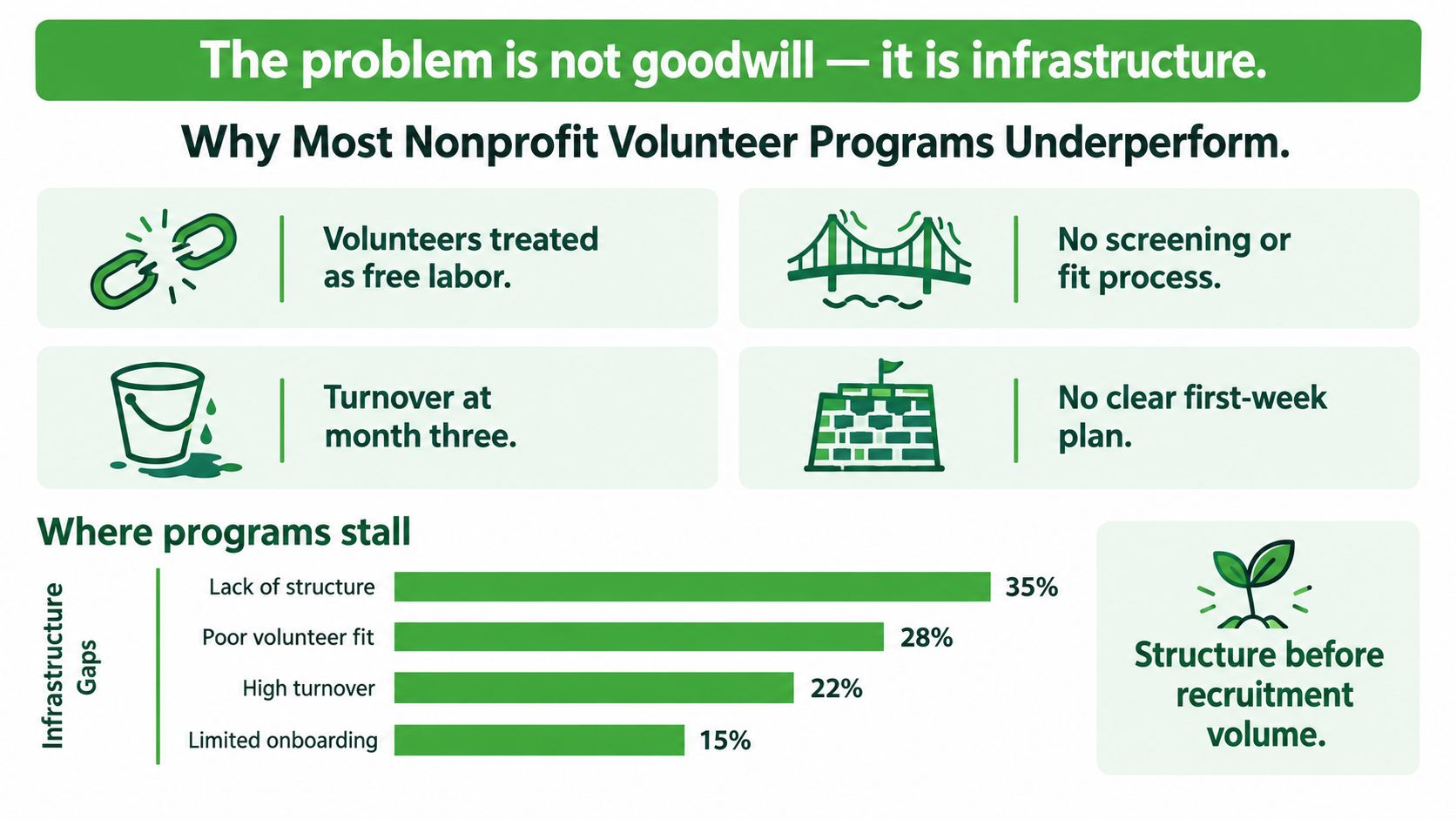
Volunteer programs stall when leaders budget for the mission but not the work required to support volunteers. The labor may be unpaid, yet recruiting, screening, training, scheduling, supervision, recognition, and replacement all consume staff capacity. Refusing to fund that capacity does not eliminate the cost. It shifts the burden into rushed decisions, missed coverage, inconsistent safeguards, and coordinator burnout.
The scale of volunteer service makes weak infrastructure expensive. Volunteers contributed billions of service hours during the latest U.S. measurement period, across both in-person and virtual arrangements. The reported figures show that 82% of formal volunteers served entirely in person, while more than 13.4 million participated virtually or through hybrid arrangements. A program that cannot track availability, training, hours, and handoffs across those formats has a capacity problem, not a recruitment problem.
The predictable failure modes
Underperforming programs tend to show the same operational defects:
- Vague role posts: “Help needed” leaves applicants guessing about duties, time commitment, location, and fit.
- Slow follow-up: An applicant completes a form but receives no screening invitation within 48 hours. Interest fades, and staff may never know why.
- Last-minute scheduling: Volunteers receive shift requests without enough detail to make a reliable commitment.
- Unassigned supervision: Nobody has clear responsibility for answering questions, demonstrating tasks, or handling incidents.
- Unclear records: Staff cannot tell who completed training, who is approved for a role, or who has stopped responding.
- Recruitment before repair: The organization keeps advertising new roles while application handoffs remain slow and existing capacity goes unused.
A no-show may reflect an unreliable volunteer. More often, it exposes a weak confirmation process, an ambiguous assignment, or missing information that made the commitment hard to keep. Treating every absence as a character problem prevents the organization from fixing the process that produced it.
Practical rule: Before increasing recruitment, identify the point where interested applicants stop progressing and repair that handoff.
A complete guide to volunteer management can help teams map the broader operating model. The operating principle remains clear: structure before volume. A smaller roster with defined roles, accountable supervision, and usable records will usually create more mission value than a large database of one-time sign-ups. Budget the infrastructure, measure each handoff, and reduce the friction that makes good volunteers disappear.
The Volunteer Lifecycle From First Click to Long-Term Service
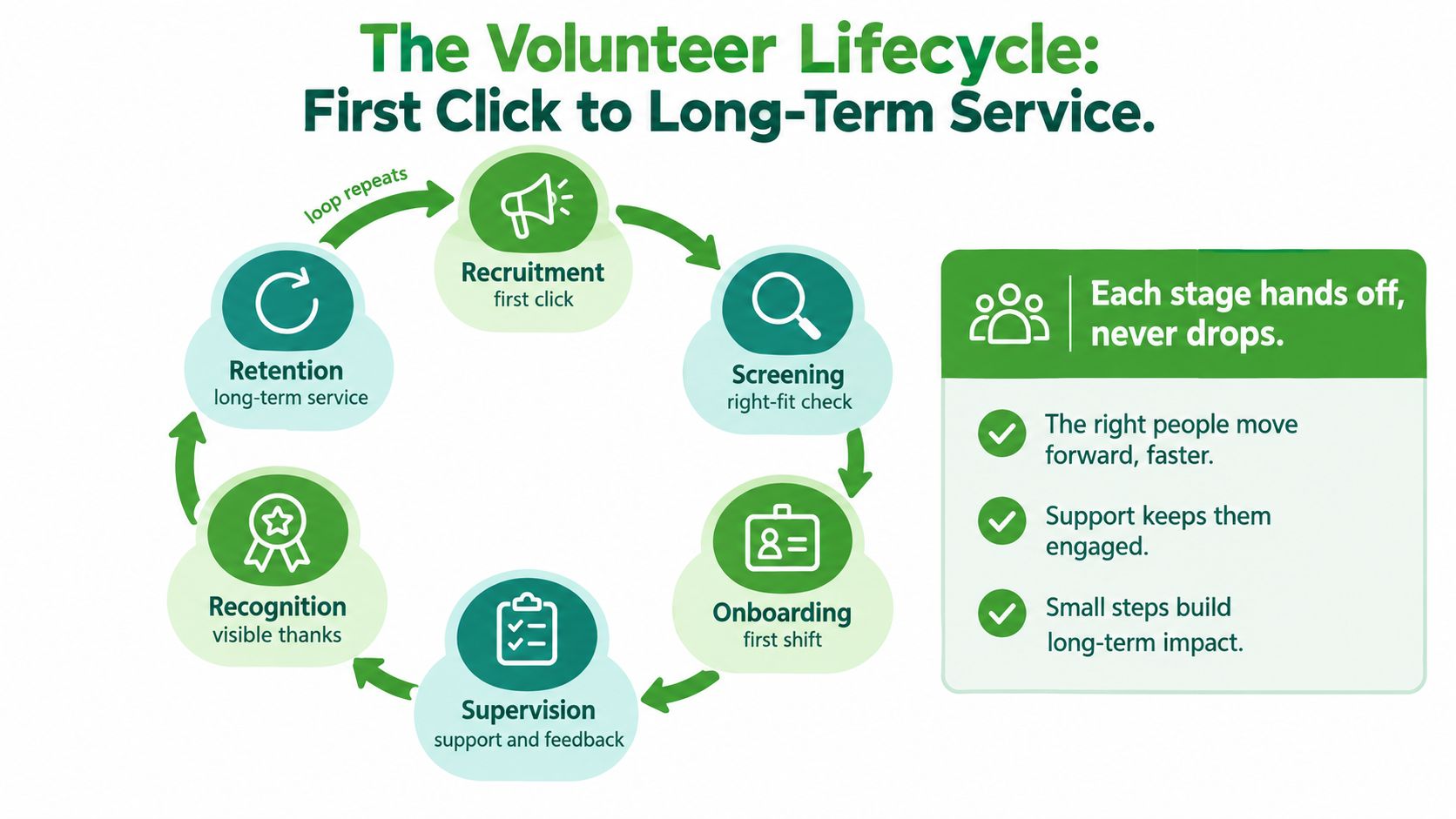
Volunteer management works as a loop, not a stack of unrelated administrative tasks. The six stages are recruitment, screening, onboarding, supervision, recognition, and retention. Each stage must hand a person to the next stage with a clear action, owner, and record.
Recruitment starts the promise
Recruitment is more than publishing an opportunity. The role description creates an expectation about the work, the people, the schedule, and the organization's competence. If the posting is clear, a volunteer can self-select into a suitable role. If it's vague, the coordinator inherits confusion later.
Screening should answer a practical question: Is this person appropriate for this specific assignment? It isn't a ritual performed identically for every role. The organization should consider the volunteer's duties, access, contact with clients, handling of money, driving requirements, and need for independent judgment.
Onboarding converts interest into readiness. A completed application isn't an onboarded volunteer. The person needs the required forms, training, location details, schedule, contact person, and a realistic picture of the first shift.
Every handoff needs an owner
Supervision begins when the volunteer arrives, but the handoff should happen earlier. The recruiter or system must tell the supervisor who is coming, what they're approved to do, what training they completed, and what support they may need. A quiet handoff is still a handoff, and it fails when nobody owns it.
Recognition should reflect actual contribution. A generic message can be pleasant, but useful recognition names the work, explains its effect, and helps the volunteer see a path to deeper involvement. Retention then becomes the result of a coherent experience, not a campaign sent after people have already disappeared.
Consider a common failure. A prospective volunteer emails about helping at a food distribution program. The coordinator is busy, the message sits unanswered, and the person never reaches screening or scheduling. No amount of gratitude can retain someone who never crossed the first transition.
The United Nations Volunteers global reporting estimated approximately 862.4 million people aged 15 and older volunteered worldwide in a typical month. That scale reinforces the need to treat coordination as a structured capability. The rest of the program should make each transition explicit, measurable, and easy for the next person to own.
Designing Roles That People Actually Want to Fill
A volunteer role should be written for one busy person deciding quickly whether to click apply. “Help with events” is not a role. It's an unresolved staffing request.
Start with the work, not the ideal volunteer. Define the task, the setting, the time commitment, the exposure level, and the result the person will help produce. Then specify what the organization provides, including training, equipment, accessibility support, and supervision.
The minimum useful position description
Every posting should answer these questions without forcing someone to email for clarification:
- What is the role called?
- What will the volunteer do during a typical shift?
- Where will the work happen, and is a virtual option available?
- When are volunteers needed?
- What skills are required, and what skills can be learned?
- What training must be completed before service?
- Who is the point of contact?
- Does the role involve clients, children, vulnerable adults, money, confidential information, or driving?
- What outcome will the work support?
Risk tiering should shape the description. A pantry sorting role needs a different screening and supervision design from a youth mentoring role or a volunteer driver assignment. Don't hide those differences in a general handbook. Put the relevant expectations where applicants will see them.
| Element | Weak Posting | Strong Posting |
|---|---|---|
| Title | Event helper | Saturday food distribution greeter |
| Duties | Help where needed | Welcome visitors, explain the queue, and direct clients to the intake table |
| Schedule | Flexible | Saturday morning shifts, with the start and end time listed |
| Location | Community center | Main entrance of the Eastside Community Center, with parking guidance |
| Skills | Good with people | Comfortable speaking with visitors; multilingual ability welcomed, not required |
| Training | Orientation provided | Brief orientation and client privacy training provided before the first shift |
| Supervision | Staff on site | Report to the distribution supervisor, whose contact details are included |
| Outcome | Support the event | Help visitors move through intake calmly and efficiently |
A strong posting also respects limited time. A clearly defined short shift with a concrete task is easier to accept than an open-ended request to “commit as much as possible.” Predictability improves the match before the first conversation.
A volunteer shouldn't have to interview the organization to discover what the organization expects.
Use the application to collect only information that supports placement, safety, or communication. Ask about availability, relevant skills, preferred tasks, accessibility needs, and workload limits. Every question should have a downstream use. If staff won't act on an answer, remove the question.
Screening Volunteers Without Slowing Your Program Down
Screening is a control within a risk-management system. It isn't proof that someone is suitable, and it can't replace training, supervision, incident reporting, or clear position requirements.
A survey of 517 nonprofit human-services organizations found that 12% reported no volunteer screening, and only 32% reported periodic re-screening among the organizations covered by the survey. The findings, summarized by the Nonprofit Risk Management Center, support a risk-tiered workflow rather than a one-time check applied inconsistently.
Assign risk before choosing a check
Build the process around the assignment. Ask what the volunteer can access, whom they'll be around, and what decisions they'll make without direct staff presence.
| Risk Tier | Examples | Required Checks | Supervision Level |
|---|---|---|---|
| Lower exposure | Sorting donations, office support, supervised event setup | Application, references where relevant, role orientation | Staff or lead volunteer available on site |
| Moderate exposure | Client reception, transport coordination, handling program records | Appropriate criminal-history review, references, role-specific training | Named supervisor with regular check-ins |
| Higher exposure | Youth programs, vulnerable-adult services, unsupervised client contact | Criminal-history review, sex-offender registry review where appropriate, references, and any legally relevant additional checks | Close initial supervision, documented reviews, and defined escalation process |
| Driving or financial access | Volunteer drivers, cash handling, purchasing support | Motor vehicle review or financial controls as appropriate, plus role-specific screening | Direct authorization, documented controls, and ongoing oversight |
Keep the FCRA workflow complete
If a consumer reporting agency provides a background report, follow the Fair Credit Reporting Act process. Obtain a standalone disclosure and written authorization before ordering the report. Give the applicant the required information and a reasonable opportunity to dispute before taking adverse action, then provide the final adverse action notice when applicable.
Keep copies of the disclosure, authorization, report, decision record, notices, and relevant correspondence according to your retention policy. Use consistent adjudication criteria, limit access to sensitive information, and document why a decision relates to the actual role.
Organizations often rush screening because they want a fast start. A better approach is to create a small set of repeatable tiers and assign each open role to one. Teams comparing vendors can review resources such as fast volunteer background checks, but speed should never outrank consent, accuracy, or lawful process.
The check is only one moment in the relationship. Train the supervisor to notice boundary problems, missed procedures, unsafe conduct, and changes in role exposure. Establish incident reporting and define when a volunteer must pause service while the organization reviews what happened. For higher-risk assignments, set a documented re-screening trigger or interval rather than assuming the original report remains sufficient forever.
Onboarding and Supervision in the First 90 Days
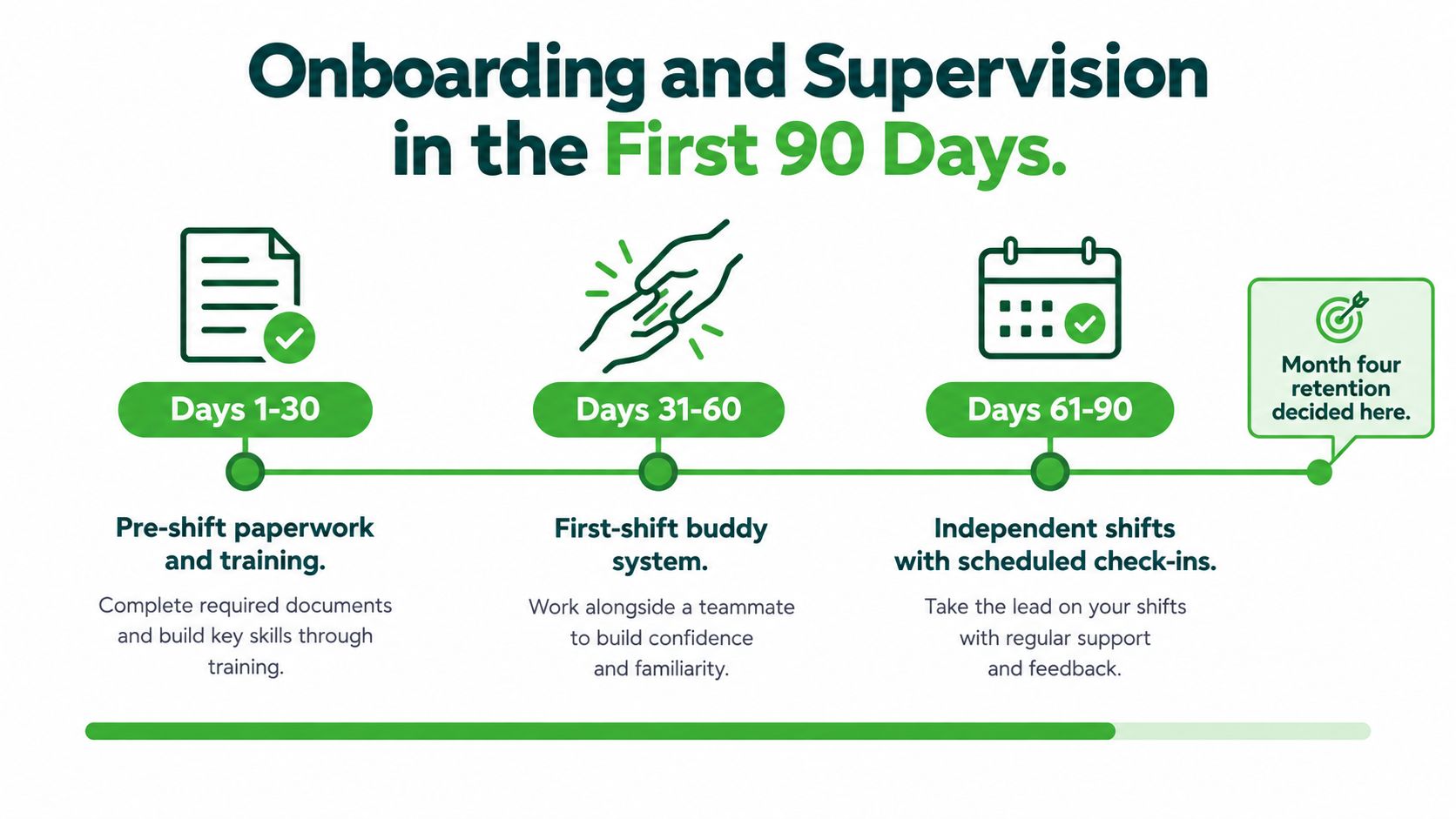
The first 90 days decide whether a volunteer becomes part of the operating rhythm or slips away. Most departures don't begin with a dramatic conflict. They begin with a missing access code, an empty supply table, a supervisor who wasn't told to expect them, or instructions that assume knowledge the volunteer doesn't have.
Days 1 through 30 build confidence
Before the first shift, send the location, parking instructions, arrival time, clothing or equipment requirements, supervisor name, emergency contact method, and a concise description of the first task. Complete only the forms and training relevant to the assignment. Then confirm that the supervisor has received the volunteer's status and requirements.
On the first shift, pair the new volunteer with a prepared staff member or experienced volunteer. Introduce them to the team, show them the physical workflow, explain what to do when something goes wrong, and give them a task they can complete successfully. A five-minute welcome is not onboarding if it leaves the person guessing.
Use a checklist that combines administrative and relational actions:
- Administrative: Sign required forms, complete training, confirm emergency procedures, and record attendance.
- Operational: Explain the task, demonstrate the standard, identify supplies, and show the volunteer where to ask questions.
- Relational: Introduce the volunteer to staff, include them in the team huddle, and ask what would make the role workable.
- Follow-up: Send a short message after the shift and record any issue that needs correction.
Days 31 through 90 test the match
At the early check-in, ask what felt unclear, whether the schedule works, and which task the volunteer would prefer to do more or less often. At the role review, compare the original description with the actual work. If the assignment changed, update the role rather than expecting the volunteer to absorb the difference.
By the later milestone conversation, discuss independence, additional training, leadership interest, and workload. Don't interpret a request for fewer shifts as a lack of commitment. A role that fits someone's actual availability is more valuable than a nominal commitment they can't sustain.
For a practical onboarding workflow, review this guide to volunteer onboarding. If performance slips, use a direct but respectful script: “I want to make sure this role works for you and for the people we serve. The agreed process is ____. I noticed ____. What got in the way, and what support or change would help you meet that expectation next shift?”
Matching Scheduling and Recognition That Drive Retention
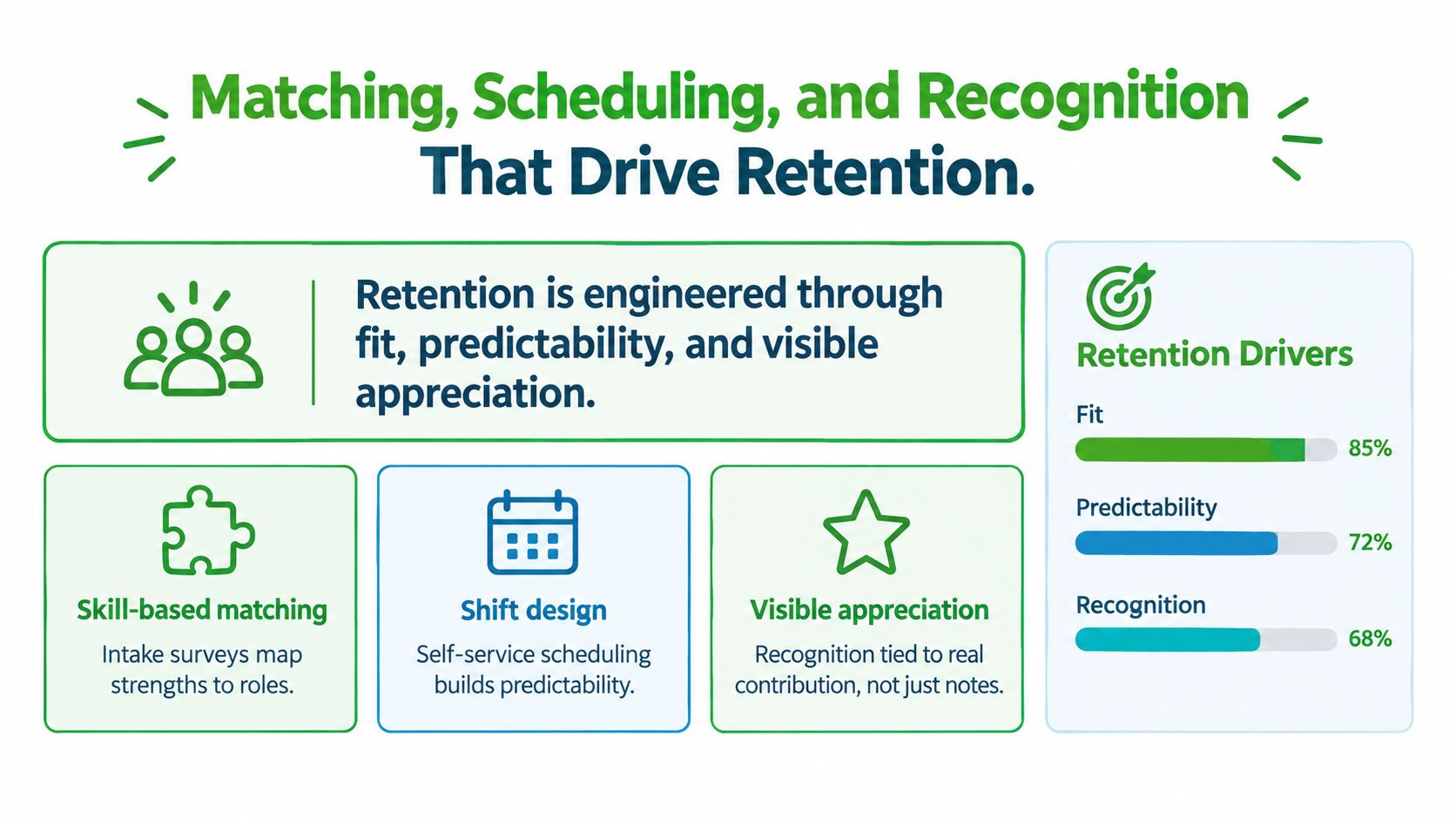
Thank-you notes don't repair a bad match. Retention improves when volunteers receive work that suits their skills, shifts they can predict, and feedback that connects their contribution to a real outcome.
Collect useful placement information at signup. Ask what the person enjoys, what they already know, when they're available, what tasks they prefer to avoid, and whether they need an accommodation. Store those answers in a structured profile instead of leaving them buried in an email.
Match for fit, then make attendance easy
A self-service schedule in tools such as VolunteerHub or SignUpGenius can reduce back-and-forth, but only if the shift description is accurate. List the start and end time, location, supervisor, duties, prerequisites, and cancellation process. Send confirmations and reminders that repeat the information a person needs on the day, not just the calendar invitation.
Scheduling research offers a useful warning against filling shifts solely according to organizational demand. An integer-linear-programming model that incorporated volunteer preferences produced a 27.5% increase in returning volunteers and a 22.8% reduction in unassigned tasks compared with a benchmark using only organizational preferences, under the study's tested assumptions, as described in the Urban Institute research on volunteer management practices and retention.
Recognition should operate at three levels:
- Immediate: Thank the person during the shift and identify the specific action that helped.
- Peer: Invite nominations, highlight reliable teamwork, and recognize milestones in a way the volunteer is comfortable with.
- Structural: Offer references, advanced training, lead roles, or access to high-impact assignments when earned.
Teams managing complex coverage can also borrow useful ideas from restaurant schedule templates and tips. The setting differs, but the scheduling lesson holds: define coverage, publish expectations, and make changes visible.
Track a compact dashboard:
| Measure | What it reveals |
|---|---|
| 90-day retention | Whether onboarding and early supervision are working |
| Shift fill rate | Whether roles, times, and locations match demand |
| Hours per active volunteer | Whether participation is deepening or spreading thinly |
| Volunteer-supported outputs | Whether service time connects to mission delivery |
Use a volunteer hour tracking system such as this guide to tracking volunteer hours to preserve reliable records. Recognition then becomes specific and defensible. A coordinator can say what the volunteer did, which program it supported, and where the contribution mattered. That record also survives staff turnover.
Building the Business Case for Volunteer Infrastructure
Volunteer management belongs in the budget because it produces operational capacity and controls operational risk. Calling volunteer labor “free” conceals the cost of the staff hours, training, technology, screening, supervision, reporting, and recognition required to turn availability into reliable service.
A simple internal calculation is:
Total volunteer program spend ÷ shifts or service hours delivered = cost per filled role or delivered hour.
Include coordinator time, platform fees, screening, training materials, accessibility support, recognition, and supervisor time. Don't compare that figure only with the value of donated labor. Also calculate the cost of an unfilled role, repeated onboarding, delayed service, unsafe supervision, and work that paid staff must absorb when volunteers don't show.
The case becomes stronger when you connect infrastructure to outcomes:
- Capacity: Which programs depend on volunteer-supported shifts?
- Continuity: What happens when a critical role remains vacant?
- Risk: Which assignments require documented screening, training, or supervision?
- Efficiency: Which workflow changes reduce manual follow-up?
- Impact: What service did volunteer-supported work make possible?
Bring leadership evidence, not appreciation language
A board or funder may care about volunteer experience, but “our volunteers deserve better” rarely survives a difficult budget cycle. Present the system as an investment in mission continuity, risk reduction, and scalable delivery.
The Points of Light report on investment in volunteering reports that about half of critical volunteer roles go unfilled each year, while 72% of nonprofits consider volunteers essential to achieving their mission and only 25% of funders share that view. Those figures create a direct communication problem: nonprofits need better evidence to show funders what volunteer infrastructure produces.
Bring four artifacts to the executive director, board, or grantmaker:
- A current role inventory with exposure and supervision requirements.
- A written screening and incident-response policy.
- A retention and service dashboard.
- A one-page cost summary showing spend, filled roles, vacancies, and program consequences.
The strongest argument may be contrarian. Recruiting more people isn't always the best investment. If the organization can't supervise and onboard them properly, more volume creates more churn. Improve the role and management capacity before buying more reach.
A 90-Day Plan to Put It All Together
A single coordinator can improve a volunteer program without rebuilding every process at once. The rollout should reduce confusion first, then add measurement, then secure the resources to maintain the system.
Days 1 through 30 create the foundation
Audit every active and advertised role. Remove opportunities nobody can properly supervise, identify assignments with unclear exposure, and rewrite the three roles that matter most to program delivery. Each description should include duties, schedule, location, training, supervision, accessibility information, and a clear outcome.
Next, create screening tiers and map each role to its requirements. Decide where applications, training status, approvals, schedules, incidents, and hours will live. A single source of truth is more important than a feature-rich platform. If the team can't trust the record, automation only spreads bad information faster.
Days 31 through 60 repair the experience
Launch the revised application flow for a manageable group of roles. Remove questions that don't affect placement or safety, and use the answers you keep. Run new applicants through the updated screening and onboarding checklist.
During this phase, track the points where people pause or disappear. Record time from application to first contact, training completion, first-shift attendance, return for another shift, role transfer, and exit reason. Review the list weekly with the supervisor responsible for each assignment.
Days 61 through 90 make the system durable
Use the early records to revise role descriptions, shift instructions, and supervisor check-ins. Present leadership with the cost summary, vacancy consequences, risk controls, and service outputs. Ask for a defined budget for coordination time, screening, training, tools, and recognition rather than a vague promise to “support volunteers.”
Document the playbook before the next busy season. Include templates for role descriptions, application questions, screening decisions, first-shift instructions, incident reports, check-ins, and recognition. The early signals of progress are practical: people reach a first shift sooner, fewer volunteers arrive confused, no-shows decline, supervisors know who is coming, and repeat shifts become more common.
Don't wait for perfect data. Start with the three roles that create the most operational pressure, fix their handoffs, and measure what changes. A dependable small system will give you the evidence needed to expand without exhausting the coordinator who has been holding the whole program together.
VolunteerBadge gives nonprofits a way to connect digital volunteer applications, FCRA-compliant background screening, identity verification, hour tracking, compliance-roster management, re-screening alerts, and grant-ready reports in one workflow. If your team needs to replace scattered spreadsheets and inboxes with clearer volunteer records, visit VolunteerBadge and evaluate whether it fits your 90-day infrastructure plan.
