
Webhook API Example: Set Up, Verify and Handle Events
Webhook API example walkthrough: configure a webhook, receive an event, verify its signature and send the right response.
On this page
A volunteer has submitted an application, their screening result is ready, and your coordinator is still refreshing a dashboard. You need that result in your volunteer database automatically, without creating another applicant record or sending the same notice again when a delivery gets retried.
A useful webhook API example needs to handle that whole situation, not just receive JSON. The receiver must distinguish an authentic notification from a forged request, accept repeated deliveries safely, and keep slow business operations out of the response path.
Table of Contents
- How a Webhook API Example Works End to End
- Configure Your Endpoint and Signing Secret
- How to Build the Receiver Step by Step
- Verify the Signature Before You Trust the Payload
- Handle Retries, Duplicates and Failure Responses
- Test and Monitor Your Webhook Before Go-Live
How a Webhook API Example Works End to End
A webhook is an HTTP request a provider sends to your application when an event happens. For volunteer screening, that might mean an application was submitted, an authorization was completed, or a result became available. Instead of repeatedly asking whether anything changed, your application receives a notification.
This is an established integration pattern. The Svix State of Webhooks report found that 83% of 100 major API providers offered webhooks in 2023.
Separate the sender, receiver and processor
The sender is the screening provider. It creates the event and delivers an HTTP POST containing a JSON body and authentication headers to your HTTPS endpoint.
The receiver is your public route. It checks the request and durably accepts legitimate work. The processor is a background worker that updates your database, communicates with another system, or sends an authorized notification.
Keeping those responsibilities separate prevents a slow CRM request from holding up acknowledgment to the sender.
Webhook lifecycle at a glance
| Stage | Sender Does | Your Receiver Does | Expected Response |
|---|---|---|---|
| Event occurs | Records a change such as a new application | Nothing yet | None |
| Request sent | POSTs a JSON body to your HTTPS URL with a signature header | Receives the raw body and headers | Waits for a reply |
| Verification | Nothing | Checks the HMAC-SHA256 signature over the raw body and the timestamp | 401 if the check fails |
| Acknowledgment | Waits for a fast reply | Stores the event ID and durably queues the work | Fast 2xx after durable acceptance |
| Processing | Nothing | Runs business logic asynchronously | Errors go to retry, then dead letter |
The body describes an event, not necessarily the resource's latest state. Say a delayed application notification arrives after the screening result. Applying its contents blindly could move a completed application backward. When sequence matters, the processor should retrieve the current resource before changing local state.
Use notifications and retrieval together
Your background check API integration should distinguish receiving a notification from retrieving authoritative information. The notification tells you something happened; an API request can establish what's true now.
That distinction also helps when evaluating unrelated data services. Solana Tracker's Solana Data API is a useful comparison resource for developers assessing a separate data-retrieval integration, not a screening connector or a substitute for webhook verification.
The receiver's contract stays narrow: accept, verify, deduplicate, persist and acknowledge. Business decisions belong in the processor.
Configure Your Endpoint and Signing Secret
Start with an endpoint your provider can reach. A route that works in Postman on your laptop isn't ready for external delivery unless you expose it through an approved development tunnel or deploy it to a test environment.
Establish the delivery contract
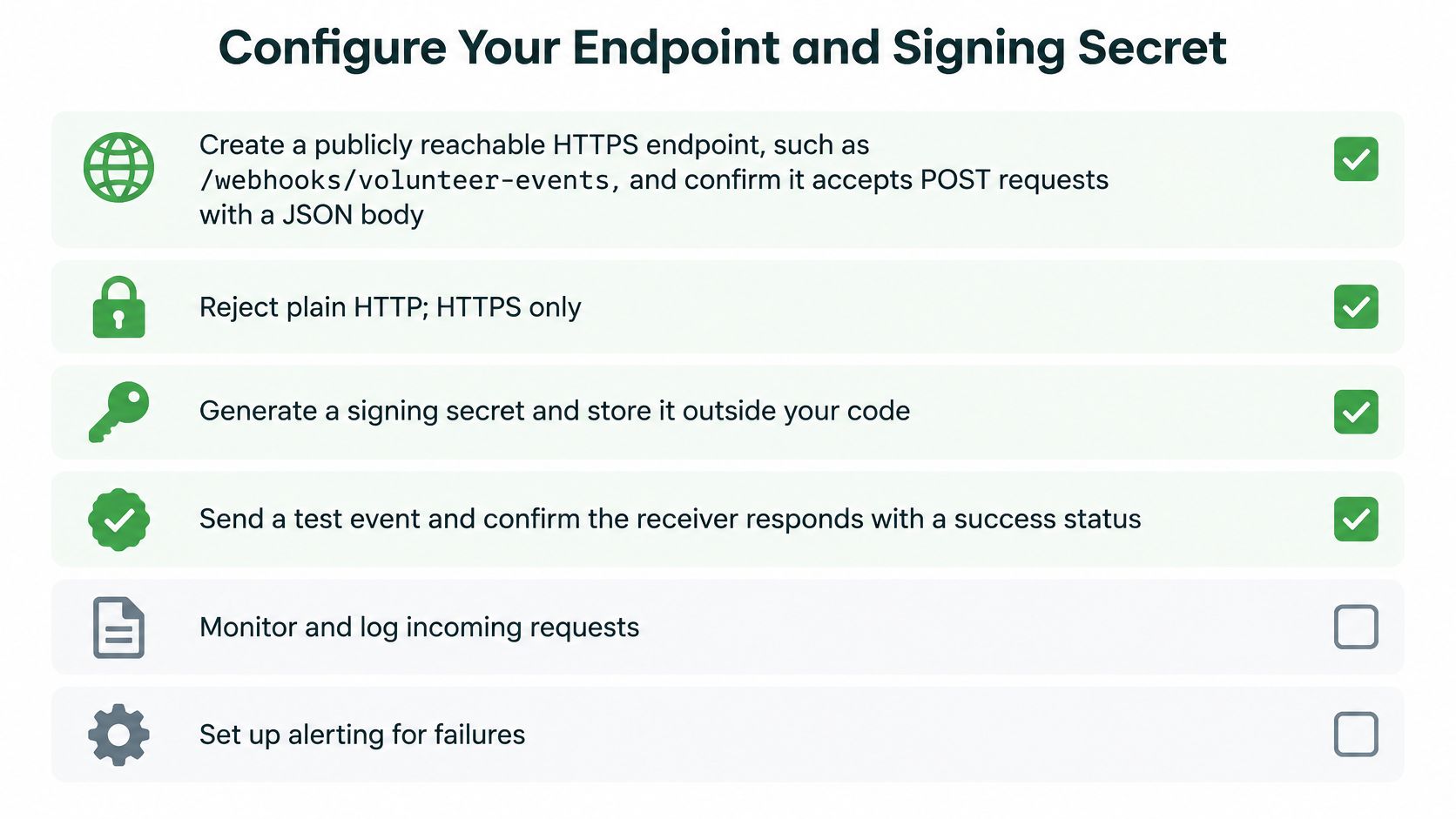
Create a dedicated HTTPS route. Use a path such as
/webhooks/volunteer-eventsand accept POST requests with the documented content type. Reject plain HTTP rather than relying on redirects. Keep this route outside interactive login middleware, but don't confuse public reachability with permission to trust requests.Subscribe only to necessary events. Select application submission, authorization completion and screening-result events only where your workflow uses them. These are descriptive examples, not promised vendor event names. Copy the exact names from your provider's documentation so spelling differences don't disable handlers.
Store the endpoint's signing secret outside source code. Use a secrets manager or an environment variable supplied during deployment. Keep development and production secrets separate. A secret committed to a repository remains exposed even after someone deletes it from the latest revision.
Register the deployed endpoint and send a test event. Confirm the configured path matches your route exactly. Check whether a proxy changes the path, whether middleware redirects requests, and whether the deployment permits external POST traffic.
Compare delivery records on both sides. Inspect the provider's response status and your application's event record. Use synthetic applicant information when inspecting a test body, and don't enable unrestricted payload logging in production.
Use this checklist while configuring the route and its secret.
Check security support before relying on it
Signing is increasingly common, but it isn't safe to assume every provider implements it. Across the major providers tracked by Svix's State of Webhooks, the share using HMAC-SHA256 signatures increased from 42% to 59% between 2023 and 2026.
Check the signing algorithm, header names, timestamp format and secret-rotation procedure before writing the verifier. Don't treat an ordinary API credential as a webhook signing secret unless the documentation explicitly specifies that arrangement.
Setup checkpoint: A successful delivery has matching evidence on both sides: the sender records a successful acknowledgment, and your application records the same event ID.
A green delivery log alone doesn't prove your worker updated the volunteer record. It proves only that the endpoint accepted the delivery.
How to Build the Receiver Step by Step
Build the request handler around durable acceptance, not immediate completion of the screening workflow. The OWASP Webhook Security Cheat Sheet recommends HMAC verification, timestamp-based replay protection, event-ID deduplication, schema validation, payload limits, rate limiting and idempotent handlers.
Keep the request path small
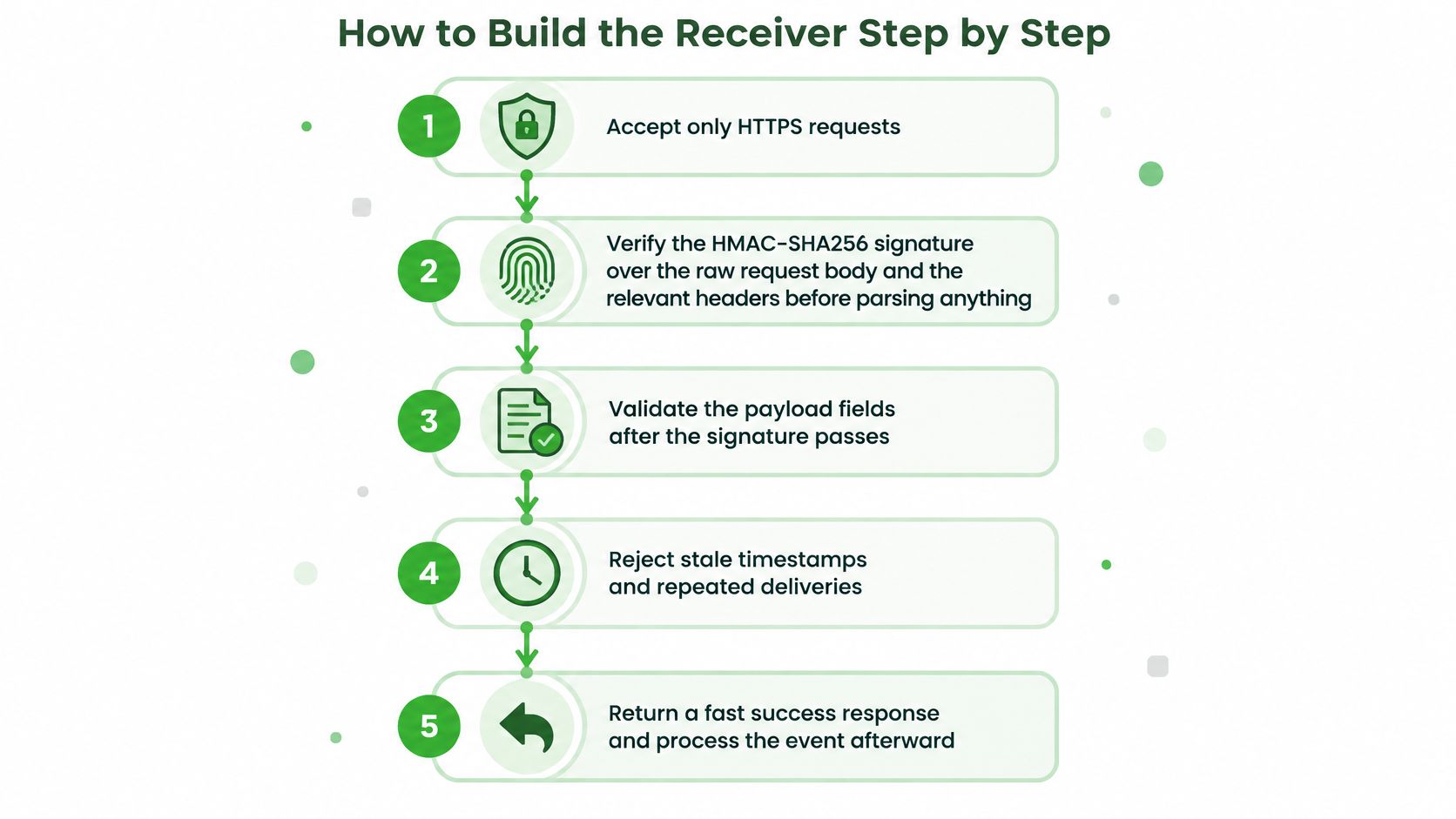
Accept HTTPS at a trusted boundary. If a reverse proxy terminates encryption, configure the application to trust forwarding information only from that proxy. Otherwise, a caller could forge headers that make an insecure request appear secure.
Verify before parsing. Capture the raw request bytes and pass them, together with the required headers, into the provider-specific verifier. A global JSON parser registered before this route is a common mistake because it can consume or transform the original body.
Validate the authenticated event. Check required fields, event type, resource identifiers, timestamp and payload size. Reject malformed supported events. For a valid but intentionally unsupported event type, acknowledge and ignore it according to your subscription policy.
Insert a unique event record transactionally. Use a database uniqueness constraint, not a separate read followed by an insert. Scope the key to the provider and tenant where their identifier guarantees require it. Concurrent deliveries can both pass an application-level existence check.
Persist work before acknowledgment. A database-backed queue can share the event transaction. With an external broker, use a transactional outbox so a committed event can't become stranded between the database write and queue publication.
Return success after the durable commit. Leave CRM calls, notices and screening-related actions to a worker. If storage is unavailable, fail the request rather than promising acceptance and then losing the event.
This flow keeps authentication ahead of business processing.
Close the database-to-queue gap
The dangerous implementation inserts the event ID, attempts to publish a job, and crashes before publication. On redelivery, the receiver sees an existing ID and skips the only opportunity to schedule work.
A transactional outbox avoids that gap. Store the incoming event and a pending job in the same transaction. A dispatcher publishes pending jobs and records publication; the worker remains safe if publication repeats.
An existing event ID means you accepted responsibility for the event. It must not mean you discarded the work.
For a criminal background check API workflow, track acceptance, processing and final outcome separately. That makes a stuck CRM update distinguishable from a missing screening notification.
A minimal implementation skeleton looks like this. These are application functions, not a vendor SDK:
POST /webhooks/volunteer-events
    raw = readLimitedRawBody(request)
    verifySignatureAndTimestamp(raw, request.headers, endpointSecret)
    event = parseAndValidate(raw)
    transaction:
        inserted = insertUniqueIncomingEvent(event)
        if inserted:
            pushDurableQueueJob(event)
    return HTTP 200
Here, pushDurableQueueJob writes to a database-backed queue in the same transaction. With an external queue, replace that operation with an outbox insert. Catch uniqueness conflicts as successful duplicate acceptance; route worker failures through bounded retries and then a dead-letter destination.
Verify the Signature Before You Trust the Payload
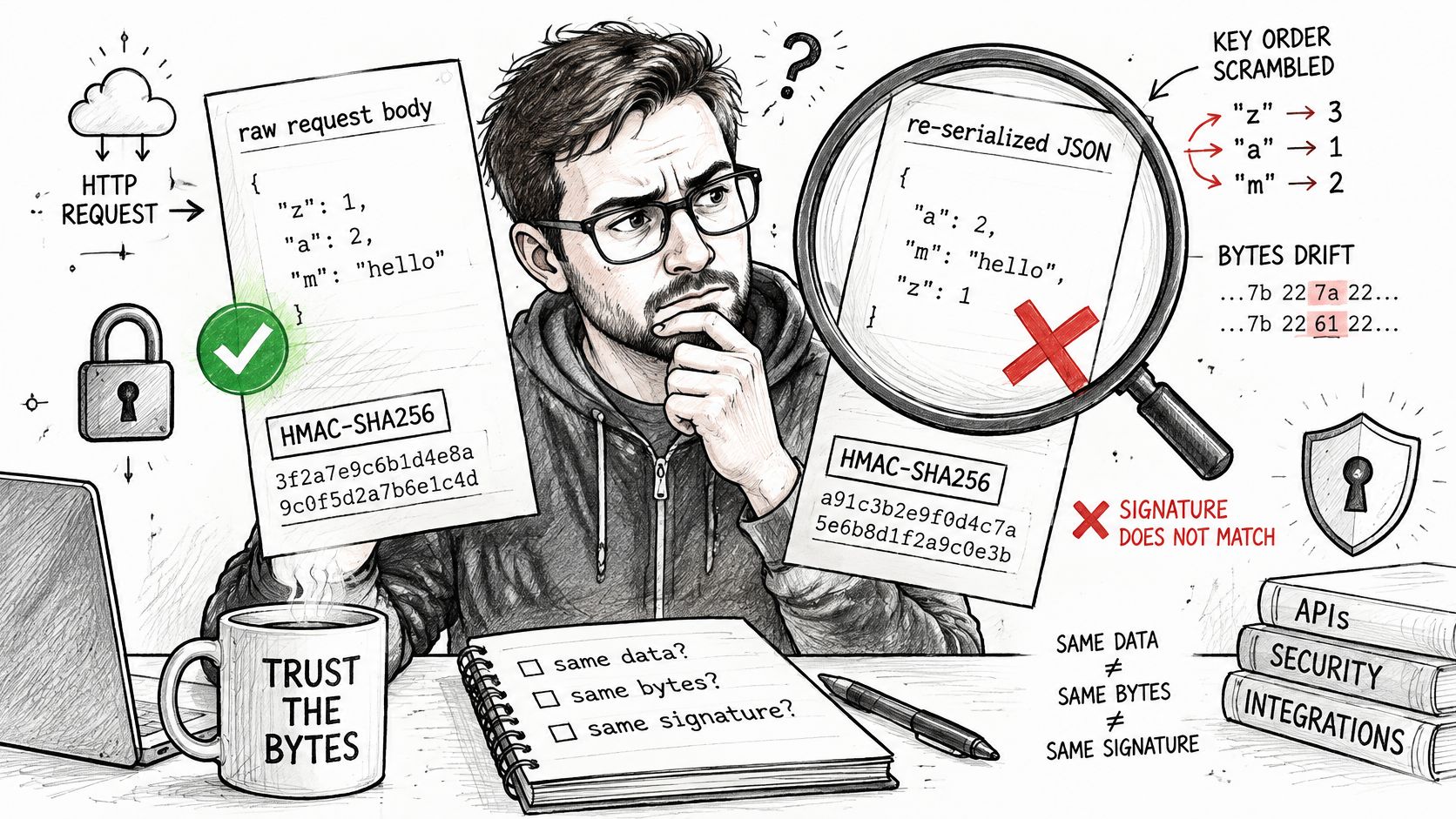
Parsing JSON and serializing it again can break signature verification even when the data looks unchanged. Whitespace, escaping and property order can change the bytes. Compute the expected signature from the exact body the provider sent, using its documented signing format.
The visual below highlights the distinction between equivalent JSON and identical request bytes.
Authenticate the request, not just its contents
A valid HMAC establishes that someone holding the shared secret signed the message and that the signed content hasn't changed. It doesn't encrypt applicant information. HTTPS is still necessary.
Use a maintained cryptographic library's constant-time comparison function after validating signature encoding and length. Don't compare signature strings with an ordinary equality operator or implement your own timing defense.
A timestamp only helps prevent replay if it's authenticated as part of the signed message. Apply the provider's documented acceptance window to delivery time, not automatically to the event's original creation time: a legitimate delayed event can be old.
Verification checks and what happens on failure
| Check | What You Compare | If It Fails |
|---|---|---|
| Transport | Request arrived over HTTPS | Reject plain HTTP and log safe source metadata |
| Signature | HMAC-SHA256 of the documented signed message, including the raw body, compared in constant time | Return 401 and don't parse the body |
| Timestamp | Authenticated delivery time against your server clock and the documented acceptance window | Return 401 and treat as a possible replay |
| Event ID | Provider event ID against stored IDs | Acknowledge with 2xx and skip reprocessing; this isn't an error |
Rotate secrets without interrupting deliveries
Give each endpoint its own secret where supported. During rotation, deploy a verifier that temporarily accepts the old and new secrets, switch the sender, confirm new-secret deliveries, and then remove the old secret. Keep the overlap bounded rather than leaving both credentials active indefinitely.
Vincent Schmalbach's webhook implementation guide covers raw-body verification and rotation, and describes RFC 9421 signing conventions for HTTP message components. Some platforms expose Signature-Input and Signature headers alongside legacy schemes, so implement the format your provider uses rather than inferring an algorithm from a header name.
Use the accompanying video as an additional implementation reference.
Log the verification outcome and, after authentication, the event ID. Never log signing secrets or raw applicant payloads; record rejected requests using safe request metadata instead of trusting identifiers inside an unverified body.
Handle Retries, Duplicates and Failure Responses
A screening-completion notification arrives, your worker creates a volunteer record, and the acknowledgment disappears on the network. The sender delivers the notification again. If your handler treats every request as a new instruction, it can create a duplicate record, repeat a notice or trigger another charge.
The assumption to reject is that a webhook arrives once. Back4App's webhook guide describes the delivery and reliability considerations behind webhook integrations: design for at-least-once delivery, not exactly-once execution across an unreliable network.
Match responses to recoverable failures
Response codes communicate acceptance, but sender retry policies aren't universal. Confirm the actual policy during integration testing rather than assuming every provider interprets every status identically.
Response codes and what the sender does next
| Response | Typical Sender Behavior | Your Action |
|---|---|---|
| 2xx | Marks delivery successful, no retry | Store the event ID and durably queue the work first |
| 429 | Retries after a delay, honoring Retry-After when supported | Return only when overloaded and include Retry-After |
| Other 4xx | Often treats delivery as a permanent failure | Use for bad signatures or malformed payloads, then fix the cause |
| 5xx or timeout | Retries, commonly using backoff and possibly jitter | Use failure responses for transient errors and avoid unnecessary delay |
| Repeated event ID | May arrive after a delayed or lost response | Acknowledge with 2xx without reprocessing |
Use these rules in the receiver and worker:
- Transient infrastructure failure: Return 5xx when you can't durably accept an otherwise valid event. After acknowledgment, worker failures belong to your internal retry mechanism.
- Malformed payload: Return 400 for structurally invalid input. Don't rely on the status alone to stop endless retries; inspect the sender's policy and delivery logs.
- Overload: Return 429 with Retry-After when appropriate. When operating a delivery worker yourself, honor that header from downstream services.
- Uncertain ordering: Retrieve current resource state instead of assuming arrival order establishes business order.
Protect effects as well as event intake
Event deduplication doesn't make every downstream action safe. A worker might send a notice successfully and crash before recording completion. Its next attempt can send the notice again.
Use a durable business-operation key, such as the screening identifier plus notice type, and pass an idempotency key to downstream services where supported. When an external service offers no idempotency support, ambiguous outcomes may require reconciliation rather than automatic repetition.
More aggressive retries improve eventual delivery, but they also create more opportunities for duplicate side effects.
Set bounded attempts, exponential backoff with jitter and an operator-visible dead-letter destination. Prove the protection by replaying the same event ID and checking that the subsequent delivery changes no records, sends no notices and initiates no additional purchase.
Test and Monitor Your Webhook Before Go-Live
Test the failure paths before connecting live applicants. Send a valid synthetic event and confirm acknowledgment, persistence and worker completion. Replay it, submit a bad signature, and simulate a timeout, a storage outage and reversed event order.
Measure acceptance and completion separately
Track first-attempt success beside eventual delivery within the retry window. Also monitor duplicate processing, signature failures, acknowledgment latency at high percentiles, queue depth, retry rate, dead-letter volume and recovery time by tenant.
Truto's production webhook guide suggests investigating delivery success below 99%, treating below 95% as serious, and escalating when queue-drain time exceeds 10 minutes. Treat these as starting alert thresholds, not service guarantees.
- Correlate safely: Log correlation IDs, event IDs, tenant IDs, timestamps and final processing status, with personal information and secrets redacted.
- Test recovery: Repair a failed worker, replay its dead-letter job and verify the intended effect occurs without repeating completed actions.
Map authorization-related transitions to your electronic consent software workflow rather than treating a delivery acknowledgment as proof of applicant consent.
Our fully documented REST API and webhooks use one API key and are free, with no enterprise tier. We integrate with Planning Center, Bloomerang, Little Green Light, Breeze ChMS, Better Impact, Rosterfy, Assemble, CERVIS and Zapier.
VolunteerBadge offers REST API and webhook support for connecting volunteer screening to your existing systems. Visit VolunteerBadge and choose a screening-result workflow to implement this week, then validate it with a synthetic event, a duplicate delivery and a recoverable worker failure before enabling live processing.
