
How to Read Background Check Reports
Learn how to read background check reports for volunteers. Spot false positives, verify criminal hits, and handle FCRA adverse action notices correctly.
On this page
A volunteer coordinator opens a completed screening report before a new program starts. The summary shows a criminal record match, and the application status changes from clear to review. The temptation is to decline the applicant immediately, especially when the role involves children, older adults, or people receiving support.
That shortcut can create two problems at once. You may reject a suitable volunteer because the record belongs to someone else, or you may miss a meaningful risk because the report lacks a final disposition, omits a jurisdiction, or provides too little context. Learning how to read a background check report means examining the identifiers, dates, legal outcome, and connection to the role before making a decision.
Table of Contents
- Why Reading the Details Matters for Volunteer Screening
- Interpreting Criminal Hits and Watchlist Results
- Using Address History to Find Hidden Jurisdictions
- Identifying False Positives and Incomplete Records
- Navigating FCRA Rules and Adverse Action Notices
- Building a Fair and Consistent Screening Workflow
Why Reading the Details Matters for Volunteer Screening
A flagged report isn't a final answer. It's a prompt to investigate.
Suppose a volunteer applicant has a report showing a charge from a county where they once lived. The summary doesn't explain whether the case ended in a conviction, dismissal, acquittal, or another non-conviction outcome. It also doesn't establish that the record belongs to the applicant. A name match alone can be misleading, particularly when the report lacks a matching birth date, address history, or other identifying information.
The role matters just as much as the record. A result connected to financial handling may deserve a different assessment for a volunteer managing donations than for someone helping with event setup under supervision. An old matter may also have a different relevance from a recent one. That doesn't mean coordinators should minimize a serious record. It means the decision should rest on verified facts and the actual responsibilities of the placement.
Practical rule: Treat a red flag as a question to answer, not as a decision already made.
What a surface-level review misses
A simple “clear” or “not clear” label compresses details that deserve separate attention. A reviewer should ask:
- Identity: Do the name, date of birth, address history, and any permitted identifiers point to the same person?
- Jurisdiction: Does the court or registry location match somewhere the applicant lived or worked?
- Legal outcome: What happened after the arrest or charge?
- Timing: What are the offense date, disposition date, and reporting status?
- Role relevance: Does the information relate directly to the duties and access involved?
The background check services for nonprofits overview can help directors compare screening components, but the report itself still requires human review. A separate explanation of whether a background check is required can also help your organization decide when screening belongs in the volunteer intake process.
Arrests aren't convictions, and a charge isn't the same as guilt. A careful coordinator protects the nonprofit by checking the record, while protecting the applicant by refusing to treat an unexplained database entry as proof of wrongdoing.
Interpreting Criminal Hits and Watchlist Results
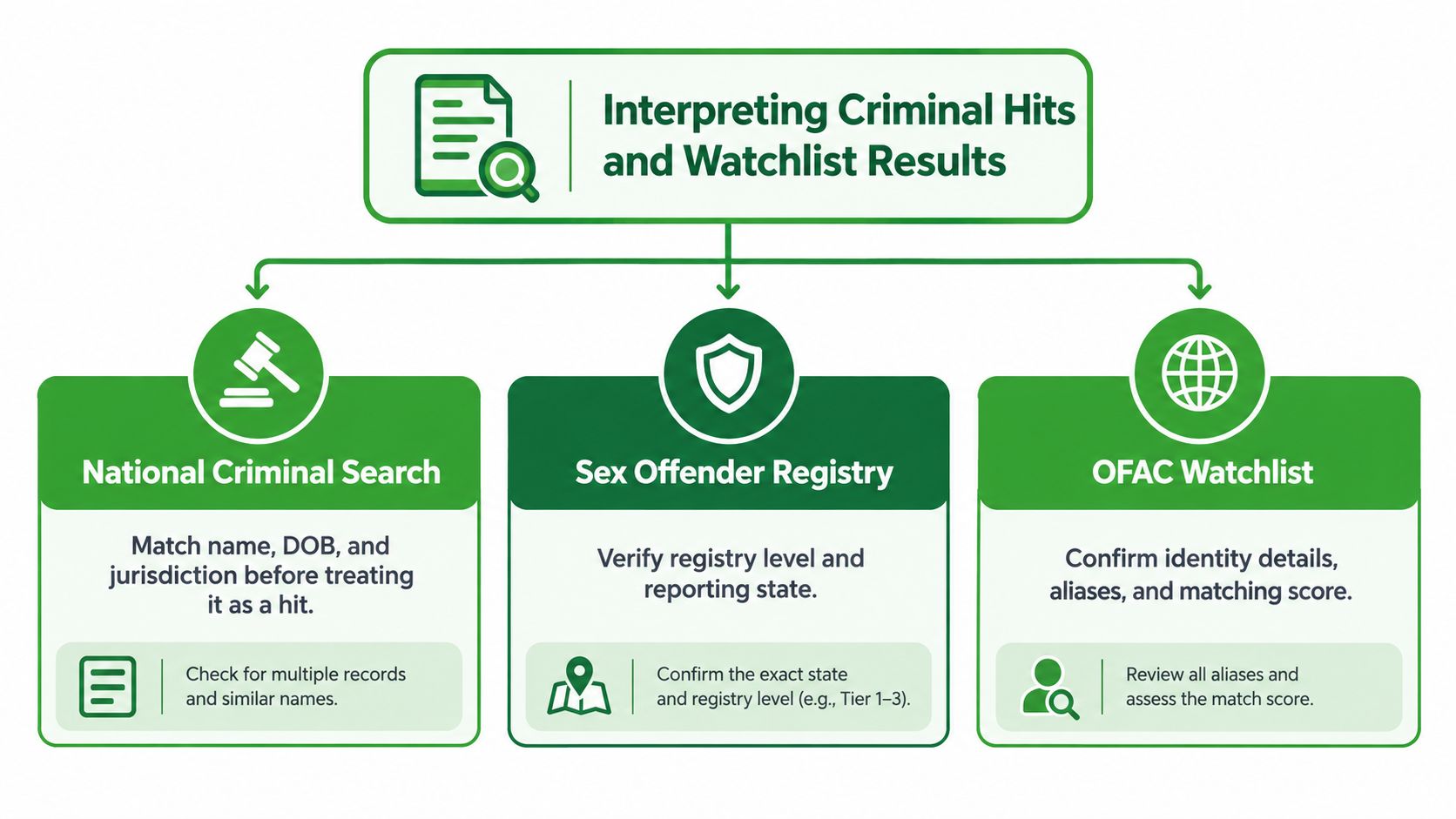
Start with the record detail, not the status label. A national criminal search, sex offender registry result, or watchlist match may identify a possible lead, but each type of result needs its own verification process.
Read a criminal record line by line
For a criminal hit, review the case number, jurisdiction, charge type, offense date, disposition, and disposition date. The case number helps distinguish one proceeding from another. The jurisdiction tells you which court handled the matter and whether it connects to the applicant's known history. The charge type describes the allegation, but it doesn't tell you the final legal result.
The disposition is usually the most important field. A conviction indicates a different outcome from a dismissal or acquittal. A deferred judgment, pending matter, or missing disposition calls for a different response from a completed case with a clear outcome. Don't infer the result from the charge wording or assume that an arrest establishes guilt.
Use this sequence:
- Match the person. Compare identifiers and address information before treating the entry as the applicant's record.
- Confirm the court. Check whether the jurisdiction is plausible and whether a direct court search is needed.
- Classify the outcome. Separate conviction, dismissal, acquittal, pending case, and non-conviction outcomes.
- Assess relevance. Compare the verified result with the volunteer's actual duties, supervision, access, and setting.
- Record the reasoning. Note which facts supported further review or allowed the application to proceed.
For readers comparing screening terminology across countries, an explanation of how enhanced DBS differs from standard provides useful context, although U.S. organizations must apply the rules governing their own screening process. A separate guide to global watchlist screening can help clarify why a watchlist result should be reviewed as an identity match rather than accepted as a conclusion.
Approach watchlists with the same discipline
A sex offender registry match requires confirmation of the applicant's identity, the reporting state, and the registry information. An OFAC or other watchlist result should be checked against identity details, aliases, and the basis for the match. Similar names can generate alerts, so the reviewer shouldn't rely on a name alone.
A watchlist result may require escalation under your policy. The right response is still fact-specific: verify the identity, preserve the report, restrict access to sensitive information, and document who reviewed the result and what was confirmed.
Using Address History to Find Hidden Jurisdictions
Address history is more than background information. It acts as a map for deciding whether the criminal searches ordered cover the places where an applicant may have lived.
A national database search can point toward records, but it may not provide a complete, final answer for every jurisdiction. If the report shows an address in a county that wasn't listed on the volunteer application, that discrepancy deserves attention. The same applies when the timeline jumps from one address to another without an explanation.
Read the timeline for gaps
Lay the applicant's disclosed addresses beside the automated address history. Look for:
- Unlisted locations: An address appears in the report but not in the application.
- Unexplained gaps: The timeline leaves a period with no location.
- Overlapping dates: Two residences appear to cover the same period without context.
- Inconsistent geography: The application says one state while the report points to another.
- Name variations: A former surname, middle-name variation, or alias appears in the search data.
None of these findings proves dishonesty or wrongdoing. People move, use different mailing addresses, share housing, and leave old information in consumer records. The purpose of the comparison is to identify where a more targeted search may be appropriate, not to punish an applicant for an untidy timeline.
A missing address is a search decision, not a character judgment.
Turn discrepancies into follow-up actions
When an address points to a new county or state, check whether that jurisdiction needs a direct court search. If a name variation appears, confirm that the screening vendor has associated it with the applicant rather than treating it as an unrelated identity. If the report cannot establish the connection, pause the decision and seek clarification through a consistent process.
The address history background check resource can help coordinators understand how this part of a report supports jurisdiction selection. Your written policy should state what happens after a discrepancy appears. For example, the coordinator might request clarification, order a permissible additional search, or refer the matter to a designated reviewer.
Don't use address history as a reason to demand unnecessary personal information. Collect only what the screening and compliance process requires, control access to the report, and explain to applicants why clarification is needed. That approach improves search coverage without turning routine data inconsistencies into automatic disqualifiers.
Identifying False Positives and Incomplete Records
A background check can contain an error even when it comes from a legitimate reporting process. Academic research published in 2024 found false-positive errors in both regulated and unregulated private-sector criminal checks, with 60% of participants experiencing at least one false positive on regulated checks and 50% experiencing at least one on unregulated checks. The study also found false-negative errors affecting 90% and 92% of participants respectively, which shows why a report can be incomplete as well as wrong. The published study makes careful verification a practical necessity.
The same research found that almost one quarter of the sample had no criminal-record information reported even though state repositories showed records, and 9.3% of reported charges lacked disposition information. Those findings don't tell you what happened in a particular applicant's case. They do show why “the database found nothing” and “the database found a charge” both require careful interpretation.
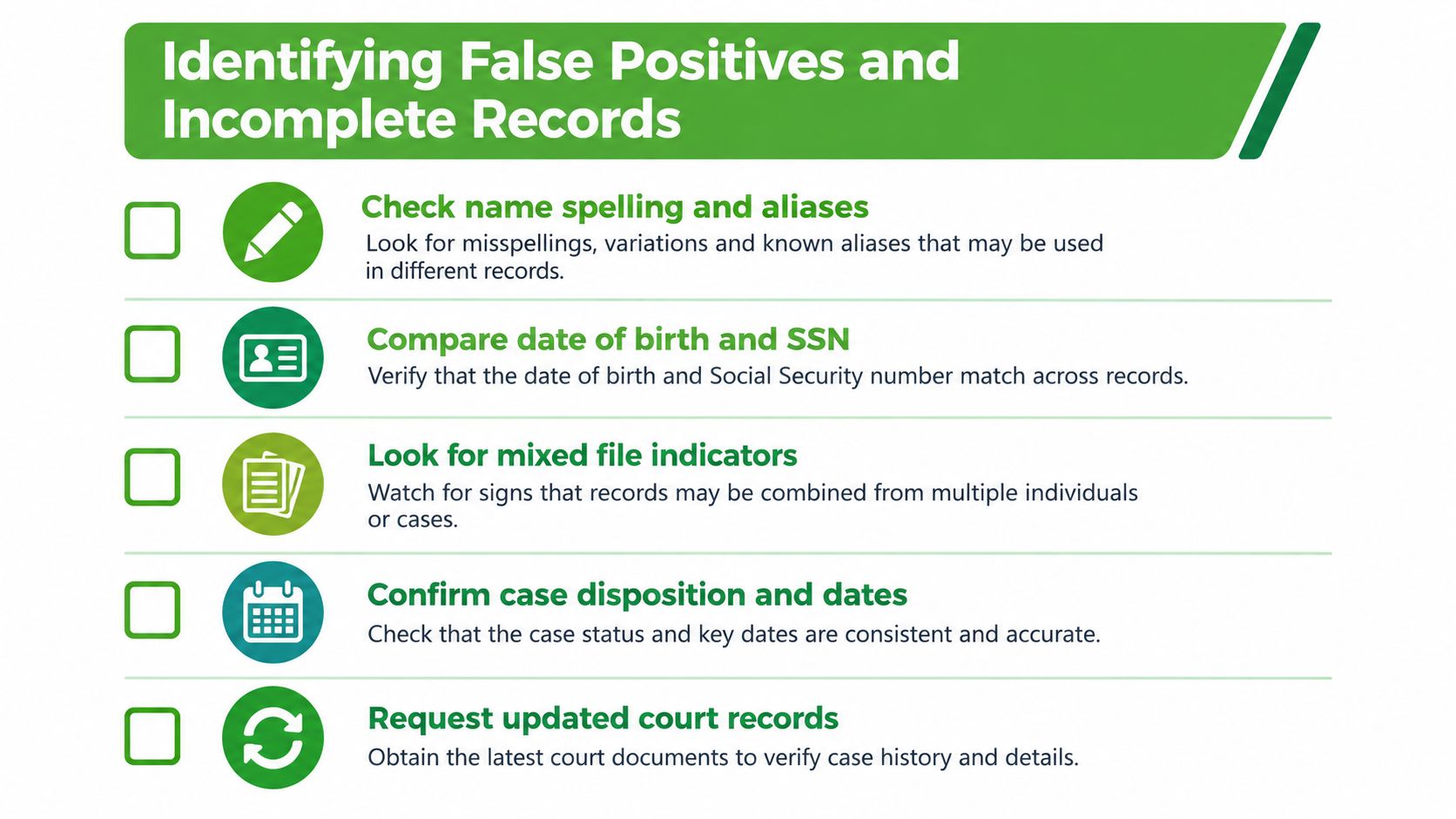
Use three accuracy checkpoints
First, confirm that the record belongs to the right person. Compare spelling, aliases, date of birth, address history, and other identifiers available under your process. A shared name or similar profile can produce a mixed file, where information from more than one person appears connected.
Second, find the final disposition. An arrest or charge describes an event in the legal process, not necessarily its conclusion. If the disposition is blank, unclear, or inconsistent with the applicant's documentation, don't make a final decision until the outcome has been reviewed.
Third, inspect missing fields. An absent court location, incomplete date, unclear charge classification, or unexplained status can change the meaning of the entry. Ask the reporting company or court source to clarify the information and give the applicant a meaningful opportunity to provide supporting records.
Organizations handling applicant information should also limit unnecessary exposure of personal data. Practical guidance on how to protect your family from ID theft reinforces why reports should be stored securely and shared only with people who need them for the screening decision.
The strongest response to a questionable result isn't an argument with the applicant or an immediate rejection. Preserve the original report, identify the exact field in dispute, request an updated record where appropriate, and document the correction or reason the result remains unresolved.
Navigating FCRA Rules and Adverse Action Notices
If a nonprofit uses a consumer report and may reject a volunteer because of information in that report, the Fair Credit Reporting Act governs important parts of the process. The FTC describes the required sequence in its guidance for organizations using consumer reports.
Follow the pre-adverse action stage
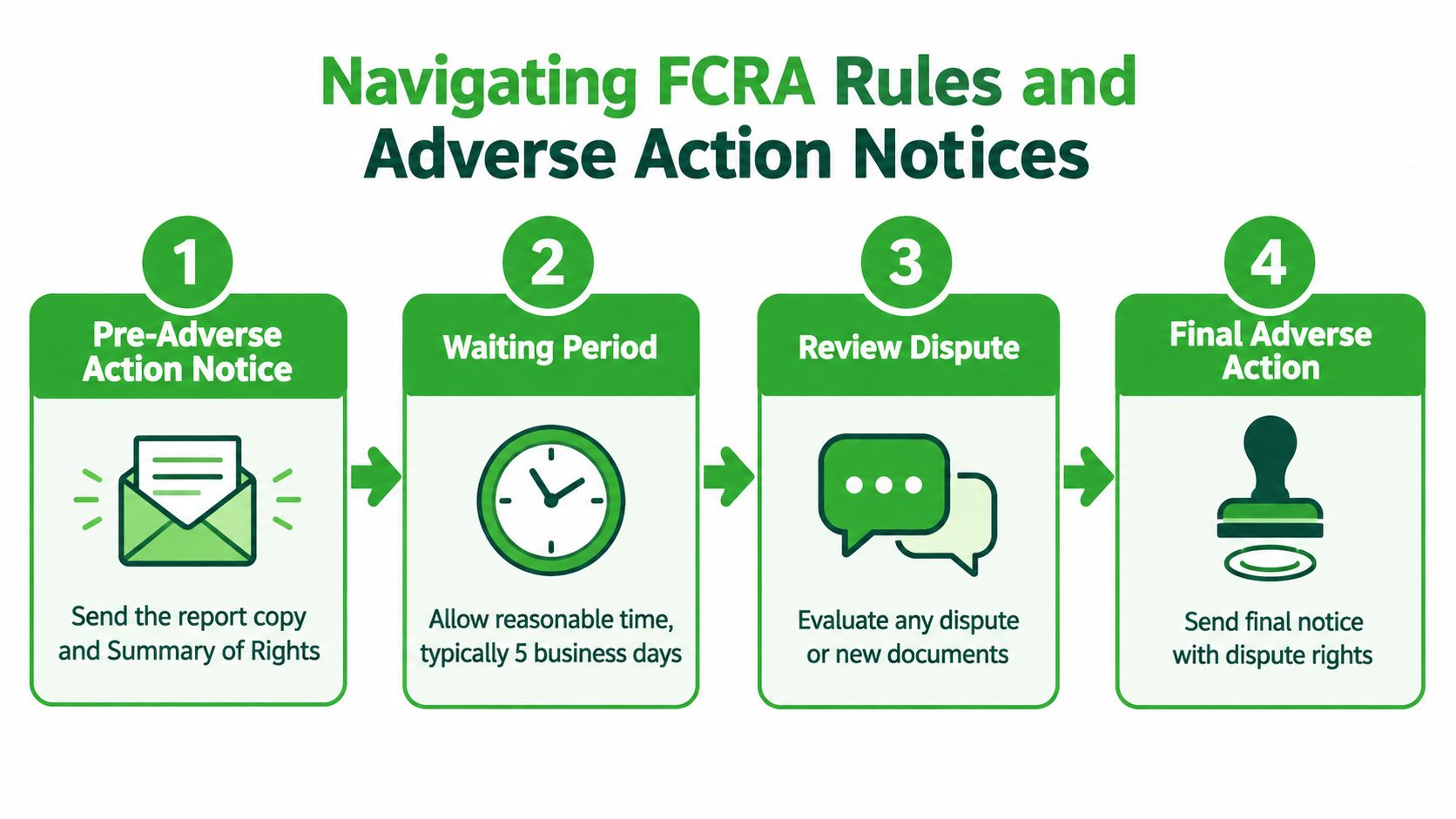
Before rejecting the applicant based on the report, provide a copy of the report and a summary of rights. This gives the person a chance to identify a mixed file, missing disposition, outdated entry, or other inaccuracy before your organization finalizes its decision.
Pause the decision while the applicant reviews the information. Your policy should explain how the applicant can dispute the report or submit relevant documentation, and staff should route any dispute to the appropriate reporting company or compliance contact. Don't describe the outcome as final while this review remains open.
The FTC guidance on using consumer reports explains that the FCRA was first enacted in 1970 and established the modern legal framework for consumer reports used in background checks. It also explains the reporting company's role in the dispute process and the organization's notice obligations.
Complete the final notice correctly
If the organization proceeds with adverse action, send the final notice. The notice must identify the reporting company and explain the person's right to dispute inaccurate or incomplete information. It must also explain the right to request an additional free report within 60 days, as described by the FTC.
A final notice isn't a substitute for individualized review. Keep the report, notices, decision notes, and dispute materials together under your retention and access policy. Automated workflows can help generate consistent documents, but a tool won't decide whether the record is accurate or relevant to the volunteer role.
The sequence is easier to remember when staff connect each action to its purpose:
- Share the report and rights summary so the applicant can inspect the information.
- Allow a genuine review opportunity instead of treating the preliminary decision as final.
- Evaluate disputes and documents before reaching a conclusion.
- Send the final notice if the organization still takes adverse action.
Organizations should also check applicable state and local requirements. FCRA compliance is a baseline, not a guarantee that one national workflow satisfies every rule affecting volunteer screening.
Building a Fair and Consistent Screening Workflow
A sound screening process gives reviewers the same questions for every applicant while leaving room for individual facts. The point isn't to eliminate judgment. It's to make judgment traceable, role-specific, and grounded in verified information.
Create a screening matrix before the next report arrives. For each volunteer role, describe the access involved, the people served, the level of supervision, and the types of verified information that may require escalation. Keep the criteria tied to duties rather than broad labels such as “any criminal record.”
Use a repeatable review record
A coordinator's worksheet can include:
- Report scope: Which searches were ordered and completed?
- Identity match: Which identifiers support or weaken the match?
- Address coverage: Are all relevant jurisdictions represented?
- Record details: What are the case number, charge, disposition, and dates?
- Role connection: What specific duty creates the concern?
- Applicant response: Did the applicant dispute or clarify anything?
- Decision owner: Who reviewed the information and approved the outcome?
This record helps a second reviewer understand the decision without starting over. It also exposes weak reasoning. “The report looked bad” isn't a defensible explanation. “The verified conviction directly relates to unsupervised access under the written role criteria” is more precise, although the organization still needs to apply its policy and applicable law carefully.
Communicate without prejudging
Tell applicants what screening involves, how they'll receive a report when required, and who can answer questions. If a result needs review, describe it as a review, not a conclusion. That language matters because applicants may have a legitimate correction, dismissal record, or explanation that changes the assessment.
A nonprofit can use a reporting workflow such as VolunteerBadge to obtain a downloadable report, review a privacy-safe summary, and manage FCRA-related notices in one process. The tool supports administration, but the coordinator remains responsible for checking relevance, considering disputes, and applying the organization's written standards consistently.
Review the workflow periodically. Remove steps that collect information no one uses, clarify vague escalation rules, and train anyone who can access reports. A careful process is not the one with the most red flags. It's the one that can explain why each decision was made.
VolunteerBadge helps nonprofits request volunteer background checks, review report details, identify address-history issues, and manage pre-adverse and final adverse action notices through a structured workflow. Visit VolunteerBadge to see how the platform can support a more consistent, FCRA-aware screening process.
