
OFAC Sanctions List Search: A Nonprofit Screening Guide
Learn how to run an OFAC sanctions list search for volunteer screening, interpret fuzzy matches, document hits, and integrate checks into your workflow.
On this page
A volunteer coordinator opens the OFAC website, types a new volunteer's name, sees several similar results, and saves nothing beyond a note saying “clear.” That process feels efficient until someone asks which list was searched, when the search ran, what the confidence threshold was, and why the close matches were dismissed.
OFAC sanctions list search is useful, but the search box is only one part of a defensible screening program. Nonprofits need a repeatable operating loop: obtain current list data, screen the right people, investigate fuzzy matches, document every decision, and rescreen when the underlying list changes. The hard work isn't finding a possible match. It's proving, later, why your team reached its disposition.
Table of Contents
- Why OFAC Sanctions List Search Matters for Volunteer Programs
- Navigating the OFAC Sanctions List Search Tool
- Reading Fuzzy Matches and SDN Versus Non-SDN Hits
- Documenting and Dispositioning Sanctions Hits
- Choosing Between Web Search, Batch Files, and API Screening
- Building a Repeatable Screening Workflow for Nonprofits
Why OFAC Sanctions List Search Matters for Volunteer Programs
A volunteer can pass identity verification and safeguarding checks yet still create sanctions exposure through reimbursed expenses, contractor payments, international projects, resource transfers, or partnerships outside the United States. Sanctions screening belongs in the same onboarding control set because an unpaid role does not remove transaction risk.
OFAC's live sanctions list search is the official U.S. Treasury search for the SDN and Consolidated Sanctions Lists. The Specially Designated Nationals and Blocked Persons List, commonly called the SDN List, identifies blocked persons and entities. The consolidated search also covers related non-SDN lists, including sectoral restrictions and foreign sanctions evaders. A result is a potential match, not proof that the volunteer is listed.
Names generate messy results. Common surnames, transliteration, aliases, incomplete records, and ordinary data-entry differences can produce fuzzy matches. Reviewers need a defined disposition process that compares available identifiers, records the reason for each decision, and preserves the search context. A clean result from one manual query does not demonstrate an ongoing control.
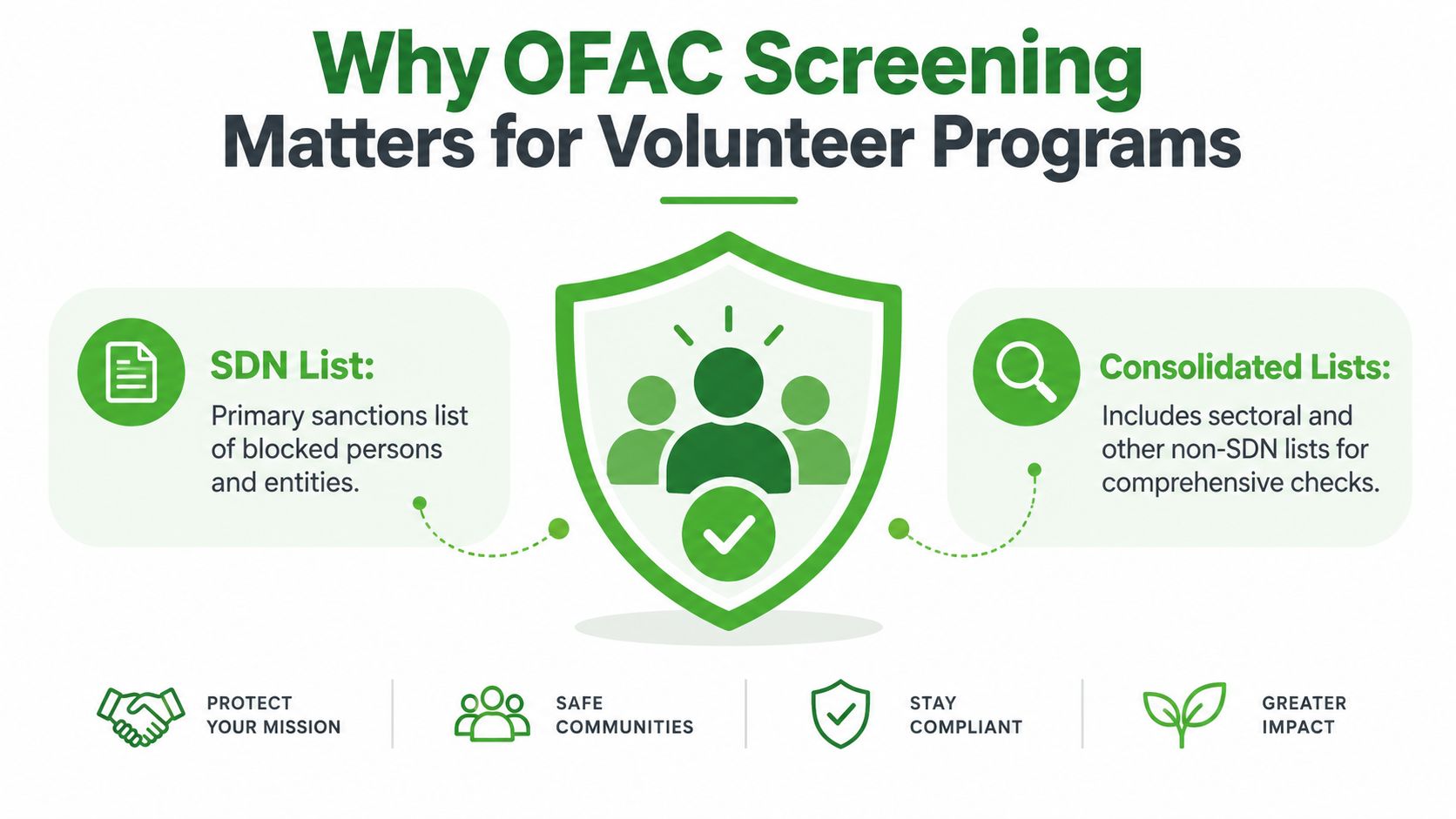
A one-time check leaves an operational gap
OFAC states that its free search tool is intended for individual users seeking potential matches, rather than automated systems configured to search continually, as explained in OFAC FAQ 287. Do not build a script that repeatedly queries the public interface. Set a refresh cadence and assign responsibility for list-change review instead.
A practical nonprofit control should define:
- Who gets screened: Volunteers, contractors, vendors, international partners, and other parties involved in relevant transactions.
- What gets checked: The SDN List and appropriate consolidated non-SDN lists, based on the organization's activities and risk assessment.
- How fuzzy matches are handled: Compare secondary identifiers, record the evidence reviewed, and assign a clear non-match, escalation, or hold disposition.
- What the audit record contains: The queried name, search date, list context, result, reviewer, decision, and supporting notes.
- When screening repeats: At onboarding, on a defined rescreening cycle, and after list updates that could affect people already cleared.
Operational rule: A name search is one event. A screening program is the documented process around that event.
A broader volunteer background-screening policy may also reference the FBI Most Wanted List guide, but that check does not replace sanctions screening. Keep the checks distinct in policy, workflow, and audit records.
Navigating the OFAC Sanctions List Search Tool
A volunteer submits a legal name with a middle initial omitted, a former surname, or a transliterated spelling. Search the exact legal name first, then run each known variation deliberately. Keep the spelling and formatting used for every query in the case record. A nickname or shortened name alone is not an adequate search.
The interface reflects OFAC's maintained sanctions data. Start in the primary search view for a straightforward name check. Use advanced options when the results need narrowing. Filters separate SDN entries from consolidated non-SDN entries, while the confidence slider controls how broadly fuzzy matching returns possible candidates.
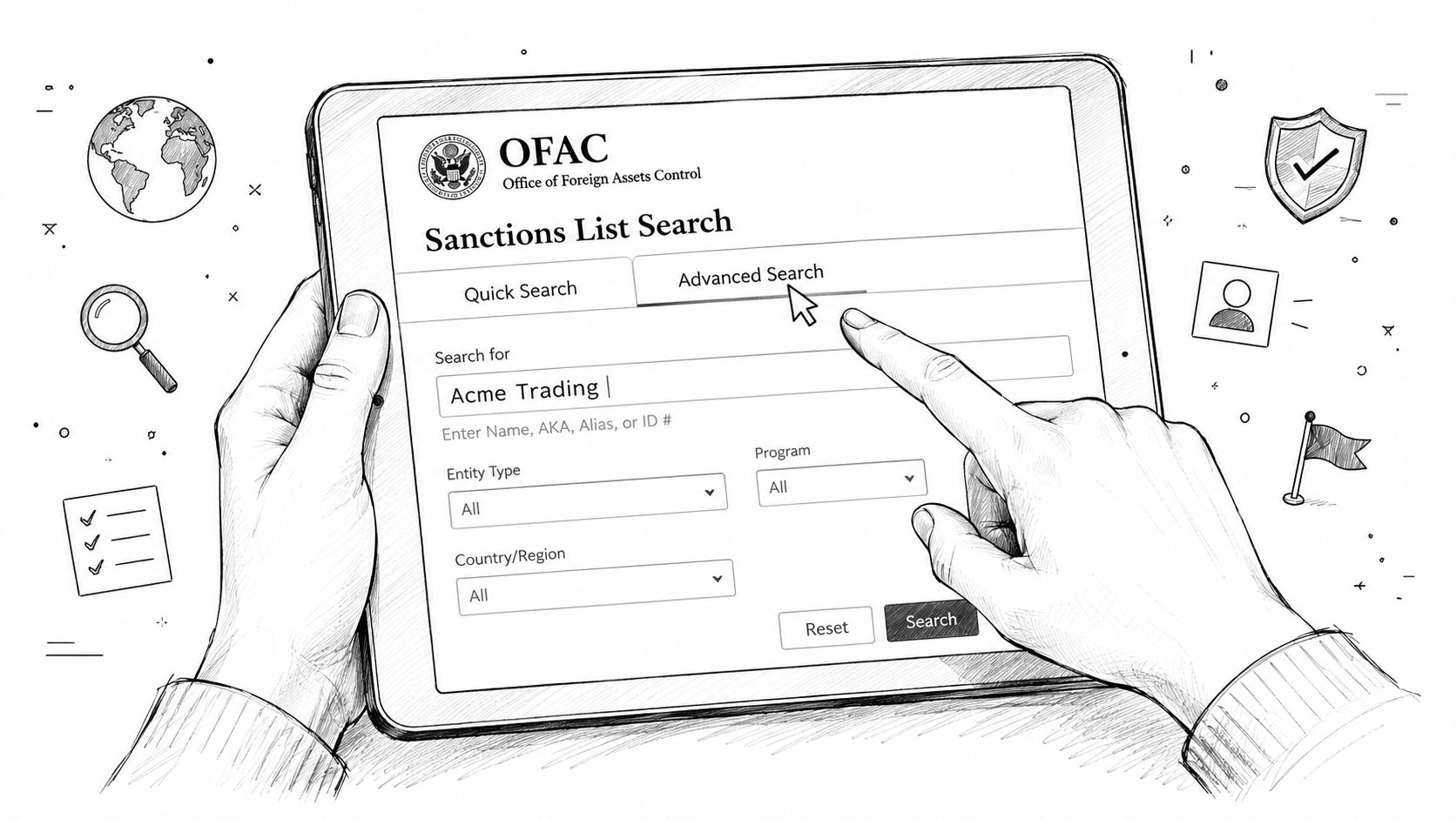
Search broadly, then review precisely
Common surnames can generate many low-confidence candidates. A distinctive organization name may produce one stronger result. Neither result establishes identity. Compare available dates of birth, nationality, location, aliases, entity details, and other secondary identifiers before assigning a disposition.
Record the list publication or update information shown on the result page. The case file should identify which public-data version supported the decision, rather than merely showing that someone opened a page.
Treat search history and recent-search features as conveniences, not as the audit system. Browser history, temporary tabs, and account-level records can disappear or fail to preserve the reviewer's reasoning. Export the result or capture a screenshot, then store it with the volunteer's screening record.
OFAC's tool has changed over time. In its 2014 tool update, OFAC described replacing the narrower “SDN Search” with “Sanctions List Search,” which supports broader list searching. Configure the current search to cover the lists relevant to your program instead of assuming an SDN-only check is sufficient.
Preserve the query, result rows, list labels, and confidence information through the page's export or browser-capture options. Before closing the case, record the exact search terms, filters, threshold setting, result date, and reviewer identity. These details make a fuzzy-match decision reproducible.
Use the public interface for individual checks and controlled investigations. Do not script repeated queries against it. OFAC's public search tool is designed for human review, so larger populations require an approved data-delivery or screening design that respects automation restrictions and supports the organization's refresh schedule.
Reading Fuzzy Matches and SDN Versus Non-SDN Hits
A fuzzy-match score shows how closely a submitted name resembles a name in OFAC records. It does not prove that the people or entities are identical. The search tool is designed to surface possible matches, so a lower threshold catches more candidates and creates more work for a human reviewer.
That trade-off is part of operating a defensible screening process. False positives make up most sanctions alerts, while only a smaller share become actionable hits, according to Lenzo's sanctions-screening analysis. Treat those figures as industry context, not a forecast for your nonprofit. A long queue of similar names is not a reason to clear a result without comparing identifiers.
Treat the list label as a risk signal
An SDN result usually requires the fastest response because blocking-related restrictions and prohibited dealings may apply. A non-SDN entry can impose narrower restrictions tied to a specific program. Confirm the list designation before deciding whether a volunteer, payment, or activity can proceed.
| List Type | Scope of Restriction | Typical Match Volume | Disposition Urgency |
|---|---|---|---|
| SDN | Blocking-related restrictions and prohibited dealings may apply | Often high noise for common names | Immediate hold and escalation |
| Sectoral Sanctions Identifications List | Restrictions depend on the applicable directive or program | Variable | Prompt program-specific review |
| Foreign Sanctions Evaders List | Restrictions target identified sanctions-evasion conduct | Variable | Prompt review of relationship and activity |
| Other consolidated non-SDN lists | Restrictions vary by list and sanctions program | Variable | Review the governing program before disposition |
Read the full record, not only the highlighted name. AKA, A.K.A., and “formerly known as” entries can explain an apparent weak match in the primary name field. Compare date of birth, nationality, address, entity type, place of incorporation, and identification details. One matching name is a triage signal. Several aligned identifiers require escalation.
Use three practical dispositions
Classify a clear non-match only when contradictory identifiers support the decision, such as a different date of birth, incompatible nationality, or address history showing distinct identities. A possible match lacks enough evidence for clearance. Request secondary identifiers through the volunteer's existing identity records, then refer the case for legal or compliance review when appropriate. A confirmed or highly probable match requires stopping the relevant activity and escalating to qualified counsel or the organization's sanctions lead.
Reviewers should never convert uncertainty into a clean result. If the available evidence does not resolve the identity question, keep the case open.
Do not lower the threshold just to shrink the queue, and do not raise it to make the dashboard appear clean. Set a written review standard, collect better identifiers during onboarding, and use the confidence score for triage rather than as the final decision. Reapply that standard consistently each time the search is refreshed, so similar fuzzy matches receive similar treatment and the resulting record can withstand review.
Documenting and Dispositioning Sanctions Hits
A sanctions file should let another person reconstruct the decision without interviewing the original reviewer. For each search, save the volunteer's internal identifier, the exact query string, the search timestamp, the source list and version information, the result capture or export, the confidence setting, and the reviewer's name.
That record should also state what happened next. “No issue found” is not enough when the search produced close candidates. Explain which identifiers were compared and why they separated the volunteer from the listed person or entity.
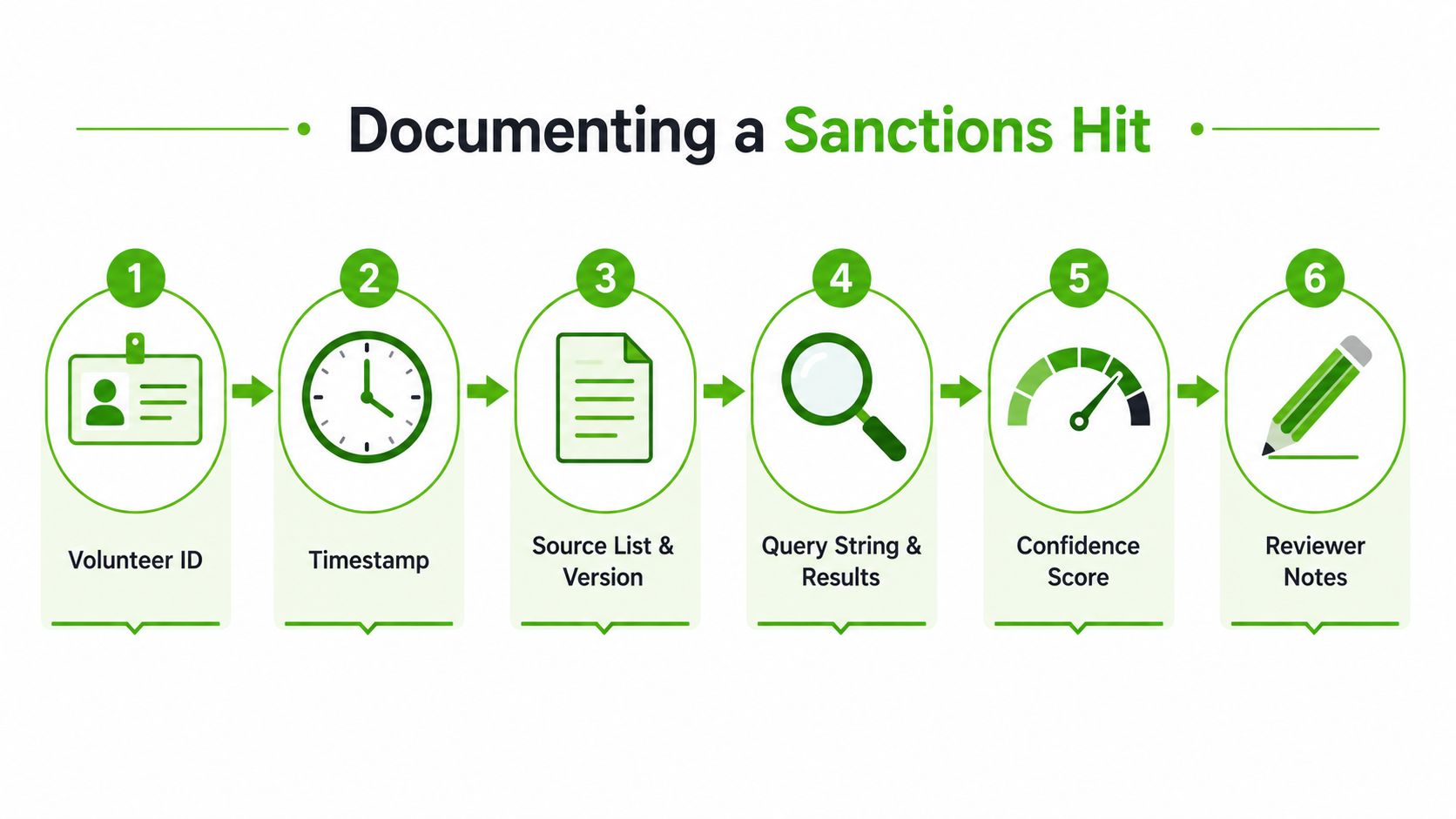
Build the case record around evidence
Use a consistent disposition structure:
- Exact or highly probable SDN match: Place the volunteer or transaction on hold, preserve the result, and escalate to sanctions counsel or the designated compliance officer. Don't promise the volunteer a final outcome before review.
- Probable match: Request and compare secondary identifiers. Record what was requested, who reviewed it, and why the evidence did or didn't resolve the similarity.
- Weak match: Close only after documenting the contradictory information, such as an incompatible birth date or distinct entity profile.
- No apparent match: Preserve the clean result with the query, date, list scope, and reviewer information.
A practical retention policy should be set with counsel and aligned with the organization's broader compliance, privacy, and background-screening obligations. If your team uses FCRA compliance procedures for volunteer reports, keep sanctions records separate enough to preserve purpose limitation while maintaining a consistent, auditable control environment. Don't collect unrelated personal information just because it might be available.
Why cleared hits still belong in the file
False positives are not administrative clutter. They show that the organization investigated a potential risk rather than ignoring it. They also protect the next reviewer from repeating the same work when a volunteer's name appears again after an update or during a later transaction.
Record reviewer notes in plain language:
- Which candidate record was reviewed.
- Which identifiers matched.
- Which identifiers contradicted the candidate.
- Whether the list was SDN or non-SDN.
- Whether the case was escalated, cleared, or held.
- What supporting document or result capture supports the decision.
OFAC's archive preserves list changes going back to 1994, with SDN archives in PDF format from 2001 to the present and text archives from 1994 to 2023, according to the official Sanctions List Search service. That historical availability is useful when reconstructing an older decision, but the live search remains current-state data. Preserve your own case evidence instead of assuming the website will retain the exact historical view you need.
Choosing Between Web Search, Batch Files, and API Screening
A coordinator screening one new volunteer can work manually. A program onboarding a large roster, repeating checks, and defending decisions during an audit needs a different operating model. Choose based on population size, list-update sensitivity, staff capacity, and the evidence reviewers must retain.
| Method | Cost | Freshness | Audit Risk | Best For |
|---|---|---|---|---|
| OFAC web search | Free public interface | Current search data, subject to OFAC updates | High if reviewers save little evidence | Occasional individual checks |
| Batch files or Sanctions List Service | Data access without repeated web queries | Refreshes when the organization ingests updated files | Moderate, because matching and records are your responsibility | Larger populations with technical support |
| API-driven screening | Vendor or platform charges may apply | Depends on provider's list-ingestion process | Lower when logs, dispositions, and reviewer actions are built in | Recurring workflows and integrated onboarding |
The public interface
The web tool works for an individual investigation. Search the name, inspect possible matches, record the identifiers reviewed, and save the result with the reviewer's disposition. The method breaks down when staff handle a large roster, repeat checks, or capture evidence inconsistently.
OFAC restricts automated systems that continually run searches against the public page. Do not automate clicks or build a scraper around that interface. Manual searches fit occasional cases. Recurring or higher-volume programs should use controlled file ingestion or a governed screening service.
Files and APIs
Treasury provides downloadable data files and the Sanctions List Service, including immediate downloads and archive access. Batch screening gives a nonprofit control over its refresh schedule and roster processing. That control also creates operational duties: maintain name matching, alias handling, change detection, reviewer queues, and audit logs.
An API-driven service can place screening inside volunteer onboarding, create a queue for fuzzy matches, and preserve decision metadata. It still requires vendor due diligence, clear data-processing terms, defined escalation ownership, and testing against known cases. An API moves mechanical work into an integration. It does not decide whether a close match is the same person.
For programs comparing sanctions screening with other onboarding checks, a volunteer background check service may combine those functions. Review actual list coverage, refresh handling, evidence capture, dispute procedures, and exportability before approving a provider.
The practical recommendation is simple. Use the web search for occasional, well-documented checks. Use batch files when your team can maintain matching logic and audit controls. Use an API when screening must run inside an onboarding workflow and the provider exposes usable logs, dispositions, and update information. In every model, define who reviews a fuzzy match and what record proves the decision.
Building a Repeatable Screening Workflow for Nonprofits
A volunteer arrives for orientation while the coordinator is handling a full onboarding queue. The screening record still needs a clear owner, complete evidence, and a decision before the volunteer receives access to funds, systems, travel support, or sensitive program activity. Build those controls into the volunteer record, and block activation until required review fields are complete.
Run an initial check before the volunteer begins work. Set a periodic rescreening schedule based on the organization's risk assessment. A twelve-month cycle can serve as a practical baseline for many programs, while higher-risk activities may require more frequent checks. Keep the cadence documented, assign responsibility, and record exceptions rather than relying on calendar reminders alone.
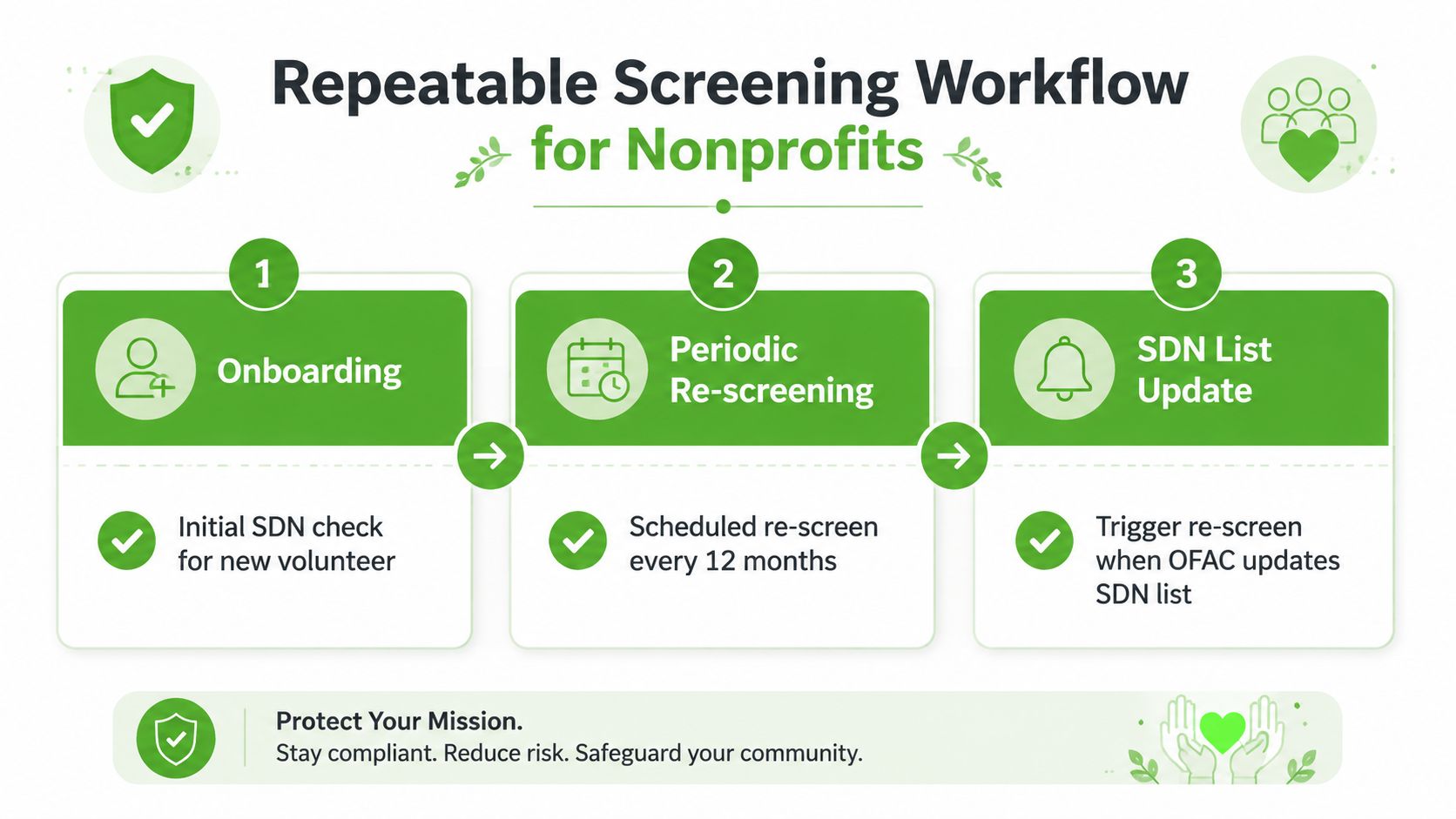
Treat list updates as workflow events
OFAC updates its live lists frequently. Subscribe to official change notifications, monitor update communications, and use a controlled process for downloading or ingesting revised data. When a designation or record change appears, identify the affected volunteer population and rescreen relevant records instead of waiting for the next scheduled cycle.
The update process should separate additions, removals, edits, and duplicate cleanup. OFAC has explained that it consolidated 18 duplicate list entries while confirming that the underlying sanctioned persons and associated blocked property remained sanctioned, as described in its Sanctions List Service notice. A changed row does not automatically indicate a changed legal status. Reviewers must compare the record history and the substance of the change.
Use this signoff checklist before activation:
- Identity captured: Record the legal name, alternate names, and available identifiers.
- Scope selected: Search the relevant SDN and consolidated lists.
- Evidence saved: Attach the query, timestamp, list version, result, and confidence setting.
- Matches resolved: Clear each candidate with documented reasons, or escalate it to an assigned owner.
- Update path assigned: Enroll the record in periodic rescreening and applicable list-update review.
- Purpose respected: Use the result for sanctions compliance, not unrelated employment or volunteer judgments.
OFAC screening is not a consumer report. Limit access to authorized reviewers, protect identity data, document corrections, and do not use an unresolved sanctions hit as a shortcut for unrelated eligibility decisions. If a possible match involves a real transaction or blocked-property question, pause the activity and obtain qualified legal guidance.
VolunteerBadge can place OFAC sanctions screening within a broader volunteer background-check workflow, with records and review steps organized for nonprofit operations. Visit VolunteerBadge to review its screening process for repeatable volunteer onboarding and documented compliance review.
