
Free FCRA Background Check: What It Really Means
Wondering about a free FCRA background check for volunteers? Learn what's actually free under the FCRA and how nonprofits stay compliant on a budget.
On this page
The FCRA gives consumers one free file disclosure every 12 months, but no free third-party FCRA background check exists for organizations. That “free” right belongs to the applicant, not the nonprofit paying a consumer reporting agency to produce a report.
Search results often blur those two products. A volunteer coordinator sees “free FCRA background check,” clicks through, and discovers either a limited public-record search, a free applicant copy, or a platform that charges for the actual screening components. That distinction matters because the moment a nonprofit uses a consumer report to decide whether someone may volunteer, compliance stops being optional paperwork and becomes part of the decision process.
A defensible program doesn't chase a zero-dollar headline. It buys only the searches a role needs, uses a provider that supports the required notices, and keeps a record of every step.
Table of Contents
- The Free FCRA Background Check Myth
- What the FCRA Actually Requires
- What Is Free Under the FCRA and What Is Not
- Free and Low-Cost Sources a Nonprofit Can Use
- Staying FCRA Compliant Step by Step
- Three Real Volunteer Screening Scenarios
- Affordable Paid Options That Keep You Compliant
- A 30-Day Action Plan for Volunteer Coordinators
The Free FCRA Background Check Myth
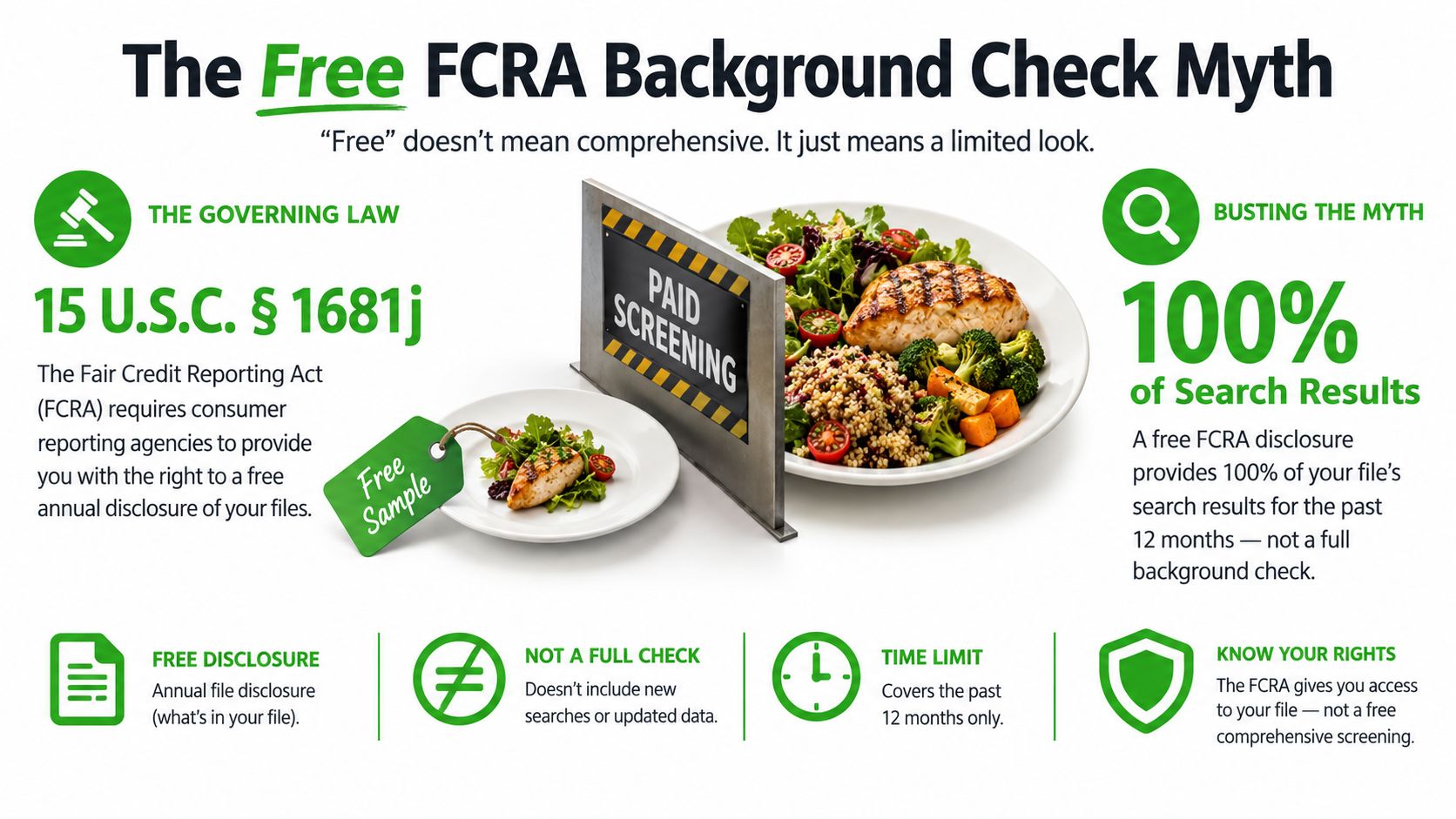
The “free FCRA background check” claim often sells the wrong product. A nonprofit cannot rely on a free, all-inclusive third-party FCRA screening product. The free item usually belongs to the consumer, not the organization ordering a report for volunteer vetting. The Federal Trade Commission explains that consumers may receive a free disclosure from nationwide credit bureaus and specialty consumer reporting agencies in specific circumstances, including the applicable recurring disclosure entitlement. That right does not make an organizational screening order free. The FTC's FCRA consumer guide distinguishes the applicant's right to access information from the organization's purchase of a report.
What the nonprofit pays for
A screening order can include several cost layers:
- Identity resolution: Matching the applicant to names, addresses, and other identifying information.
- Criminal searches: National, state, county, or federal searches selected for the role.
- Registry and watchlist checks: Sex-offender registries, sanctions sources, or other designated lists.
- Court verification: Confirming a possible record through the relevant court or jurisdiction.
- Workflow infrastructure: Disclosure delivery, electronic authorization, status tracking, dispute handling, and adverse-action notices.
The price becomes clear with a worked example. A nonprofit screening 50 volunteers at $4.95 per check spends about $250 a year, while a subscription platform charging $25 per check plus a $99 monthly minimum would cost $2,448 for the same volume. The provider, package, jurisdictions, and recurring fees determine the final bill, but “free” should never be treated as the expected price for a usable organizational screen.
Practical rule: Treat “free” as a question, not a conclusion. Ask whether the offer covers the report used for the decision, or only the applicant's right to obtain a copy.
The Fair Credit Reporting Act was enacted by Congress in 1970 and became effective on April 25, 1971. More than 50 years later, it remains the central federal framework for many consumer-report-based background screening workflows in the United States. The Consumer Financial Protection Bureau's background-screening report identifies accuracy, fairness, privacy, disclosure, and authorization as central concerns. A nonprofit should budget for those safeguards rather than chase a zero-dollar headline.
What the FCRA Actually Requires
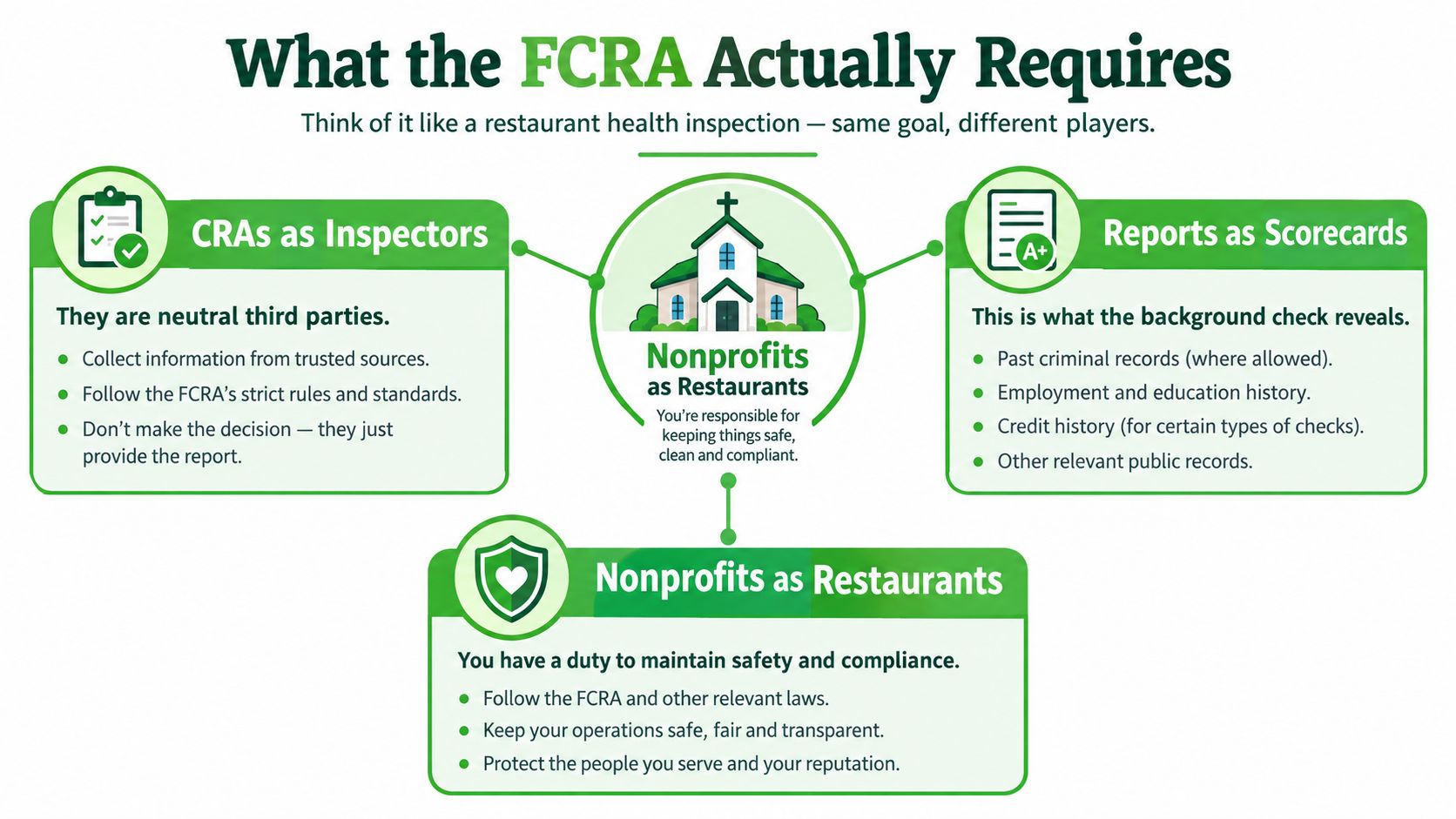
Think of a FCRA screening process like a restaurant health inspection. The consumer reporting agency, or CRA, acts like the inspector. The report is the scorecard. The nonprofit is the restaurant, responsible for using the scorecard for a legitimate purpose, responding when information is challenged, and following the required process before taking action.
The analogy has a limit. A CRA doesn't decide whether a volunteer is accepted. The nonprofit does. The provider supplies information and may support the workflow, but the organization remains responsible for using the report properly.
When volunteer screening enters FCRA territory
A nonprofit should examine the relationship among three facts:
- A third party compiles background information.
- The organization uses that information for a decision about the individual.
- The information qualifies as a consumer report or related report under the law.
That pattern can arise when a volunteer will drive a nonprofit vehicle, handle funds, supervise children, work with vulnerable people, or occupy another role where the organization uses a report to decide eligibility. The role itself doesn't magically determine FCRA coverage. The source of the information and the way the organization uses it matter.
A one-off helper who hands out flyers may not create the same screening situation as a recurring youth mentor. Don't apply one blanket rule to every volunteer. Write a role matrix that identifies who requires screening, what searches are necessary, and which decision-maker reviews the result.
For a more focused explanation of criminal-history screening, review whether the FCRA applies to criminal background checks.
The distinction between a consumer report and an investigative consumer report also matters. A standard consumer report can contain character, reputation, or personal-information material collected for an eligibility decision. An investigative consumer report involves information gathered through interviews or similar inquiries into character or reputation, which can carry additional disclosure considerations. Ask the CRA to identify the report type and explain the forms it uses before launching the program.
What Is Free Under the FCRA and What Is Not
The applicant's free file disclosure is not the same product as the nonprofit's screening order. A file disclosure lets a consumer see information maintained about them under specified conditions. A nonprofit needs a report it can use for a volunteer eligibility decision, and that report may require data retrieval, identity matching, court work, and compliance support.
The distinction becomes clearer when the components are separated.
| Component | Free to the Nonprofit? | Who Pays | FCRA Exposure If Skipped |
|---|---|---|---|
| Consumer file disclosure | Usually no, because it belongs to the applicant's access right | The CRA provides the disclosure under qualifying conditions | The nonprofit may still lack a report suitable for its decision |
| County criminal search | Not automatically | Usually the organization, unless a program subsidizes it | The nonprofit may miss relevant jurisdictional information or use an incomplete search |
| State or multi-state criminal search | Not automatically | Usually the organization | Coverage may not match the role or the applicant's history |
| Sex-offender registry check | Not automatically | Usually the organization or provider | A role-specific safety review may be incomplete |
| Watchlist or sanctions search | Not automatically | Usually the organization or provider | A separate screening obligation may remain unresolved |
| Identity and address-history review | Not automatically | Usually the organization or provider | The nonprofit may search the wrong person or overlook jurisdictions |
| Pre-adverse and final adverse-action workflow | Not a free report component | The organization pays through staff time or a platform | The nonprofit can mishandle a negative decision even when the report is accurate |
Why the applicant's free copy still matters
If a nonprofit takes adverse action based on a consumer report, the applicant receives important rights within the required process. The organization must provide the report and the Summary of Rights before the final decision, giving the applicant a meaningful chance to identify an error. The applicant's access right is therefore part of due process, not a discount code for the nonprofit's screening budget.
The FTC's consumer guidance explains the circumstances in which consumers can obtain a disclosure without charge, including the regular disclosure entitlement and certain events such as adverse action, fraud, public assistance, or unemployment. That doesn't make national criminal searches, motor-vehicle records, federal searches, or multi-jurisdiction checks free for the organization.
A promotional offer may absorb one limited search. It doesn't prove that the provider covers every county fee, verification step, identity check, or adverse-action service. Ask for the full package definition in writing.
Free and Low-Cost Sources a Nonprofit Can Use
Public sources can help a nonprofit understand its screening environment, but they aren't a substitute for a complete, defensible process. A state repository may provide state-level information. A county clerk site may expose a local docket. A registry may cover a defined category. None should be treated as a universal source of truth.
The safest use of free sources is policy research, triage, or corroboration, not an improvised final decision. If the organization uses a third-party consumer report to decide whether someone may volunteer, it should preserve the disclosure, authorization, report, review, and notice trail. Pulling information from a public website doesn't eliminate accuracy, privacy, fair-chance, or state-law concerns.
| Source | Cost | What It Covers | FCRA Exposure If Used Alone |
|---|---|---|---|
| State criminal repository | Often available without a screening-platform fee | Records held by the relevant state system, subject to its coverage and access rules | May omit county records, identity matches, updates, or jurisdictions outside the state |
| County court clerk website | May be publicly accessible | Information published by a particular county court | Narrow geographic coverage and manual identity matching can produce an incomplete basis for a decision |
| State sex-offender registry | Often publicly searchable | Registry entries maintained by the state | Doesn't replace criminal, identity, or jurisdictional screening |
| OIG excluded-individuals list | Public list access may be available | Exclusion information maintained by the relevant federal source | A list check isn't a complete criminal background check and may require a separate decision process |
| GSA exclusions data | Public federal exclusions information | Entities or individuals appearing in the applicable exclusions system | Doesn't establish that all other screening obligations have been satisfied |
| Consumer's free file disclosure | Free to the qualifying applicant, not the nonprofit's screening order | Information in the consumer's file under applicable disclosure rules | The nonprofit can't treat the applicant's copy as its own compliant screening workflow |
Where the exposure begins
The exposure begins when someone turns a fragment of public data into a negative eligibility decision without building the protections around that decision. That includes using a name-only match, ignoring an address discrepancy, failing to verify a possible record, or denying a volunteer access without the required notices.
Public sources can also create hidden labor. A coordinator must identify the right jurisdiction, capture the result, evaluate identity, record the search date, and decide whether the information is complete enough to use. If the search raises a concern, the team still needs a fair review and a defensible communication process.
Use free sources to improve planning, not to create false confidence. For final screening, choose the smallest paid package that fits the role and provides a record you can explain.
Staying FCRA Compliant Step by Step
A compliant workflow is easier to manage when every action has an owner and every document has a place. Don't let an online application, volunteer handbook, and vendor dashboard each contain a different version of the process.
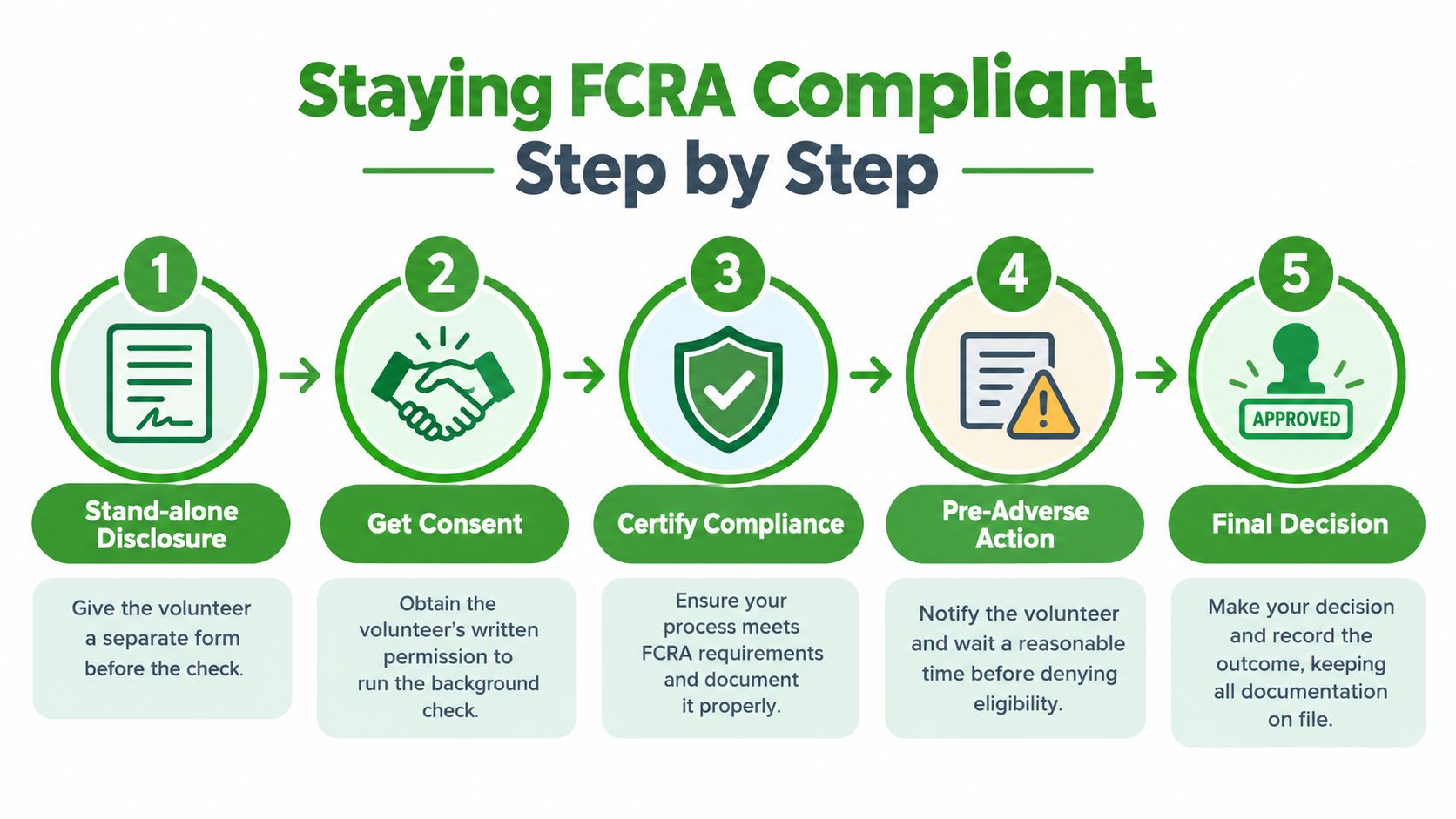
Give a stand-alone disclosure. Before ordering the report, provide a clear, conspicuous disclosure that a consumer report may be obtained for volunteer eligibility. Keep it separate from the application and unrelated legal terms.
Obtain written authorization. Get the applicant's written or electronic authorization before the CRA pulls information. The organization should retain proof of consent with the screening record.
Use a CRA and certify the process. Order the report through a consumer reporting agency, identify the permissible purpose, and certify that the organization will comply with its obligations. Review the report for identity and context rather than accepting an automated status without human oversight.
Send pre-adverse materials if the report may affect the decision. Provide the applicant with a copy of the report and the Summary of Rights before finalizing a negative decision. The applicant needs an opportunity to dispute inaccurate or incomplete information.
Wait, review, and send the final notice. The FCRA doesn't set one universal waiting period, but practical FTC guidance has generally treated five business days as sufficient for review and dispute in this workflow. The FTC's employer background-check guidance describes the two-notice process and the information required in the final adverse-action notice, including the CRA's name, address, and phone number, plus a statement that the CRA didn't make the decision.
The final notice should go out only after the review window and any dispute handling are complete. If the applicant identifies a problem, pause the decision and let the CRA investigate. State and local rules can add timing, notice, individualized-assessment, or fair-chance requirements, including rules affecting California and New York City programs.
The workflow is simple to describe and easy to break. Train the person who reviews reports, the person who sends notices, and the person who approves volunteers. Use step-by-step volunteer screening guidance as a process reference, then have counsel check the jurisdictions where your volunteers live and serve.
Three Real Volunteer Screening Scenarios
The returning volunteer with a clear report
A returning food-pantry volunteer applies for another service period. The nonprofit provides the stand-alone disclosure, captures authorization, orders the report, reviews the result, and records the clearance. Because the report doesn't produce information that may lead to a negative decision, the organization doesn't send adverse-action notices.
The coordinator should still retain the authorization, report status, review date, and decision under the organization's retention policy. A clean result is not permission to skip the process for the next returning volunteer. It is evidence that the process worked for this applicant.
The disputed misdemeanor
A youth-program applicant receives a report showing a misdemeanor that appears connected to the wrong county and an old address. The coordinator does not reject the application immediately. Instead, the nonprofit sends the pre-adverse materials, gives the applicant the report and Summary of Rights, and pauses the final decision while the applicant disputes the record.
The CRA investigates the dispute. If the record is corrected or cannot be verified, the nonprofit reviews the updated report and documents the outcome. Rushing to a final notice before that review defeats the purpose of the dispute window and can turn a fixable data problem into a compliance problem.
The watchlist hit
A volunteer applicant triggers a possible match on a sanctions or global watchlist during screening. A name match isn't automatically proof that the applicant is the listed person. The reviewer compares available identifiers, follows the provider's escalation process, and separates the watchlist analysis from ordinary criminal-history review.
If the organization still considers denying eligibility, it uses the applicable adverse-action process and obtains advice on any sanctions-specific obligations. The file should show what was matched, who reviewed it, what was verified, what notice was sent, and why the organization reached its decision. A volunteer coordinator shouldn't make a final decision from a red banner alone.
Affordable Paid Options That Keep You Compliant
The cheapest defensible option is usually a pay-per-check CRA with compliance workflow, not a free database. Look for a provider that captures disclosure and authorization before the search, identifies the report source, supports dispute handling, and generates both adverse-action notices. A low headline price is meaningless if staff must build the legal workflow in spreadsheets.
| Provider | Base Price Per Check | FCRA Workflow Included | Watch Out For |
|---|---|---|---|
| Public-record search | May appear free | Usually not a complete CRA workflow | Incomplete coverage, identity errors, manual verification, and no integrated notices |
| Subscription screening platform | Varies by contract | May include workflow, depending on the plan | Monthly minimums, setup charges, county add-ons, and limited support |
| Pay-per-check CRA | Varies by package | Confirm disclosure, authorization, dispute, and adverse-action features | National searches may exclude county verification or other add-ons |
| Nonprofit-focused CRA | $4.95 per check under the published offer | Digital disclosure and authorization, address-history review, and automated adverse-action notices are described as included | Confirm the exact coverage, refund conditions, retention controls, and any role-specific requirements before purchase |
A provider should explain what “national” means in its package. Ask whether county, state, federal, registry, motor-vehicle, sanctions, and global searches are included or separately priced. Also ask how the system handles an unverified county record, an applicant dispute, an identity mismatch, and a final adverse action.
Red flags are easy to spot:
- Instant mega-database claims: A large database isn't proof of current, complete, or accurately matched records.
- No stand-alone forms: If disclosure and authorization are buried in a general application, choose another workflow.
- No sample report: You should see how names, identifiers, jurisdictions, sources, and status are displayed.
- No human override: Auto-adjudication should not replace a trained reviewer, especially for disputed or ambiguous matches.
- Unclear CRA status: Ask who is furnishing the report and how the organization supports permissible purpose, accuracy, and disputes.
- Unclear pricing: Require a written explanation of county fees, recurring charges, refunds, and add-on searches.
Review five volunteer background-check considerations before comparing vendors. The provider should make the compliant path easier, not merely sell access to more data.
A 30-Day Action Plan for Volunteer Coordinators
A volunteer coordinator can build a workable process in four weeks without waiting for a large technology project.
Week 1
Write a one-page screening matrix. List each volunteer role, the risks associated with it, the searches required, the decision-maker, the retention rule, and the point at which screening occurs. Define the permissible purpose and decide who can view reports.
Week 2
Compare vendors using the full cost, not the advertised search price. Confirm CRA status, disclosure language, authorization capture, identity resolution, report coverage, dispute support, adverse-action notices, data security, and exportable records. Reject any provider that can't explain its fees or workflow in plain English.
Week 3
Train staff and run a dry test. Use a test applicant to walk through the disclosure, authorization, report review, pre-adverse notice, dispute pause, and final decision. Check that the system records dates and that no one can approve a volunteer before the required steps are complete.
Week 4
Launch with a controlled group of volunteers. Review every file manually, collect coordinator feedback, and fix unclear instructions before expanding the process. Set a recurring policy review so your team can revisit jurisdictional rules, provider coverage, and Federal Trade Commission guidance.
The right budget test is blunt: a paid check that your team can document is cheaper than a free search that produces an unreliable decision. A nonprofit doesn't need every available search for every volunteer. It needs a role-matched screen, a reliable workflow, and staff who will follow it consistently.
VolunteerBadge provides nonprofit-focused volunteer screening with digital disclosure and authorization, address-history review, national criminal coverage, registry and watchlist searches, and automated pre-adverse and final adverse-action notices. If your organization wants to replace scattered free searches with a documented FCRA workflow, visit VolunteerBadge and review the screening process for your volunteer roles.
