
Electronic Disclosure and Consent Agreement Reference
Complete reference on the electronic disclosure and consent agreement for FCRA-compliant volunteer background screening, with templates, state caveats
On this page
A volunteer coordinator at a church or youth league may be trying to publish a signup form by Friday, with background screening included and no time for a legal deep dive. The form can look finished and still leave the organization unable to show what the volunteer agreed to, which report they authorized, or which notices they received.
An electronic disclosure and consent agreement should capture three separate events: consent to receive required records electronically, written authorization for a consumer reporting agency to furnish a report for a stated purpose, and acknowledgment of required notices. Each needs its own understandable action and retrievable evidence. Treating them as one click may feel efficient at launch, but it can leave basic questions unanswered during an audit.
Table of Contents
- What an Electronic Disclosure and Consent Agreement Actually Does
- How the E-SIGN Act Shapes Electronic Disclosure Workflows
- FCRA Authorization Requirements Under 15 U.S.C. § 1681b
- Three-Event Audit Trail vs Single Checkbox Bundling
- Sample Disclosure and Authorization Templates
- Technical Controls Behind a Defensible Implementation
- State-Specific Caveats That Change the Form
- UX Considerations for Accessible Electronic Consent
- VolunteerBadge Digital Disclosure Flow Walkthrough
- Pre-Submission Checklist for Nonprofits
- Handling Withdrawal, Lost Access, and Version Drift
- Quick Reference Glossary and Field Map
What an Electronic Disclosure and Consent Agreement Actually Does

Start by separating the evidence the form needs to produce.
- Electronic-delivery consent: The volunteer affirmatively agrees to receive covered records electronically. Preserve the disclosure shown, the consent action, its timestamp, and the version presented.
- FCRA authorization: The volunteer authorizes a consumer reporting agency to furnish a report for a specific permissible purpose. Preserve this authorization as a standalone, signed record.
- Notice acknowledgment: The volunteer confirms receipt or review of the notices presented in the process. Record which notices appeared and the acknowledgment action.
These records answer different questions. A typed name or signature may help establish who acted, but it doesn't by itself prove that the volunteer agreed to electronic delivery or that the FCRA authorization was clear and separate. If an applicant later disputes the process, a reviewer should be able to retrieve each event without inferring what a generic “I agree” checkbox meant.
That separation also helps the coordinator choose a workable paper alternative. A volunteer who doesn't want electronic delivery still needs a route to complete the required process without being pressured into consent. For broader privacy planning, create a compliant privacy policy with advice from Coto & Waddington, Attorneys at Law, and make sure the form's data practices align with the promises made in that policy.
The practical test is simple: can someone who wasn't present later identify what the volunteer saw, what they chose, and what the organization relied on? If the answer depends on memory or a screenshot of a generic confirmation page, the record is too thin.
How the E-SIGN Act Shapes Electronic Disclosure Workflows
The Electronic Signatures in Global and National Commerce Act, commonly called the E-SIGN Act, was enacted in 2000 and took effect in October of that year. It established that a contract, signature, or record can't be denied legal effect solely because it's electronic. But consumer disclosures that another law requires in writing have a stricter consent framework under Section 101(c). The FTC's report on the consumer-consent provision describes the early federal attention to implementation, including an FTC public workshop on April 3, 2001.
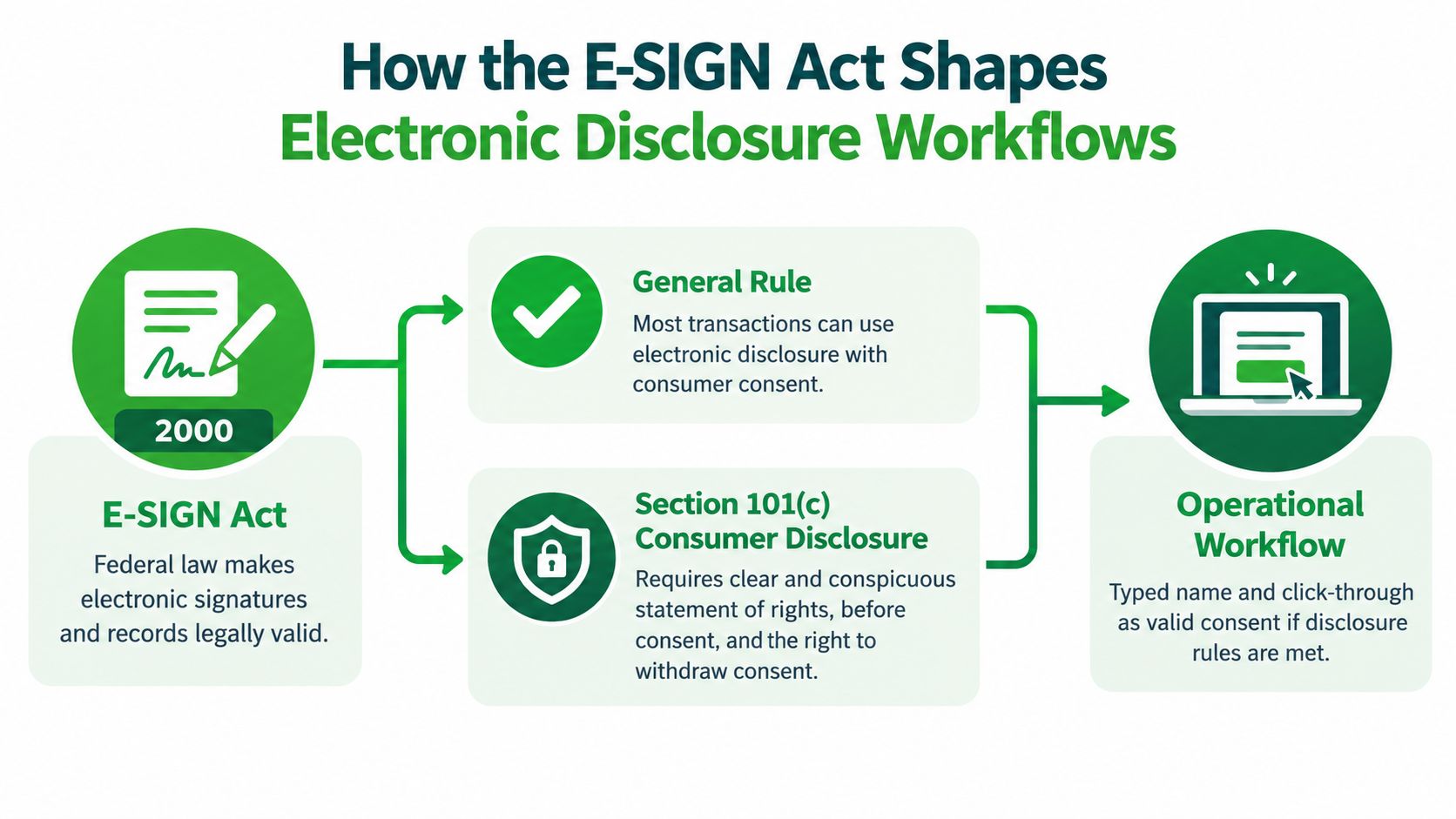
For a consumer disclosure, the volunteer must affirmatively consent, or confirm consent, electronically. The method must also reasonably demonstrate that the volunteer can access the information in the electronic form the organization will use. A checkbox or typed name can record an action, but it doesn't automatically establish that access condition.
Before the volunteer consents, present the required information in a clear, usable format:
- Paper copies: Explain how to request paper records and whether any fee applies.
- Withdrawal: State that consent can be withdrawn and explain any consequences.
- Contact updates: Give a clear method for updating the electronic contact information used for delivery.
- Scope and access requirements: Identify the transactions or record categories covered and the hardware or software needed to access them.
Don't bury these points in general terms. Put them where the volunteer can review them before the consent control appears, and make the instructions operational. A contact-update method should lead somewhere that staff monitor; a paper-copy procedure should identify who handles the request.
A form that collects a signature without documenting the access demonstration and pre-consent notice is capturing only part of the event. The workflow has to show that the volunteer could use the format presented, not merely that a record was sent.
FCRA Authorization Requirements Under 15 U.S.C. § 1681b
The FCRA authorization is a separate event from E-SIGN consent. Under 15 U.S.C. § 1681b, authorization must be written and state the report's permissible purpose in clear, conspicuous language. Electronic execution can meet the writing requirement when applicable electronic-record rules are satisfied, so the same workflow must respect both the FCRA and E-SIGN.
For a nonprofit screening a volunteer, the authorization should make the purpose unmistakable. Name volunteer screening as the reason for obtaining the report, identify the consumer reporting agency, and describe the categories of information that may be obtained. The volunteer should be able to distinguish this permission from consent to electronic delivery and from any acknowledgment that notices were received.
Use standalone formatting. Don't attach the authorization to a liability release, general terms of service, or unrelated permissions. That bundling can make it harder to show that the report authorization was conspicuous and independently understood. A separate signature or affirmative action tied directly to the authorization gives the audit record a clearer meaning.
If your team needs help distinguishing a lawful report purpose from other screening language, this guide to FCRA permissible purpose can help frame the operational question. Then confirm that the wording on your actual form identifies the organization's purpose and the report being requested.
Retain the completed authorization with the record of the screening decision. The practical retention period should be set with counsel and the organization's record-retention policy, based on how long the organization may need to demonstrate its permissible purpose. Don't assume that keeping only the final screening result proves the volunteer gave the required authorization.
Three-Event Audit Trail vs Single Checkbox Bundling
A single checkbox that says “I agree to the terms” may be quick to implement, but it merges three different questions into one answer. It can leave the organization unable to show whether the volunteer consented to electronic delivery, authorized a report, or merely acknowledged that notices were available.
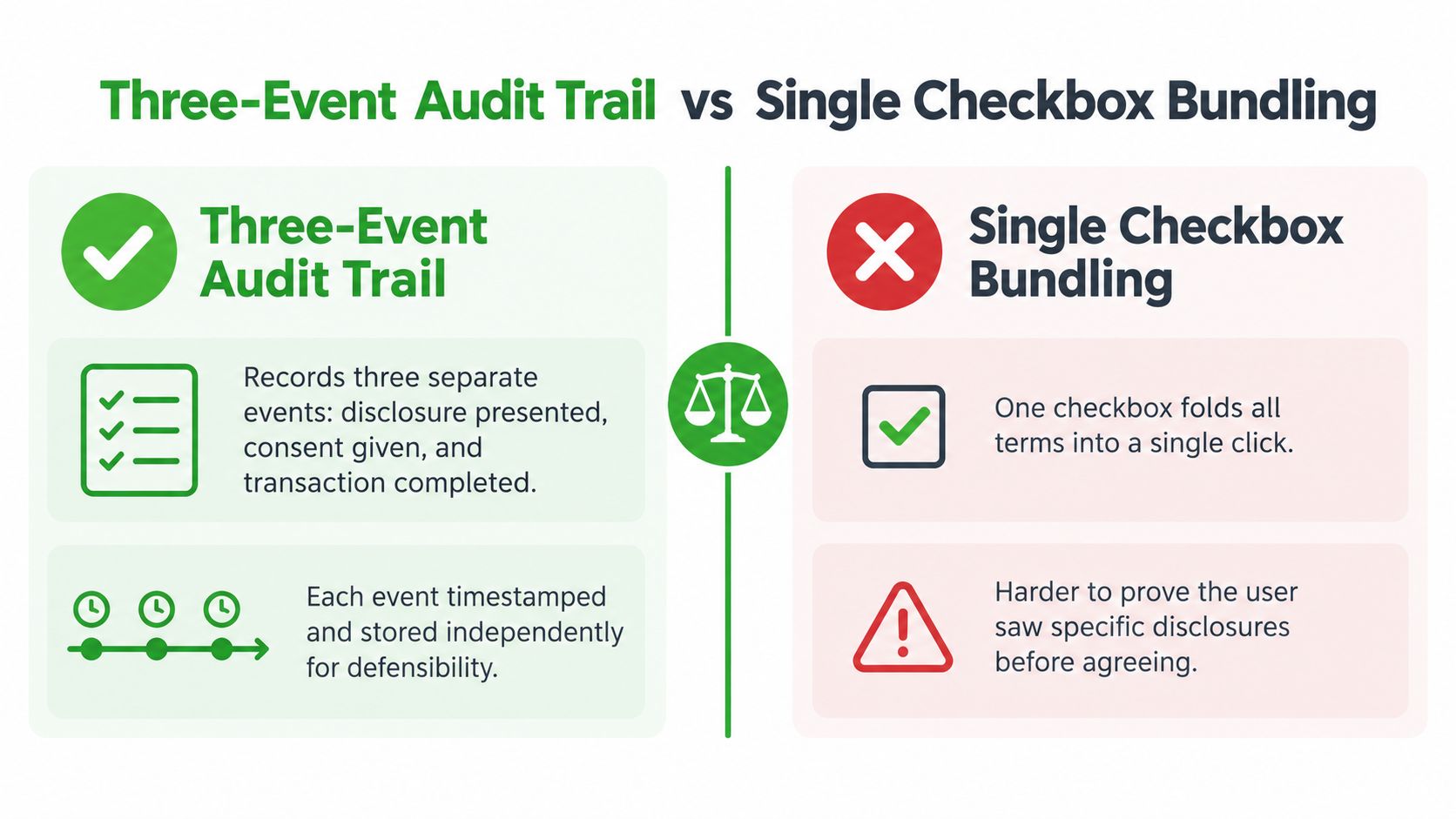
A three-event flow produces a more useful record. For example, a reviewer can see that a volunteer opened the electronic-delivery disclosure, separately authorized the report, and then acknowledged the required notices. Each event should preserve its own timestamp, the text version shown, and the affirmative action associated with it. Those entries let the reviewer reconstruct the interaction rather than guess what one broad click covered.
The bundled alternative has a different profile:
| Flow | What the record shows | Audit concern |
|---|---|---|
| Three-event | Separate actions tied to specific disclosure, authorization, and notice records | Requires deliberate setup and recordkeeping |
| Single checkbox | One general acceptance event | Difficult to prove which specific terms the volunteer saw and accepted |
A single click may appear to work until the volunteer disputes consent or the organization can't identify the text presented. A neat confirmation page doesn't cure that gap if the underlying event record is vague.
Organizations that need internal review before publishing forms can also look at WebinOne approval workflow tips. The same discipline applies here: make it possible for the right people to review the wording and the actual interaction before launch, not just the final screen.
Sample Disclosure and Authorization Templates
Use these as drafting starting points, then have qualified counsel review them against the organization's process and applicable law. Replace every bracketed item with accurate information, and don't activate a checkbox by default.
E-SIGN pre-consent notice
Electronic records and consent. [Organization] asks for your consent to receive [identify covered records or transactions] electronically. You may request paper copies by [method]. You may withdraw electronic-delivery consent by [method]; [state any consequences accurately]. To access and retain these records, you need [describe applicable hardware and software requirements]. Update your electronic contact information through [method]. This consent applies to [define the covered transaction or record category].
Present this notice before the consent control. The paper-copy process, withdrawal method, scope, and access requirements must be understandable without searching through unrelated terms.
Standalone FCRA authorization
Authorization for volunteer screening. I authorize [consumer reporting agency] to furnish a consumer report to [organization] for the permissible purpose of evaluating me for [specific volunteer role or screening purpose]. The report may include [categories of information sought]. I understand that this authorization applies to [define its scope].
Volunteer name: [field]
Signature: [signature field]
Date: [date field]
Keep this block separate from liability releases and terms of service. Your disclosure statement examples may help with drafting comparisons, but the final authorization needs to match the actual screening purpose and report.
Signature confirmation event
At the moment of signing, capture the volunteer's typed name or signature, timestamp, consent method, and the version identifier or hash for the text displayed. Record identity or authentication evidence and IP or device metadata only where lawful and appropriate under your privacy practices.
The form should require an affirmative action for each event. Never use pre-checked consent boxes or hide report authorization inside a general acceptance control. If the system can't reproduce the exact version later, the signature record won't describe what the volunteer saw.
Technical Controls Behind a Defensible Implementation
Document wording can be sound while the system still fails to show that the volunteer could access it. Treat accessibility, retention, and reproducibility as technical controls, not finishing touches.
Make access demonstrable
Render the disclosure in a readable format before enabling the signature step. An interaction such as opening or expanding the actual disclosure can help show that the volunteer had access to the form used. It shouldn't be a decorative click that skips the content or hides key terms on a small screen.
Preserve the whole consent event
Retain a tamper-evident copy of the signed agreement and the surrounding event. The stored record should reproduce the exact text and notices shown, the volunteer's affirmative actions, timestamp, identity evidence, version, and delivery channel. Keep the evidence tied to the screening record so a reviewer doesn't have to assemble it from disconnected systems.
Offer working procedures for paper-copy requests, consent withdrawal, and contact updates. These processes need to remain available after the signature, not disappear when the application is submitted. A useful privacy-by-design principles guide can help teams think through how privacy choices should be built into the workflow.
Before publishing, check that the purpose is valid, the FCRA authorization is standalone and conspicuous, the access test works, the full audit trail can be retrieved, and a paper alternative is ready. Your compliance documentation checklist should also make clear who owns each record and where the organization can locate it.

State-Specific Caveats That Change the Form
Federal compliance is a floor, not a complete multistate checklist. State rules can affect disclosure format, report scope, or when a form may be presented. Because those requirements can change and depend on the screening context, confirm each state's current law with counsel before launch.
| State | Standalone Format Required | Scope or Notice Modification | Implementation Note |
|---|---|---|---|
| California | The ICRAA requires a standalone disclosure and authorization document | State requirements may add to the federal process | Keep the document separate and validate its wording for the screening context |
| New York | Check applicable state disclosure rules | General Business Law 399-aa restricts reportable conviction information | Confirm the report's permitted categories before ordering |
| Illinois | Check applicable state disclosure rules | The stated record-expungement rules affect screening questions | Review questions and decision procedures for current requirements |
| Massachusetts | Check applicable state disclosure rules | Ban-the-Box timing rules affect when disclosure may be presented | Coordinate form timing with the application process |
| Texas | Check applicable state disclosure rules | State law changes what criminal record information may be reportable | Confirm the scope used by the screening workflow |
Use the table as a routing aid, not a legal opinion. A nonprofit recruiting across state lines should identify the volunteer's relevant location and the role's screening context before presenting the form. Then confirm whether state-specific language or timing changes the federal workflow.
UX Considerations for Accessible Electronic Consent
A paperless workflow can create more compliance risk than a paper form if the volunteer can't read or operate it. E-SIGN requires more than sending a record: the process must reasonably demonstrate that the consumer can access the electronic form used.
Check the user experience in the conditions volunteers face:
- Mobile text: If the paper-copy notice is clipped or hard to read, revise the layout and use a readable text size. Don't make essential terms depend on zooming or horizontal scrolling.
- Screen readers: Label disclosure controls so assistive technology identifies what the volunteer is opening and what action is required.
- PDF access: Prefer readable, searchable content or provide a plain-HTML version. A file that won't render or can't be searched may undermine an access demonstration.
- Language: Route volunteers who need another language to an appropriate version rather than assuming an English-only notice is understandable.
- Consent controls: Never pre-check boxes. Present electronic-delivery consent and report authorization as separate, affirmative choices.
Test the flow on common mobile devices and with assistive technology, not only on the coordinator's desktop. A polished animation doesn't compensate for a disclosure that disappears beneath a fixed button or a control that a screen reader can't identify.
The strongest interface is often the one that makes each choice obvious. Conspicuous and independently presented usually wins out.
VolunteerBadge Digital Disclosure Flow Walkthrough
A digital screening workflow should make the three events visible to the volunteer and separately retrievable for the nonprofit. In a VolunteerBadge flow, the applicant reviews the electronic-delivery notice, completes a standalone FCRA disclosure and authorization for volunteer screening, and signs to confirm the authorization.
The recordkeeping detail matters as much as the screen. The workflow captures the displayed disclosure text and version, timestamp, identity information, and the volunteer's affirmative consent and signature. Where lawful, IP or device details can support the audit record; the nonprofit should still apply its own privacy and retention practices to that metadata.
The application also includes an automated address-history pull that flags gaps or inconsistencies before a screening credit is used. VolunteerBadge lists its screening at $4.95 per check with no monthly fees, and describes a screening package that includes the digital disclosure and authorization. Its workflow supports automated pre-adverse and adverse action notices when needed. The organization should review those notices and its handling procedures as part of the larger compliance process rather than treating automation as a substitute for oversight.
For organizations that need an embedded process, VolunteerBadge offers an NLP interface, REST API, and webhooks as integration paths. Whatever tool a nonprofit selects, test that the volunteer can review the exact text, that each event has a distinct record, and that staff can retrieve the signed version without relying on a vendor's live application screen.
Pre-Submission Checklist for Nonprofits
Before launch, give one person responsibility for testing the form from the volunteer's point of view and another for retrieving the resulting evidence. Mark each item Pass only when the evidence can be demonstrated, not because the form appears to contain the right words.
- Permissible purpose: Pass if the report's volunteer-screening purpose is named plainly in the authorization.
- Standalone authorization: Pass if the FCRA authorization is visibly separate from releases, terms, and unrelated permissions.
- E-SIGN notice: Pass if the pre-consent screen explains paper copies, withdrawal and consequences, access requirements, covered records, and contact updates.
- Access test: Pass if the volunteer must interact with the disclosure before the signature step is enabled and can access the format used.
- Audit trail: Pass if staff can retrieve the exact text, version, timestamp, identity evidence, delivery channel, and consent method.
- Paper alternative: Pass if a volunteer who declines electronic delivery can complete the process through a documented paper or assisted route.
- Retention: Pass if the organization has a policy for keeping the authorization and related consent records for a defensible period.
If an item fails, pause publication and assign a named owner to fix it. A checklist that nobody verifies is just another document the organization can't rely on when someone asks what happened.
Handling Withdrawal, Lost Access, and Version Drift
A compliant process needs to keep working after the volunteer signs. Someone may withdraw consent to electronic delivery, request paper records, lose access to the email account used for the application, or return later for a role after the disclosure has changed.
Preserve the original record as it appeared at signing. If the wording changes, retain the prior version alongside the current one and use a version identifier or hash that lets staff distinguish them. Don't overwrite an old disclosure with new text and assume the signature still explains what the volunteer accepted.
Record withdrawal as a distinct, timestamped event and apply it to future electronic deliveries. Route paper-copy requests through a documented alternate process, and let volunteers update their contact information without losing access to prior records. If an application is incomplete, retain enough event information to establish which steps were completed and which weren't.
These are operating requirements, not unusual exceptions. A workflow that handles withdrawal and lost access cleanly is easier to defend than one that depends on the original email remaining available forever.
Quick Reference Glossary and Field Map
Use this lookup to check whether each concept has a corresponding record. Retention periods should follow the organization's policy and legal advice; the key is to preserve the evidence for as long as it may be needed to demonstrate what happened.
| Term | Meaning | Field or record to capture |
|---|---|---|
| E-SIGN consent | Affirmative consent to receive covered records electronically under the applicable framework | Pre-consent text, affirmative action, access demonstration, version, timestamp |
| FCRA authorization | Written permission for a consumer reporting agency to furnish a report for a permissible purpose | Standalone authorization text, purpose, signature, date |
| Permissible purpose | The stated reason the organization may obtain the consumer report | Role or screening purpose shown in the authorization |
| Consumer reporting agency | The organization that prepares or furnishes the consumer report | Agency identity in the authorization and screening record |
| Notice acknowledgment | Evidence that the volunteer acknowledged the required notices presented | Notice version, presentation record, acknowledgment action |
| Pre-adverse action | A notice stage before an adverse decision based on report information | Notice copy, delivery record, related case documentation |
| Adverse action | A final adverse decision for which applicable FCRA procedures may require notice | Final notice copy, delivery record, decision documentation |
Store the signed authorization and event history together, but keep each event independently identifiable. That makes the field map useful as both a form review and a retrieval test.
VolunteerBadge provides nonprofits with digital disclosure and authorization, background screening, and automated notice support within a volunteer-screening workflow. Review whether its process fits your organization's recordkeeping and accessibility needs, then visit VolunteerBadge to assess the available options.
