
Affordable Background Checks: A Nonprofit Guide
Learn how nonprofits can access affordable background checks to protect their mission and community. A practical guide for 2026.
On this page
Nonprofit background checks now commonly run under $10 per report, but the more important variable is whether the workflow stays FCRA-compliant without manual admin cost. A low database fee isn't affordable if your team spends hours chasing addresses, collecting consent, and managing adverse-action notices.
That's the counterintuitive part of volunteer screening. In 2000, United Way paid $100 for each background check, while a 2017 Sterling Volunteers guide reported that technology had reduced the typical cost to under $35. The change shows how digital records and electronic fulfillment lowered the direct price, but it doesn't mean every inexpensive screening program is efficient. Sterling Volunteers' industry guide makes the larger lesson clear: technology changed the economics of screening, but nonprofits still have to manage the workflow around the report.
I've seen organizations focus on the invoice and miss the labor. A cheap report can still create address follow-up, consent errors, delayed placements, and compliance exposure. Affordable background checks are about the cost of getting a volunteer cleared correctly, not just the price of opening a report.
Table of Contents
- Why Nonprofits Overpay for Background Checks
- What an Affordable Background Check Actually Means
- What Drives the Cost of a Volunteer Screen
- FCRA Compliance Essentials for Nonprofit Programs
- Choosing the Right Screening Components by Role
- Implementing a Volunteer Screening Workflow in One Week
- Smart Ways to Cut Screening Costs Without Cutting Quality
- Nonprofit-Friendly Screening Solutions Worth Considering
Why Nonprofits Overpay for Background Checks
A coordinator at a 40-volunteer food pantry gets quoted $12 per check, approves it in one meeting, and then spends three weeks chasing addresses and consent forms. The invoice looked affordable. The workflow was not.
The report fee covers only one part of screening. Staff may still enter address history, follow up with volunteers, resolve identity mismatches, retrieve consent records, review flagged results, and send notices when the organization cannot approve someone immediately. Those tasks determine the total cost of clearing a volunteer.
The invoice is not the program cost
A nonprofit might pay under $15 for a report and still spend substantial staff time getting one volunteer through the process. Someone has to send a corrected authorization request, clarify a previous address, explain a delayed result, and document the final decision. If the report triggers adverse action, the organization also needs a consistent notice and review procedure.
Two providers with similar report prices can therefore create very different operating costs. One may collect address history automatically, present the required disclosure separately, and generate notices when needed. Another may return a PDF and leave the coordinator to reconstruct the compliance record.
Practical rule: Count staff minutes from invitation to final onboarding, not just the vendor fee.
Role-based scoping controls the other major source of waste. A church screening occasional event helpers should not automatically buy the same package used for a youth mentor or treasurer. Order searches that match the role, the people served, and the decisions the organization must make.
Automation matters just as much. A low per-check price is not low if staff must repeatedly correct intake data, chase signatures, or manage notices by hand. Affordable background checks mean a compliant volunteer reaches a documented decision with limited staff intervention. That is the number worth comparing.
What an Affordable Background Check Actually Means
An affordable check has four parts: an appropriate search scope, a lawful intake process, reliable identity matching, and a result-review workflow that doesn't depend on manual paperwork. Remove any one of those and the apparent saving may shift into staff labor or legal risk.
At minimum, the organization should know exactly what the package includes. A volunteer screen may combine identity verification, a national criminal database search, relevant county searches, and a sex-offender registry check. A driving role may require a motor vehicle record. A finance role may need additional verification. The right package depends on the work, the people served, and the organization's legal obligations.
Compare like with like
A bare criminal search and a complete volunteer screen aren't interchangeable. Ask vendors these questions before comparing prices:
- Identity matching: Does the process verify the applicant's identity and surface address-history gaps?
- Search scope: Which national, county, state, federal, or registry sources are included?
- Consent workflow: Are disclosure and authorization presented clearly and stored electronically?
- Result handling: Can authorized reviewers see plain-language status information and supporting detail?
- Adverse action: Does the system support pre-adverse and final adverse-action notices?
- Record access: Can the nonprofit retrieve consent and decision records when it needs them?
The cheapest package on a pricing page may only cover a database sweep. That can be useful for a low-exposure role, but it isn't automatically enough for someone working closely with children, driving clients, handling donations, or providing housing support.
Think in delivered cost
A useful internal metric is cost per onboarded volunteer. Include the report fee, staff time, follow-up, failed submissions, delayed placement, and any manual compliance work. A slightly higher report price can be the cheaper choice if it eliminates duplicate entry and gives coordinators a defensible review trail.
The CFPB background-screening overview supports this operational view by connecting price and turnaround to search complexity. Affordable means predictable, role-appropriate, and complete enough to support a lawful decision.
What Drives the Cost of a Volunteer Screen
The biggest pricing mistake is treating every screening component as a mysterious vendor bundle. Each component has a reason, a source of cost, and a scaling behavior. Once you separate them, you can remove unnecessary scope without weakening the roles that require deeper review.
A national criminal file search can be inexpensive, while a county search adds cost when a court must be contacted or records verified. LexisNexis pricing material illustrates the modular structure with a national criminal file search priced at about $5.00, a county criminal search adding $8.50 per county, and a federal courts search costing about $12.00. Those figures aren't a universal price list, but they show why address history and jurisdiction count matter.
Audit the components
| Cost Driver | How It Scales |
|---|---|
| National criminal file search | Usually applies once per applicant, but scope and provider pricing vary |
| County criminal search | Adds cost for each county that must be searched or verified |
| Federal court search | Adds a separate jurisdictional search where the role justifies it |
| Sex-offender registry search | May be included or priced as a separate component |
| Motor vehicle record | Applies when driving is part of the volunteer's duties |
| Identity verification | Becomes more valuable when names, dates, or addresses don't match |
| Employment or reference verification | Adds manual work and third-party response time |
| Compliance administration | Scales with the number of applicants, exceptions, and flagged results |
A candidate with a long address history may trigger several county searches. If the volunteer enters incomplete information, a coordinator may need to request corrections, manually re-enter the data, and restart part of the process. That labor can cost more than the original database search.
Read this background-check pricing guide as a reminder to compare scope, not just the headline fee. Reseller markups, separate charges for FCRA features, and administrator-seat fees can also inflate a program that looked inexpensive at launch.
Scope is the strongest lever
Vendor selection matters, but scope selection usually matters more. If every volunteer receives a high-risk package, the nonprofit pays for searches unrelated to the work. If a high-risk role gets only a shallow database search, the organization saves money in the wrong place.
Ask for a line-item quote. Require the provider to identify included searches, pass-through court fees, manual-research charges, failed-order policies, and administrative fees. The goal isn't to buy the smallest package. It's to pay for the smallest package that matches the role.
FCRA Compliance Essentials for Nonprofit Programs
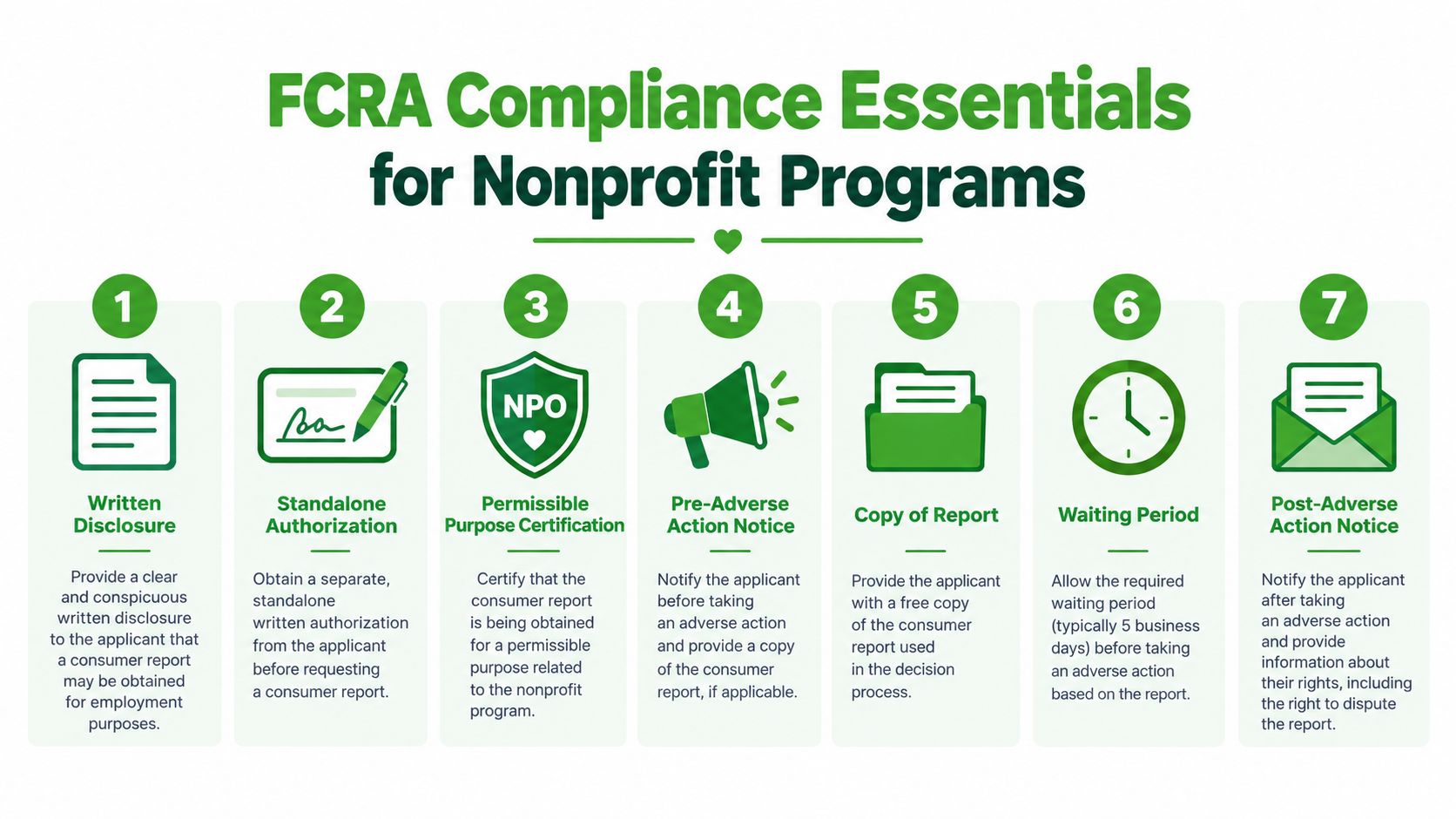
A low per-check fee becomes expensive when staff must rebuild the compliance record by hand. If your nonprofit uses a consumer reporting agency for volunteer screening, treat consent, disclosure, review, and adverse-action steps as one controlled workflow. The VolunteerBadge guide to FCRA compliance for nonprofits explains why these steps belong in the screening process rather than in a separate stack of paperwork.
Build the workflow around these seven controls:
- Written disclosure: Tell the volunteer clearly that a consumer report may be obtained for screening.
- Standalone authorization: Obtain permission in a document separate from a liability waiver or unrelated application language.
- Permissible purpose certification: Confirm that the organization has a lawful reason to obtain and use the report.
- Identity verification: Match the report to the correct person and resolve inconsistencies before making a decision.
- Pre-adverse action notice: If the report may support an unfavorable decision, provide the preliminary notice and report information required for review.
- Final adverse action notice: After that review, send the final notice if the organization decides not to proceed.
- Security and retention: Protect the information, limit access, and retain records according to organizational policy and applicable requirements.
Automation determines the true cost
A provider that supplies disclosure text, electronic signatures, permission logs, address-history capture, and notice generation reduces repetitive administration. A provider that returns only a report leaves your nonprofit to assemble the audit trail, track deadlines, and document each decision.
Keep authorization separate from any liability waiver. Do not act on a flagged result before the volunteer has a fair chance to identify inaccurate information. Store sensitive reports in a restricted system, not an unprotected shared folder.
Print this checklist: disclosure, standalone authorization, permissible purpose, identity match, pre-adverse notice, report review, final notice, secure retention.
County research can delay a result when a court requires manual record retrieval. A county court that requires manual record pulls can add three to five days to turnaround, so your policy should distinguish a pending search from a final decision. Assign approval authority for each outcome before orders begin.
A short training video can help coordinators follow the sequence. It should support written procedures, not replace them.
Choosing the Right Screening Components by Role
Role-based screening is where nonprofit budgets either become disciplined or leak. Start with the volunteer's access, supervision, and responsibility. Then assign a package. Don't make a remote administrative helper pay for the same research as someone transporting children or managing donor funds.
One important caveat: the specific dollar ranges in many informal package comparisons aren't universal. Verified market material shows that search scope can vary from under $10 to $100 or more, while modular examples show separate charges for national, county, and federal searches. Use the following framework to choose components, then obtain a current quote for your jurisdictions.
| Risk Tier | Components Included | Typical All-In Cost | Example Roles |
|---|---|---|---|
| Low exposure | Identity verification and relevant registry search | Confirm with the provider because scope and jurisdiction costs vary | Virtual fundraising, event check-in, supervised administrative help |
| Moderate exposure | National criminal search, identity verification, and county research where justified | Confirm based on address history and county access | Food pantry volunteers, mentors, after-school tutors |
| High exposure | County searches tied to residence history, federal search where relevant, motor vehicle record for drivers, and reference or credential verification when needed | Confirm individually because each added component changes the quote | Youth transportation, finance access, medical or housing services |
Match depth to exposure
Low-exposure volunteers may have limited access to people, funds, or sensitive information. Their package should remain focused. Over-screening them creates unnecessary cost and may discourage participation without improving the organization's decision.
Moderate-exposure roles deserve more attention because they often involve recurring contact with community members or young people. A national search can identify potential records, while county research helps verify jurisdiction-specific information when the role warrants it.
High-exposure roles need a written rationale for every component. Driving calls for motor vehicle information. Financial authority may justify additional verification. Work with vulnerable populations may require deeper criminal and registry screening under organizational policy or local law.
The weak approach is to choose the broadest bundle for everyone. The strong approach is to document why each role receives its package, who reviews results, and when the organization will reassess that decision.
Implementing a Volunteer Screening Workflow in One Week
A small nonprofit can establish a workable screening process quickly if it assigns decisions before opening a vendor account. The seven-day plan below is practical because it separates policy choices from software setup.
Days one and two
List every volunteer position, including seasonal and occasional roles. For each one, record access to children or vulnerable adults, money, vehicles, private data, facilities, and unsupervised contact. Assign a risk tier and write the screening components that follow from it.
Do not start with the vendor's menu. Start with the role. Otherwise, the available packages will define your policy by accident.
Day three
Create the vendor account and configure role codes. Each code should point to the correct package, disclosure, authorization, reviewer, and decision path. Keep administrator permissions narrow, and decide where completed consent records will live.
Day four
Pilot the workflow with volunteers from different roles. Test the invitation, mobile disclosure, electronic authorization, address-history capture, identity review, and result delivery. A process that works on a coordinator's laptop but fails on a phone will create avoidable follow-up.
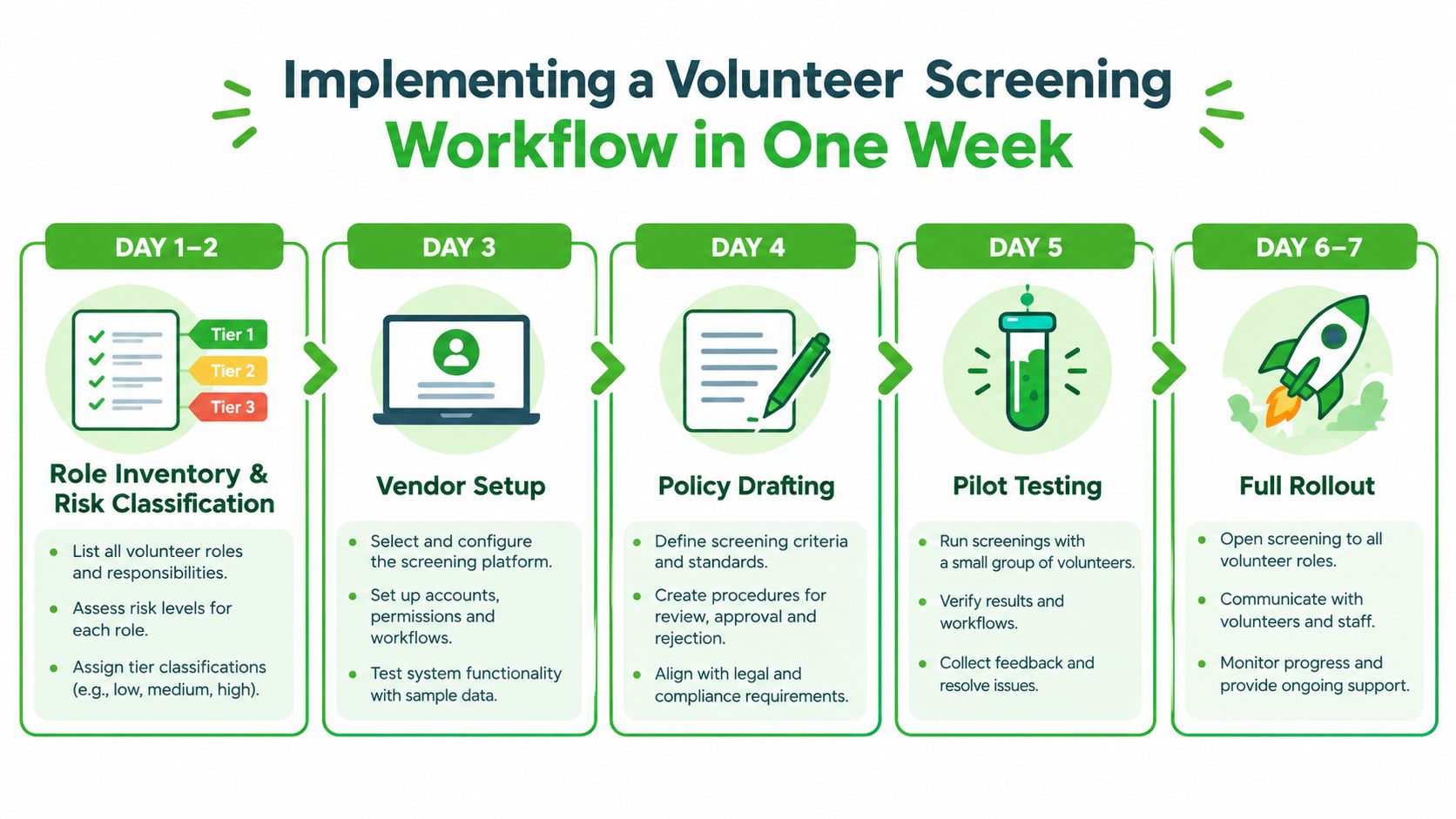
Days five through seven
On day five, appoint two approvers and define how they review clear, pending, and potentially disqualifying results. Write a consistent message for delayed searches and a separate procedure for adverse-action cases. Coordinators shouldn't improvise sensitive communications.
On day six, update the volunteer application page, notify existing volunteers with pending access, and brief program managers. On day seven, check consent timestamps, review failed submissions, and record turnaround and cost-per-screen information for the next budget cycle.
Schedule re-screening at the same time you launch the initial process. The appropriate cadence depends on role exposure, policy, and applicable requirements. A schedule that lives in a calendar is more reliable than a promise to remember later.
Smart Ways to Cut Screening Costs Without Cutting Quality
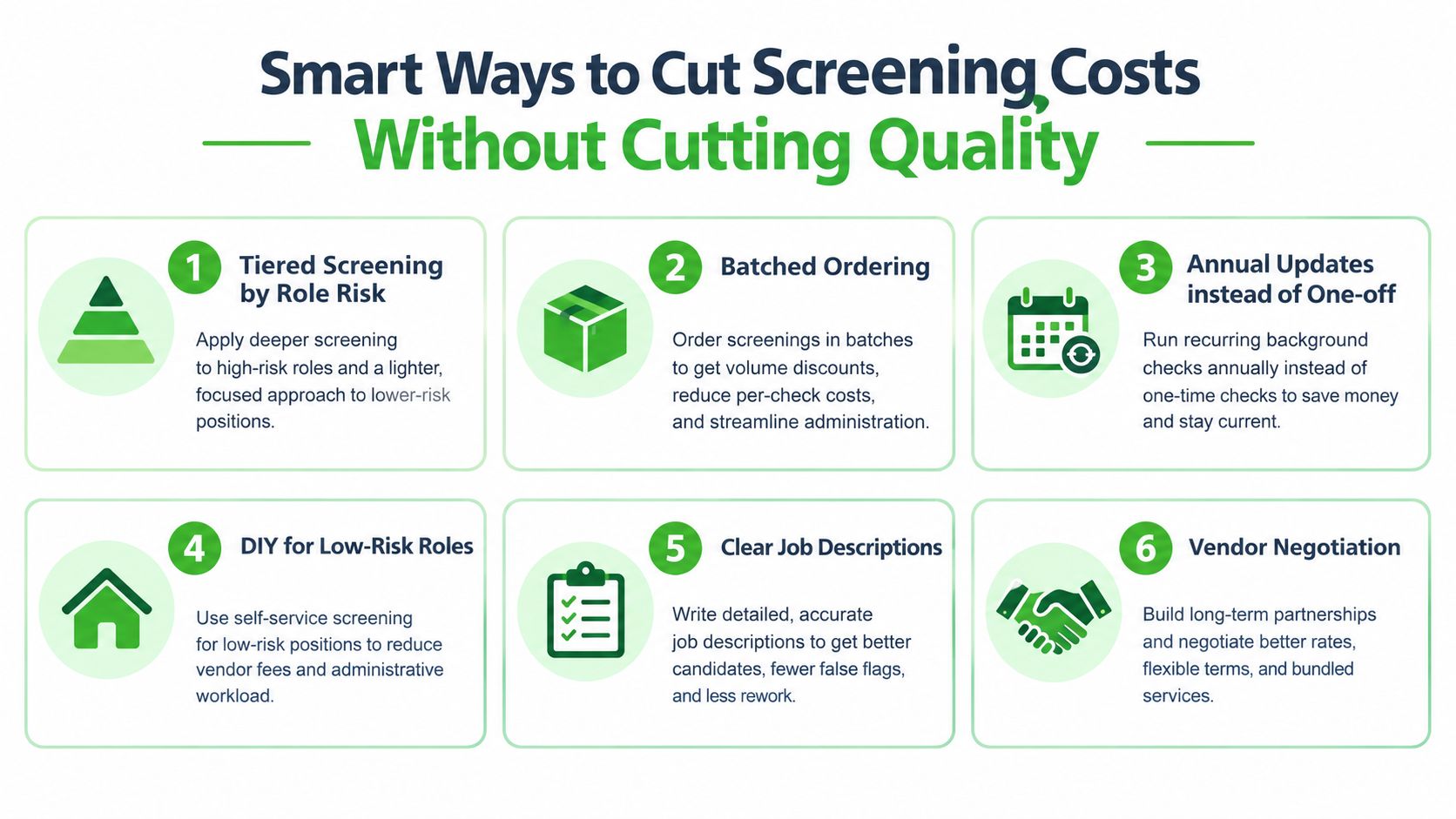
The best savings come from removing waste, not from deleting safeguards. A nonprofit should first eliminate unnecessary scope, then automate repetitive administration, then negotiate the remaining volume.
Start with role tiers. Assigning a high-depth package to every volunteer is usually the fastest way to inflate spending. Keep low-exposure roles focused, and reserve county, federal, driving, or verification searches for positions that justify them.
Six cost controls that hold up
- Batch predictable demand: Order routine screening together when the provider offers suitable pricing, but never delay a required check just to create a batch.
- Capture address history once: Let volunteers enter their own history through the intake flow, then require follow-up only when the system identifies a gap or inconsistency.
- Reuse the portal: Avoid duplicate data entry across spreadsheets, email, and a vendor dashboard. One controlled intake path lowers both labor and transcription errors.
- Archive consent automatically: Store authorization and decision records in a controlled system rather than asking coordinators to assemble files after the fact.
- Calibrate re-screening: Set the schedule by role exposure and policy. Repeating an unnecessarily broad package wastes money, while skipping appropriate updates creates a stale program.
- Negotiate the whole workflow: Ask whether the quote includes compliance features, failed searches, manual research, administrator access, and support.
The volunteer background-check resource can help coordinators think through screening decisions in the context of volunteer work. Use any resource as a starting point, then verify the provider's current scope and your own legal obligations.
Priority order: tier the roles first, automate consent and notices second, then negotiate transparent pricing.
Don't accept “cheap” if the provider removes FCRA support and hands the work to your staff. A lower report fee is useful only when the organization still produces a complete, consistent, secure record.
Nonprofit-Friendly Screening Solutions Worth Considering
The cheapest report is not always the cheapest screening program. A nonprofit-friendly provider should reduce the staff time and compliance work surrounding each check, rather than merely advertise a low per-check fee. Look for self-service intake, role-based packages, clear line items, secure records, and support when a result requires review. Consumer lookup tools may cost less upfront, but they generally do not manage consent, permissible purpose, or adverse action.
Traditional employment-focused consumer reporting agencies can deliver deeper screening, yet their packages may be difficult to configure for volunteer roles. Compliance functions may also sit outside the report itself, leaving a small nonprofit to manage several handoffs. That arrangement can work, but the organization must price the administrative labor and compliance risk alongside the report.
| Vendor Category | Typical Pricing Model | FCRA Automation | Best Fit For |
|---|---|---|---|
| Consumer lookup service | Low headline fee, often limited scope | Often limited or unclear | Personal research, not a nonprofit screening program |
| Generalist CRA | Component-based pricing and add-ons | Varies by provider and package | Employers or organizations needing broad verification |
| Traditional enterprise screening provider | Contract, volume, and jurisdiction pricing | Often substantial, but configuration may be complex | Larger programs with dedicated HR or compliance staff |
| Volunteer-focused screening platform | Per-check or role-based pricing | Designed around consent, review, and notices | Churches, charities, schools, leagues, and community groups |
Questions to ask before signing
Ask for direct answers on:
- FCRA status: Does the provider operate as a consumer reporting agency, and what compliance support is included?
- Data retention: How are reports, consent records, and decisions secured and retained?
- Disputes: What process applies when a volunteer challenges inaccurate information?
- Line items: Are county fees, manual research, failed orders, and administrative features included?
- Role controls: Can the nonprofit assign different packages without creating duplicate workflows?
- Adverse action: Does the platform generate and document preliminary and final notices?
VolunteerBadge is one volunteer-focused option, with published pricing around $4.95 per check with no monthly fees and built-in FCRA notice generation. Its materials also describe digital disclosure and authorization, address-history checks, and broader search options. The platform's nonprofit screening information identifies national, county, state, and federal criminal searches, registry and watchlist screening, plus API and webhook integrations. Verify the current scope, pricing, and legal fit before adopting any provider.
Choose the provider that makes the compliant workflow easiest for staff to follow. The right system should show whether consent was captured, what package matched the role, and which notice comes next without requiring a compliance specialist.
VolunteerBadge offers nonprofit-focused volunteer screening with role-based intake, digital consent and authorization, address-history checks, and automated FCRA notice support. Review the current workflow on the VolunteerBadge site and decide whether it fits your organization's screening policy.
