
Background Check Report Format: A Complete Guide
Learn the standard background check report format for nonprofits — sections, sample layouts, FCRA compliance, and volunteer screening best practices.
On this page
You've just downloaded a volunteer's first screening report. The PDF opens with a branded cover page, several identifiers, legal notices, and more result codes than plain-English explanations. Your cursor pauses over a line marked “discrepancy,” and the practical question arrives: What does this report allow our nonprofit to decide?
A background check report isn't a pass-or-fail page. It's a traceable record of who was screened, what the consumer reporting agency searched, which results were returned, and what compliance steps must happen before an organization acts. Once you learn its layout, the document becomes much easier to read fluently and use consistently.
Table of Contents
- What a Background Check Report Actually Looks Like
- The Standard Anatomy of a Screening Report
- Identity, Address History, and Search Scope
- Criminal Records, Registries, and Watchlist Results
- FCRA Compliance Built Into the Report Layout
- Comparing a Clean Report With a Problem Report
- Volunteer Screening Workflow From Report to Decision
- Key Takeaways and Quick Reference Checklist
What a Background Check Report Actually Looks Like
A new volunteer coordinator often starts at the top, sees a summary status, and assumes the answer is already settled. The first page may show the applicant's name, the screening package, completion timestamps, and a prominent indicator such as clear, review, or adverse. Below that, the report usually unfolds into separate modules rather than one continuous narrative.
The visual style varies by consumer reporting agency, or CRA, but the underlying logic is familiar. A report commonly contains the candidate's identity details, the search package or criteria used, and the results body. Identifying data can include a name, date of birth, Social Security number, address history, and the state or ZIP connected to the screening. Criminal-record entries generally add a case number, jurisdiction, offense date, disposition, and disposition date, as described in the FTC's employer background-check guidance.
Practical rule: Read the report as a chain of evidence. Every result should connect to an identity, a search scope, and a source.
The five zones to recognize
Most reports can be understood through five broad areas:
- Report identification, including the report number, subject, ordering organization, and completion status.
- Applicant identity, including names, birth information, address history, and identity-matching details.
- Search scope, showing which databases, courts, registries, or verification sources were used.
- Results, with separate records for criminal matters, registries, watchlists, driving records, or other ordered checks.
- Compliance notices, including disclosures, certifications, rights language, disclaimers, and adverse-action materials where applicable.
The document may feel intimidating because its sections are designed for review and traceability, not casual browsing. Timestamps, source labels, jurisdiction notes, and disclaimers help a nonprofit explain what happened if a volunteer asks about a result or disputes an entry.
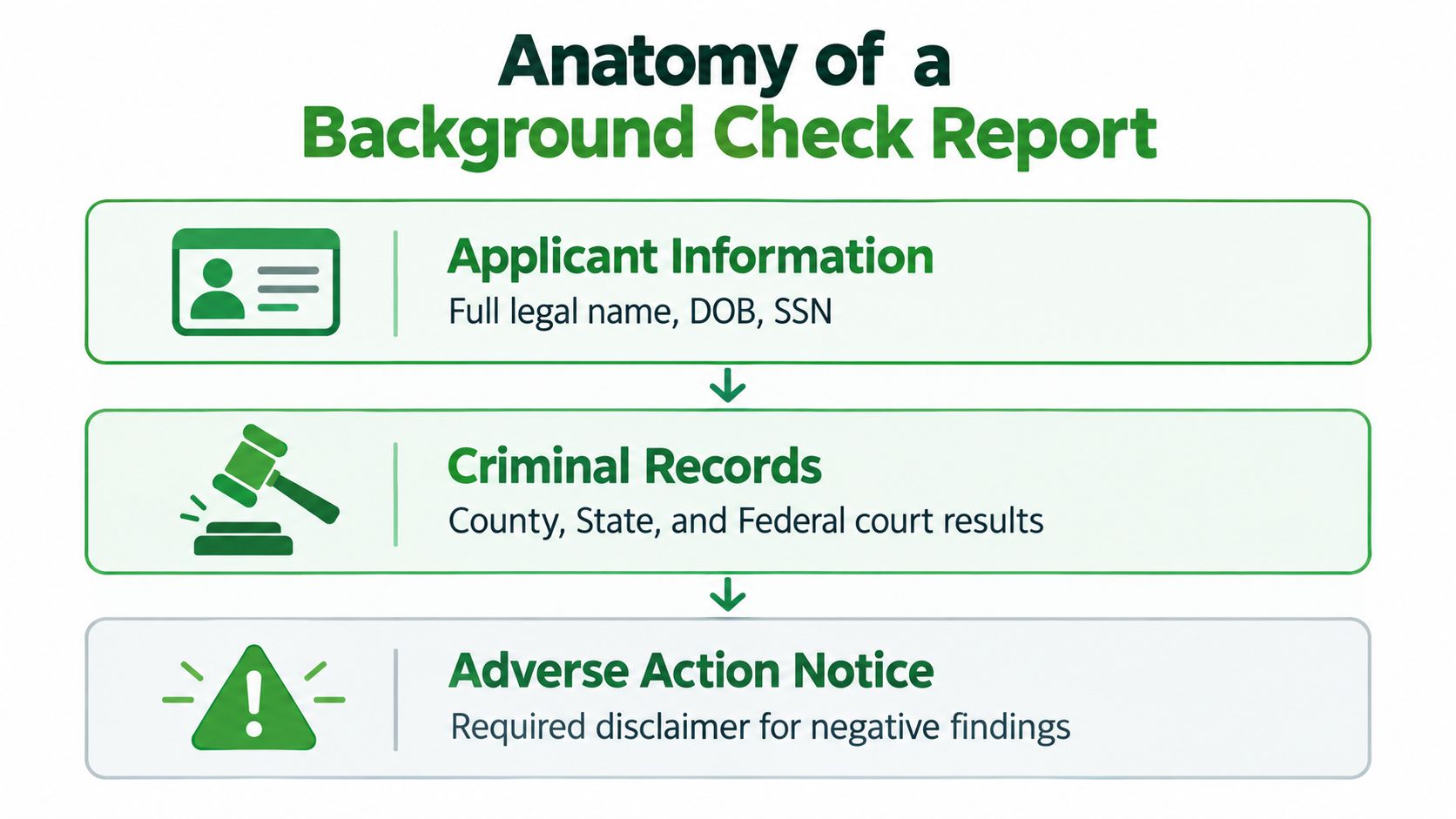
If you want to compare this document with a more visual example, see what a criminal background check looks like. The important point is that the report's order is functional. Identity and coverage establish whether the search belongs to the right person, while the results and notices support a fair, documented decision.
The Standard Anatomy of a Screening Report
Before interpreting any finding, locate the report's major blocks in reading order. A consistent background check report format helps coordinators distinguish what the CRA searched from what the search found.
- Header and report identifier. This identifies the CRA, the applicant, the requesting organization, the report number, and relevant completion details. Use it to confirm that you're reviewing the right file.
- Subject information. This block records the identifiers supplied for the volunteer. It gives later records their identity context.
- Search coverage summary. Look for the ordered checks and the jurisdictions or repositories covered. A search package may combine national databases with statewide, county, regional, or local sources. PBSA research reports that 93% of employers used national criminal database searches and 85% used statewide, county, regional, or local searches for all or some candidates, which helps explain why modern reports often separate broad database results from court-level research. PBSA's industry report provides that benchmark.
- Criminal-record modules. These may distinguish database hits, federal records, state repositories, county records, pending matters, and convictions. Each entry should provide enough detail to evaluate whether it belongs to the applicant.
- Registries and watchlists. Sex offender registries, sanctions lists, excluded-party lists, and global watchlists appear as distinct checks when ordered.
- Role-specific checks. A motor vehicle report may appear for a volunteer who drives participants. Employment, education, license, reference, or identity verification modules may also be included.
- Notices and disclaimers. Rights notices, certifications, limitations, and adverse-action language explain how the report may be used and what happens when information could affect a decision.
| Block Order | Section Name | Purpose |
|---|---|---|
| 1 | Report header | Identifies the file, subject, CRA, and completion details |
| 2 | Applicant information | Establishes the identity attached to the search |
| 3 | Search coverage | Shows the sources, jurisdictions, and checks ordered |
| 4 | Results modules | Presents records, statuses, sources, and matched identifiers |
| 5 | Compliance notices | Documents rights, limitations, certifications, and next steps |
The FCRA framework is one reason providers use recognizable blocks rather than an unstructured data dump. The FTC says the employment background-check disclosure must be written and stand alone, not embedded in the employment application, while authorization may be combined with the disclosure if it remains clear and conspicuous. For coordinators comparing screening products with broader hiring tools, Synopsix data on pre-employment tools offers useful context about how screening fits within a wider assessment process.
Identity, Address History, and Search Scope
A trustworthy result starts with the right person. That's why the report normally presents identity and coverage before criminal records. If the name is common, an address is missing, or an alias appears, the coordinator needs that context before treating a court entry as the volunteer's record.
Start with the identity block
An SSN trace or identity trace may show the reported names, prior addresses, and other information connected to the supplied identifiers. It isn't a criminal-record determination. Instead, it helps the CRA identify possible aliases and jurisdictions that may need further searching.
Address history can reveal that a volunteer previously lived in a county they didn't list on the application. It can also expose a continuity problem, such as an unexplained period or an address that belongs to another person. Don't treat every difference as deception. A variation may reflect a former name, a data-entry error, a shared residence, or a record-matching issue that needs clarification.
Then read the coverage summary
The search-scope section should tell you what was ordered and what happened. Look for federal courts, statewide repositories, county-level searches, motor vehicle records, sex offender registries, and sanctions or watchlist screens when those checks are part of the package.
| Field | What It Confirms | Why It Matters for Volunteers |
|---|---|---|
| Full legal name | The primary subject identifier | Helps connect results to the correct person |
| Date of birth | A secondary identity match | Helps separate people with similar names |
| SSN trace details | Reported names and address associations | Can reveal aliases or additional jurisdictions |
| Address history | Places connected to the subject | Indicates where local searches may be needed |
| Jurisdiction status | Whether a court or repository responded | Shows whether coverage is complete or limited |
| Search completion time | When the check was finished | Supports an auditable screening record |
A status such as “no record found” means the specified search returned no reportable match under its criteria. It doesn't mean that every possible record everywhere was searched. Conversely, “pending,” “unable to verify,” or a courthouse delay signals that the coordinator shouldn't treat the module as complete.
For nonprofit programs, this distinction matters when volunteers work with children, older adults, patients, or vulnerable communities. The identity block establishes who the search concerns, and the scope block establishes where the search reached. Address history in a background check can help coordinators understand why these fields often determine whether a local record search is necessary.
Criminal Records, Registries, and Watchlist Results
The results body is where coordinators most often rush. Resist that temptation. Read each module from its status line to its source details, then decide whether the entry is complete enough for an individualized review.
Criminal-record modules
A criminal section may combine a national database search with federal, state, county, regional, or local records. A database alert is a lead, not automatically a confirmed record. The supporting court entry should help you compare the applicant's identifiers and understand the jurisdiction.
Typical fields include:
- Case number, the court's reference for the matter.
- Jurisdiction, the court or location associated with the case.
- Offense date, when the alleged conduct occurred.
- Offense description or statute, the legal classification attached to the entry.
- Disposition, the court's recorded outcome.
- Disposition date, when that outcome was entered.
- Reporting agency or source, which identifies where the information came from.
A disposition matters because an arrest, charge, dismissal, acquittal, pending case, and conviction don't communicate the same legal outcome. A line that says “no record found” is different from a confirmed record, while “pending” or “source unavailable” requires follow-up rather than an automatic conclusion.
Registry results
The sex offender registry module should name the registry source and show the matching logic used. Depending on the provider, it may compare name, date of birth, address, or other identifiers. A possible match needs careful review because similar names and incomplete address data can produce confusion.
Sanctions and watchlists
Watchlist modules may include OFAC, global watchlists, OIG exclusions, SAM.gov records, or other excluded-party sources. These checks are not interchangeable with county criminal searches. Each has its own source, matching fields, and meaning.
Do not collapse every alert into “criminal history.” A registry result, sanctions match, and county conviction call for different verification questions.
For a volunteer coordinator, the practical reading sequence is simple. Confirm the module's status, identify the source, compare matched identifiers, read the disposition or listing details, and document what remains uncertain. If a result could affect eligibility, use the report's dispute and adverse-action workflow rather than making a decision from an unexplained code.
FCRA Compliance Built Into the Report Layout
A compliant report is part of a process, not an isolated PDF. Its visible fields document the relationship between the applicant, the nonprofit, and the CRA. The layout should make it possible to answer four questions: Was the volunteer told about the check? Did they authorize it? Did the organization order it for a permitted purpose? Were required notices handled before an adverse decision?
The FTC requires a written disclosure in a stand-alone format, rather than burying it in an employment application. The authorization can accompany that disclosure when it remains clear and conspicuous. That separation explains why a well-designed workflow keeps consent records distinct from search findings.
Map the document to the compliance process
- Consumer disclosure language tells the applicant that a consumer report may be obtained for the relevant purpose.
- Written authorization records the applicant's permission to proceed.
- Permissible-purpose and certification fields document why the nonprofit requested the report and confirm that it will use the information appropriately.
- Summary of rights language helps the applicant understand rights connected with the report and possible disputes.
- Adjudication notes record how the organization evaluated a finding against the volunteer role.
- Pre-adverse and adverse-action materials, where applicable, show that the applicant received the required opportunity to respond before a final negative decision.
The report header and footer may also identify the CRA, the subject, the ordering organization, and completion details. Those elements support traceability. They don't replace the nonprofit's responsibility to follow its own policy and applicable law.
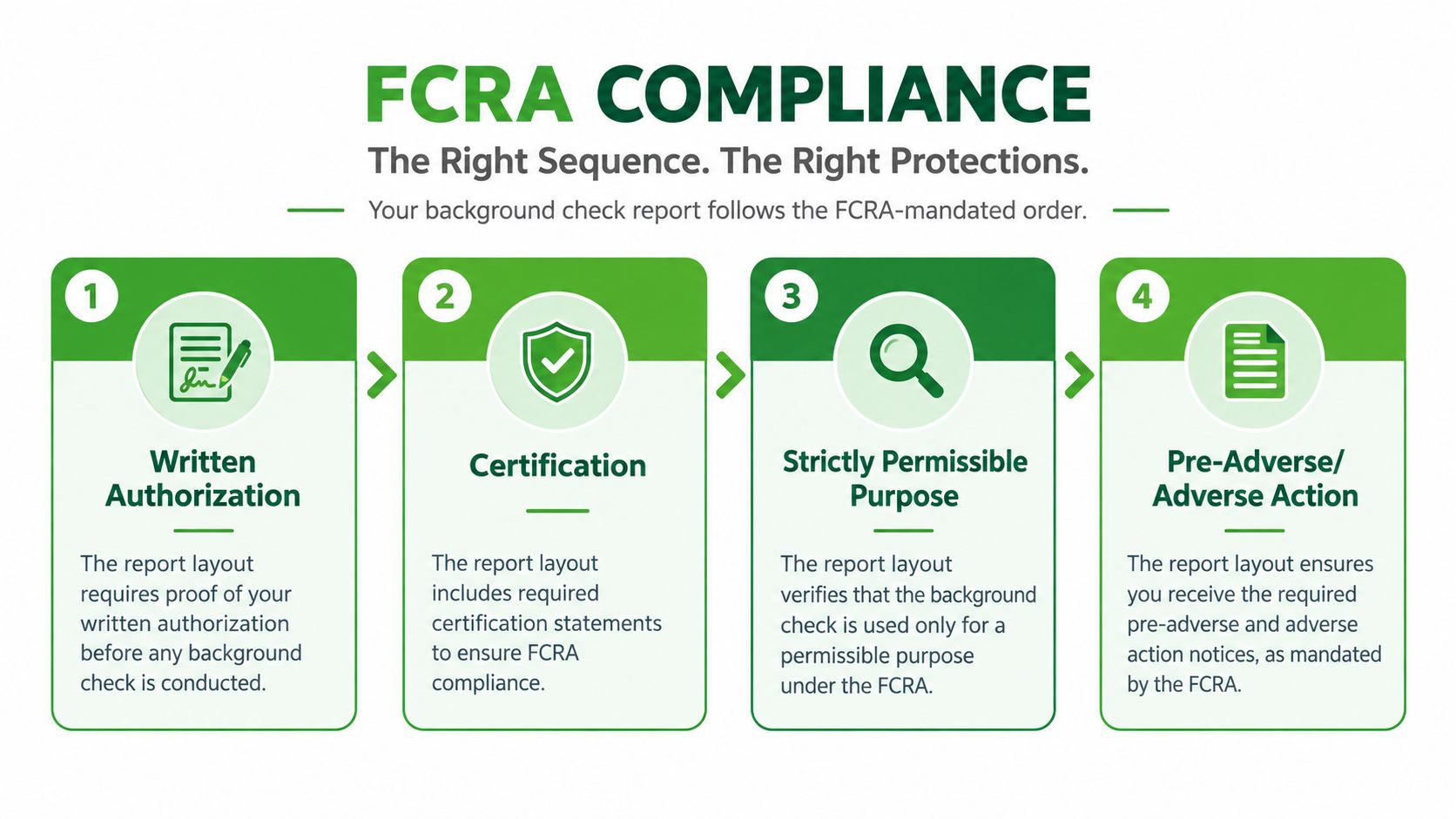
The safest interpretation is that compliance begins before the search and continues after the result arrives. Coordinators who want a focused explanation of the notice stage can review these FCRA notice requirements. A clean layout helps, but no format can excuse skipping authorization, certification, individualized review, or required communication.
Comparing a Clean Report With a Problem Report
Two reports can mention the same type of search and still differ sharply in usefulness. One gives a coordinator enough information to verify the result and document a decision. The other compresses everything into a vague paragraph, leaving the nonprofit unable to tell which jurisdiction responded or whether an alert was confirmed.
A clean report usually has a consistent header, a clearly identified subject, a complete scope summary, and separate modules for each ordered check. “No record found” should appear as an explicit status, not as silence. The document should also include rights language, certification details, and standardized limitations or disclaimers.
A problem report often creates uncertainty through formatting shortcuts. Missing birth information can weaken identity matching. Redacted or vague jurisdiction names can hide coverage gaps. Inconsistent date formats can make it difficult to distinguish an offense date from a disposition date. A single paragraph that says “clear” without naming the searches performed doesn't give the coordinator enough evidence to evaluate completeness.
| Feature | Clean Report | Problem Report |
|---|---|---|
| Subject identity | Complete, consistent identifiers | Missing or conflicting identifiers |
| Search scope | Each source and jurisdiction is named | Coverage is vague or absent |
| Result status | Each module says clear, pending, unavailable, or matched | One unexplained overall label |
| Record details | Case number, dates, disposition, and source are shown | Details are incomplete or blended together |
| Notices | Rights, certification, and disclaimers are present | Required language is missing or unclear |
| Audit trail | Report number and completion details are easy to find | Dates and ownership are inconsistent |
Formatting isn't merely cosmetic. A report that hides scope or status can conceal an incomplete search, an unresolved identity issue, or a process defect. Ask the CRA to explain any ambiguity before using the document to make a volunteer decision.
Volunteer Screening Workflow From Report to Decision
A completed report should trigger a controlled workflow, not an improvised conversation among staff. The coordinator's job is to connect the document to the signed authorization, the volunteer role, and a written outcome.
- Confirm the match. Compare the report subject with the volunteer's application and signed authorization. Check name variations, birth information, and address associations before reviewing any adverse-looking record.
- Log the date received. Record when the report arrived and preserve the original version. This creates a simple audit trail for later questions.
- Verify authorization. Make sure the disclosure and written authorization are on file and correspond to the report being reviewed. If they don't match, pause the decision.
- Review findings by role. Classify a result as disqualifying, case-by-case, or requiring clarification under the nonprofit's written policy. A dated misdemeanor may be assessed differently from an active warrant, but the coordinator should document the role-related reason rather than rely on an automatic label.
- Make and record the decision. Note whether the volunteer is approved, declined, or approved with restrictions. If the organization proceeds after reviewing a record, write the rationale, the role considered, and any safeguards assigned.
The review must remain individualized. A criminal record shouldn't be treated as self-explanatory, and an apparent match shouldn't become a final decision before the volunteer has the opportunity to dispute inaccurate information when the FCRA process applies.
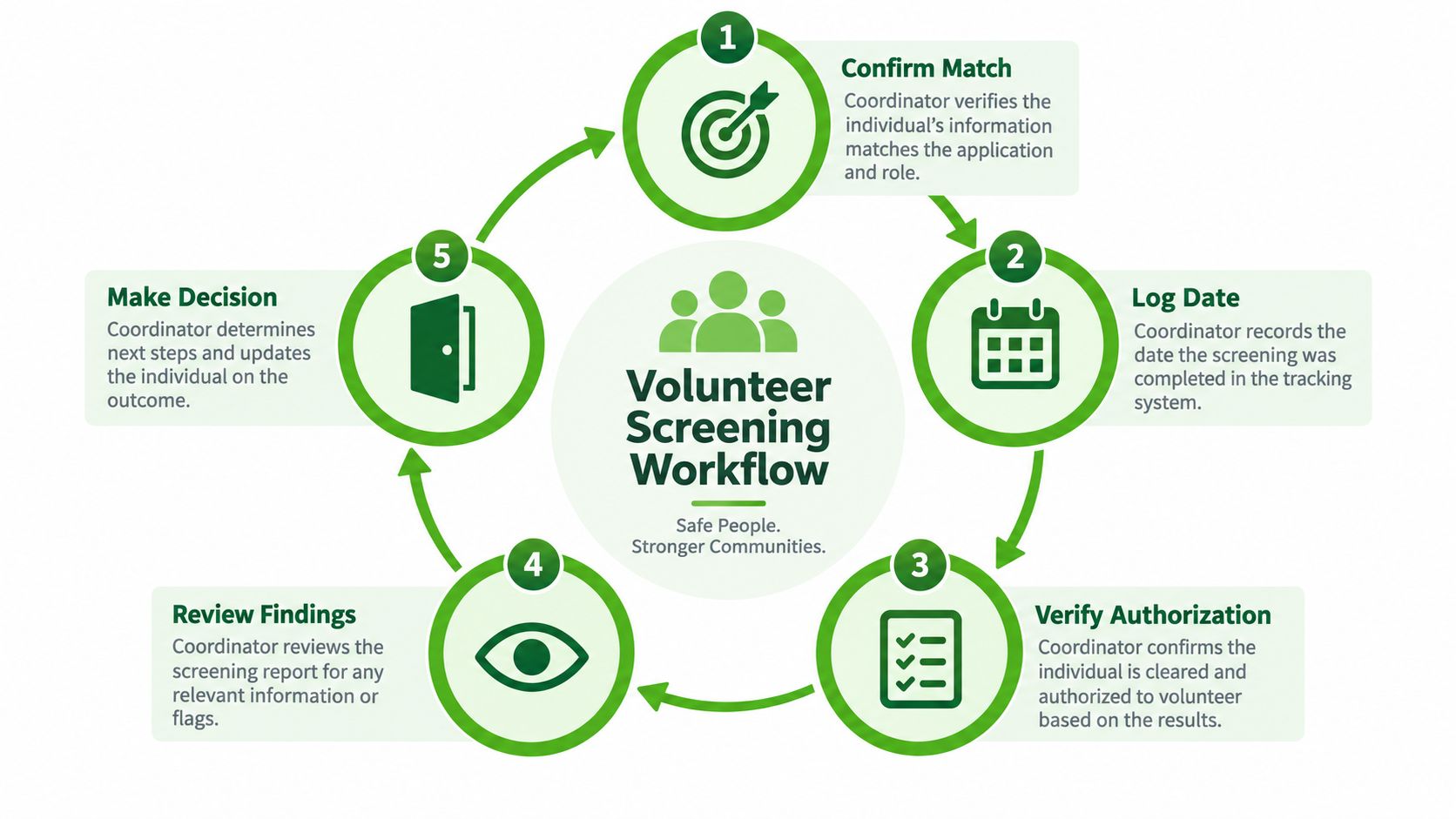
Store the report separately from the volunteer application, limit access to staff who need it, and avoid placing sensitive details in informal email threads. If the organization is considering a negative decision based on report information, follow the applicable pre-adverse and final adverse-action steps before closing the file.
Key Takeaways and Quick Reference Checklist
A background check report is a navigation aid, not merely a results page. Identity and search scope come before criminal findings because they establish whether the result belongs to the right person and whether the relevant sources responded. Notices, certifications, and disclaimers frame how the nonprofit may use the information.
Use this checklist each time a report arrives:
- Authorization on file: Confirm the volunteer received the stand-alone disclosure and provided written authorization.
- Identity match: Compare the report identifiers with the application and authorization.
- Address continuity: Review reported addresses and investigate unexplained gaps or unexpected jurisdictions.
- Criminal coverage complete: Confirm that the ordered federal, state, county, or local searches show a usable status.
- Registry result reviewed: Check the sex offender registry module and investigate any possible match.
- Sanctions screens run: Verify that the ordered sanctions, excluded-party, or watchlist modules have a clear status.
- Disclaimer block present: Locate rights language, limitations, certifications, and relevant action notices.
- Adjudication notes attached: Record the role-specific reasoning and final outcome.
Formatting problems deserve attention. A report that omits sources, identifiers, statuses, or completion details may indicate more than poor design. It can make an incomplete search look finished or turn an ambiguous alert into an apparently definitive result.
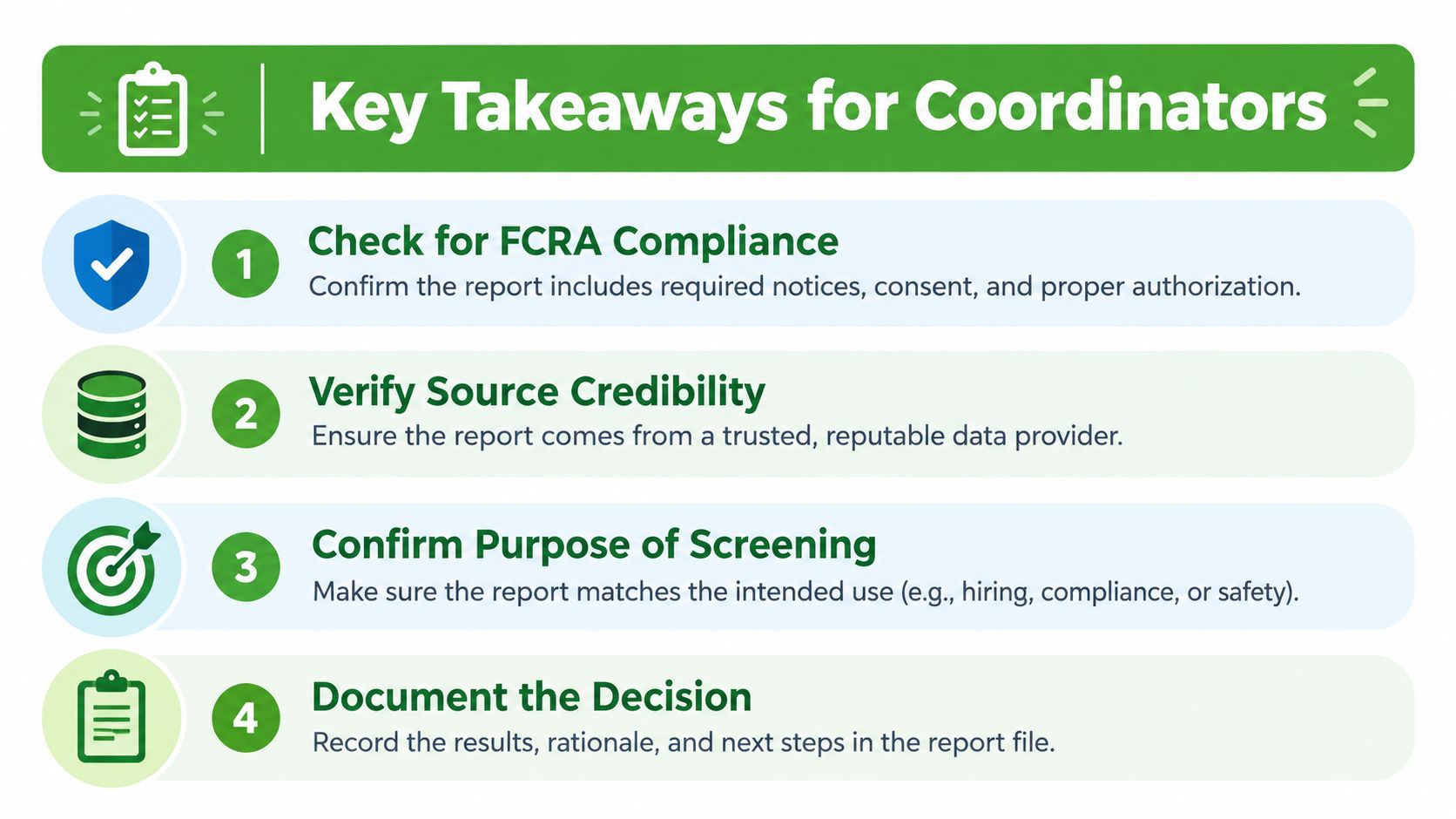
Return to the compliance section when you need to verify the notice sequence, and use the workflow section when a completed report needs to become a documented volunteer decision.
VolunteerBadge provides nonprofit teams with downloadable full screening reports, identifier-stripped summaries for everyday proof, and a separate Screening Scope PDF showing what was searched. Review the report format and workflow options at VolunteerBadge to give coordinators a clearer record from authorization through decision.
